● Use the MENU button to open the main menu, to exit the current submenu and to return to the main
menu.
● Use the UP/DOWN buttons to navigate through the menus and to scroll through the available
characters/numbers.
● Use the ENTER button to open the desired menu, to confirm your choice or to set the currently
selected character/number.
Input Ports Monitoring
The device has 2 input ports: Input A (Amber) and Input B (Blue). The status of the input ports is shown on
the display. The information about Input A is displayed in amber color and the information about Input B
in blue. The information is available on the home screen or it can be accessed via the input port buttons
and via the main menu.
Home Screen
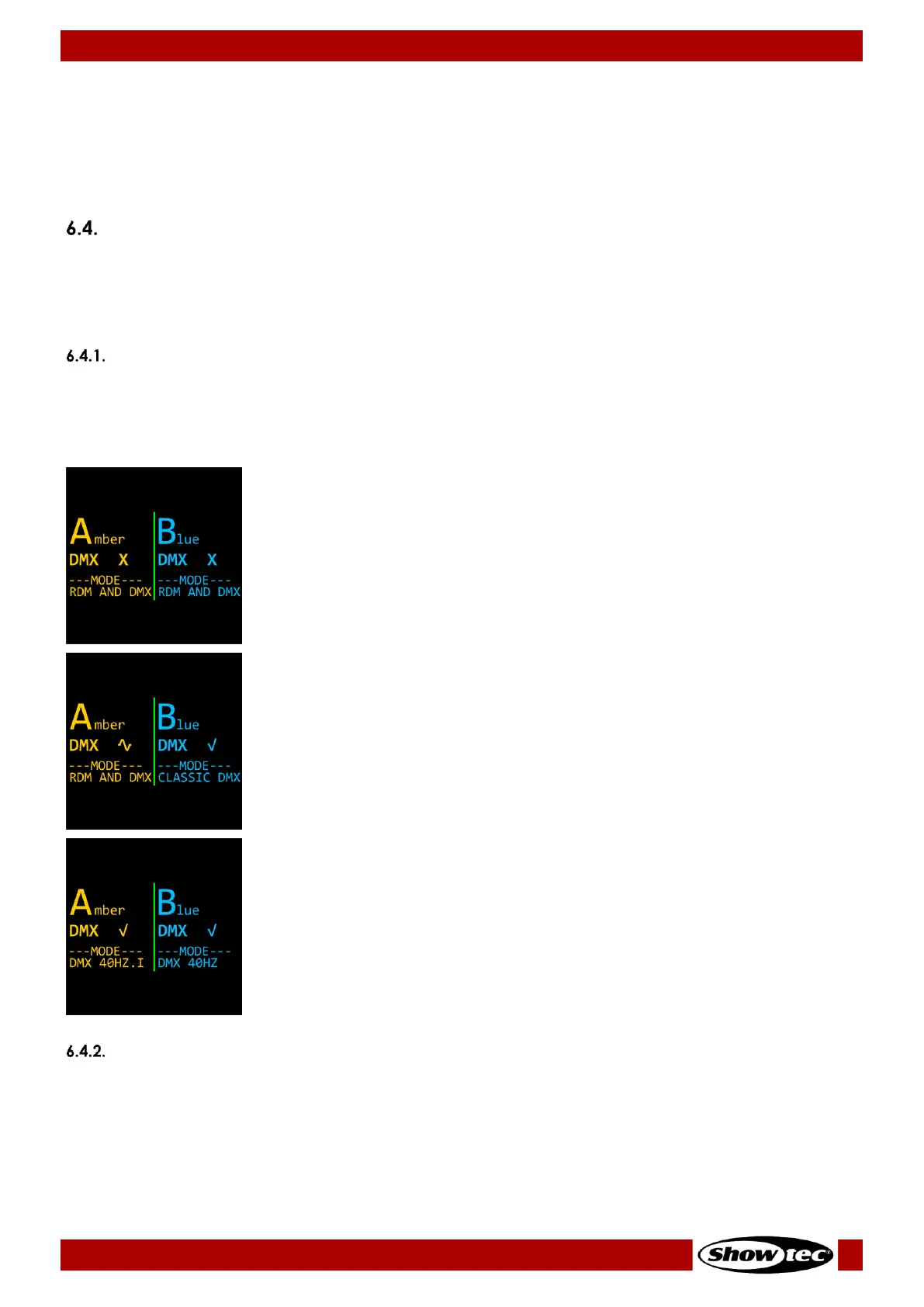
The home screen provides side by side information about the connection status of Input A and Input B
and the port mode. Press the HOME button to access the home screen.
Home screen examples:
Input A (Amber):
● DMX signal: (X) not present
● Mode: RDM and DMX
Input B (Blue):
● DMX signal: (X) not present
● Mode: RDM and DMX
Input A (Amber):
● DMX signal: (~) weak/distorted
● Mode: RDM and DMX
Input B (Blue):
● DMX signal: (√) present
● Mode: Classic DMX
Input A (Amber):
● DMX signal: (√) present
● Mode: DMX at 40 frames per second, frame integrity on
Input B (Blue):
● DMX signal: (√) present
● Mode: DMX at 40 frames per second, frame integrity off
Quick Access
The input port buttons (03) and (06) provide quick access to the Status Information submenu for
respectively Input A and Input B.
To view the status of Input A (Amber), press the input port button (03). To view the status of Input B (Blue),
press the input port button (06). The screen provides information about the presence of DMX signal, the
DMX channel and frame rate, the port mode and the assigned outputs to the respective input port.


 To Next Page