Shure Incorporated
8/22
•
•
•
•
•
•
•
•
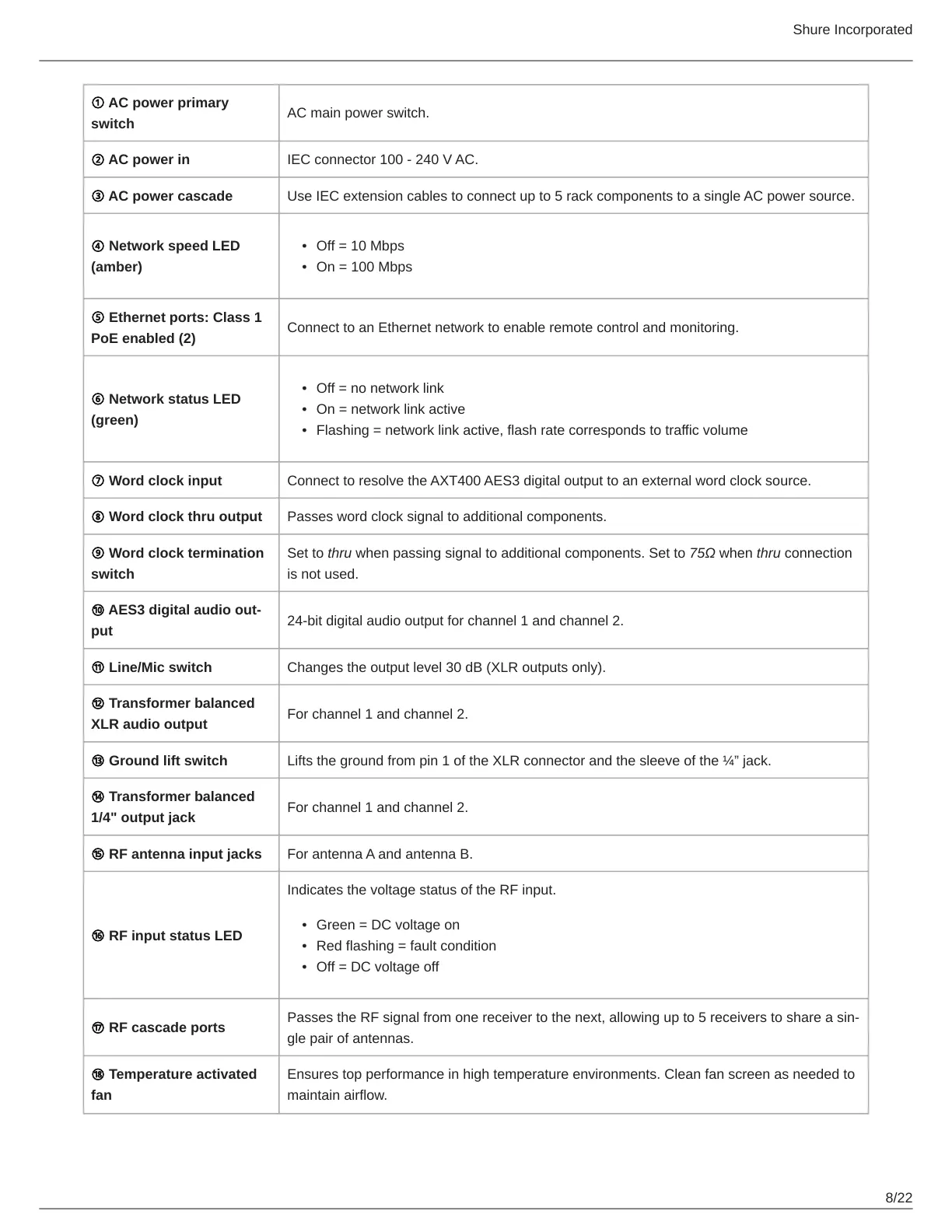
① AC power primary
switch
AC main power switch.
② AC power in IEC connector 100 - 240 V AC.
③ AC power cascade Use IEC extension cables to connect up to 5 rack components to a single AC power source.
④ Network speed LED
(amber)
Off = 10 Mbps
On = 100 Mbps
⑤ Ethernet ports: Class 1
PoE enabled (2)
Connect to an Ethernet network to enable remote control and monitoring.
⑥ Network status LED
(green)
Off = no network link
On = network link active
Flashing = network link active, flash rate corresponds to traffic volume
⑦ Word clock input Connect to resolve the AXT400 AES3 digital output to an external word clock source.
⑧ Word clock thru output Passes word clock signal to additional components.
⑨ Word clock termination
switch
Set to thru when passing signal to additional components. Set to 75Ω when thru connection
is not used.
⑩ AES3 digital audio out
put
24-bit digital audio output for channel 1 and channel 2.
⑪ Line/Mic switch Changes the output level 30 dB (XLR outputs only).
⑫ Transformer balanced
XLR audio output
For channel 1 and channel 2.
⑬ Ground lift switch Lifts the ground from pin 1 of the XLR connector and the sleeve of the ¼” jack.
⑭ Transformer balanced
1/4" output jack
For channel 1 and channel 2.
⑮ RF antenna input jacks For antenna A and antenna B.
⑯ RF input status LED
Indicates the voltage status of the RF input.
Green = DC voltage on
Red flashing = fault condition
Off = DC voltage off
⑰ RF cascade ports
Passes the RF signal from one receiver to the next, allowing up to 5 receivers to share a sin
gle pair of antennas.
⑱ Temperature activated
fan
Ensures top performance in high temperature environments. Clean fan screen as needed to
maintain airflow.



 To Next Page