Shure Incorporated
11/34
◦
◦
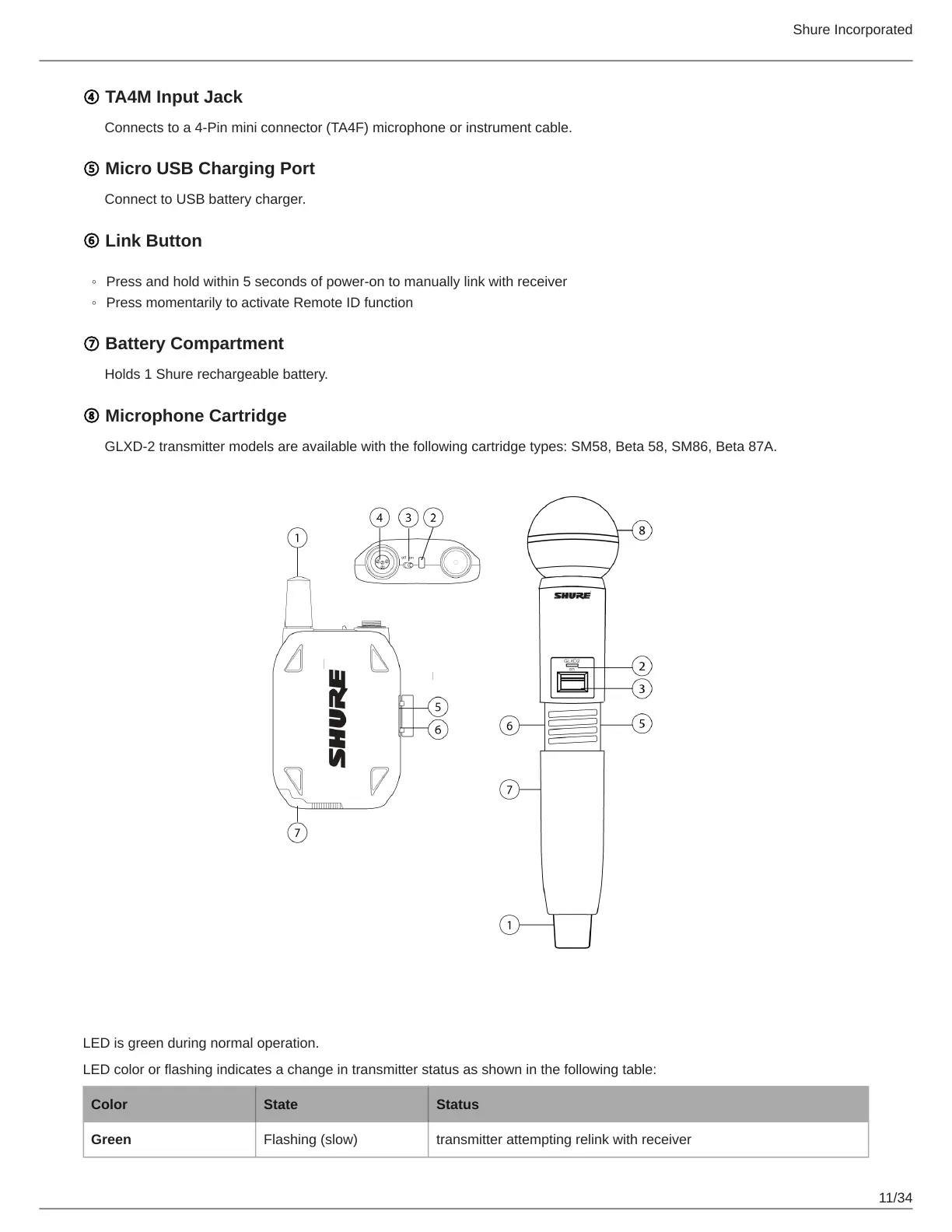
④ TA4M Input Jack
Connects to a 4-Pin mini connector (TA4F) microphone or instrument cable.
⑤ Micro USB Charging Port
Connect to USB battery charger.
⑥ Link Button
Press and hold within 5 seconds of power-on to manually link with receiver
Press momentarily to activate Remote ID function
⑦ Battery Compartment
Holds 1 Shure rechargeable battery.
⑧ Microphone Cartridge
GLXD-2 transmitter models are available with the following cartridge types: SM58, Beta 58, SM86, Beta 87A.
Transmitter Status LED
LED is green during normal operation.
LED color or flashing indicates a change in transmitter status as shown in the following table:
Color State Status
Green Flashing (slow) transmitter attempting relink with receiver



 To Next Page