Shure Incorporated
8/50
1.
2.
3.
4.
◦
◦
◦
5.
◦
◦
6.
7.
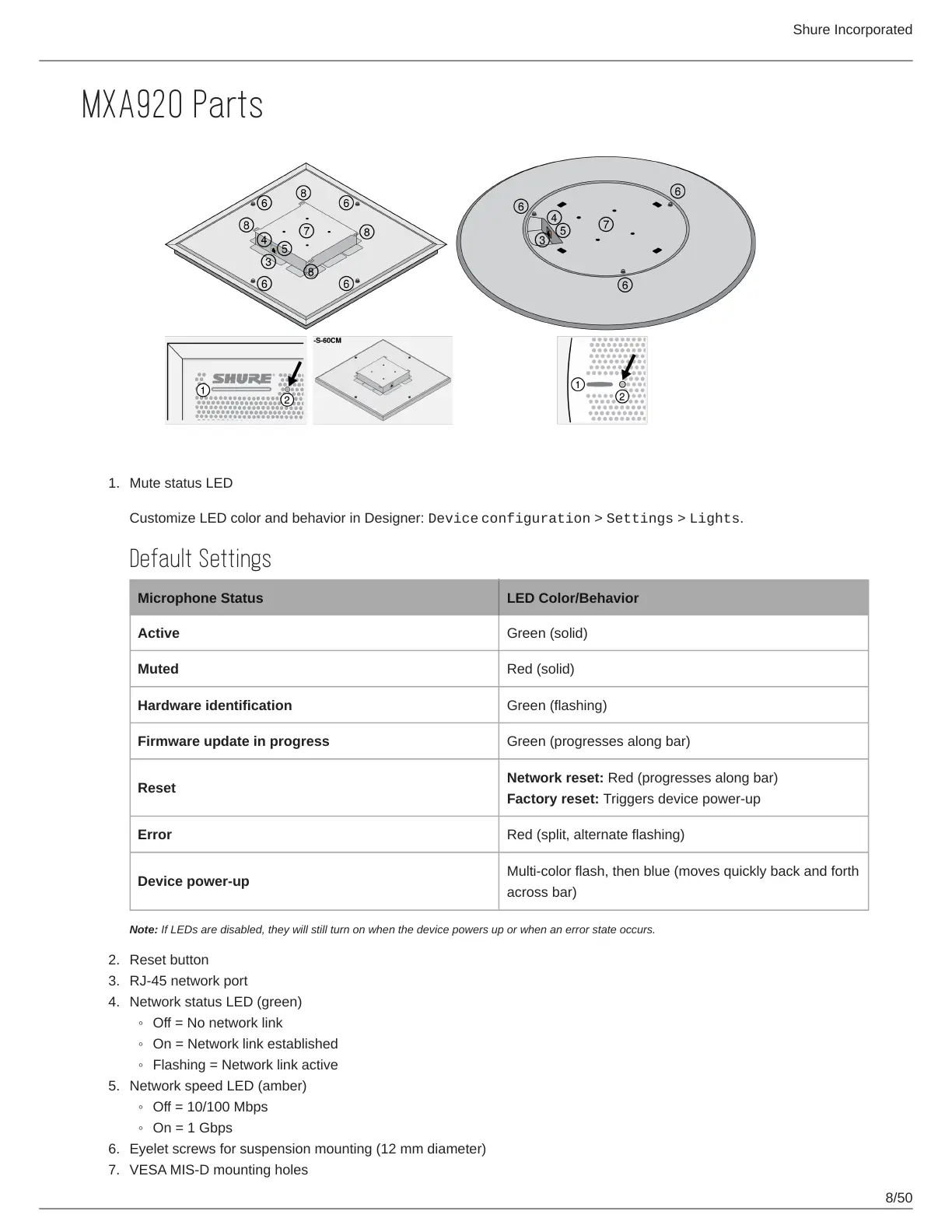
MXA920 Parts
Mute status LED
Customize LED color and behavior in Designer: Device configuration > Settings > Lights.
Default Settings
Microphone Status LED Color/Behavior
Active Green (solid)
Muted Red (solid)
Hardware identification Green (flashing)
Firmware update in progress Green (progresses along bar)
Reset
Network reset: Red (progresses along bar)
Factory reset: Triggers device power-up
Error Red (split, alternate flashing)
Device power-up
Multi-color flash, then blue (moves quickly back and forth
across bar)
Note: If LEDs are disabled, they will still turn on when the device powers up or when an error state occurs.
Reset button
RJ-45 network port
Network status LED (green)
Off = No network link
On = Network link established
Flashing = Network link active
Network speed LED (amber)
Off = 10/100 Mbps
On = 1 Gbps
Eyelet screws for suspension mounting (12 mm diameter)
VESA MIS-D mounting holes



 To Next Page