13
System Setup
Set Up Microphones
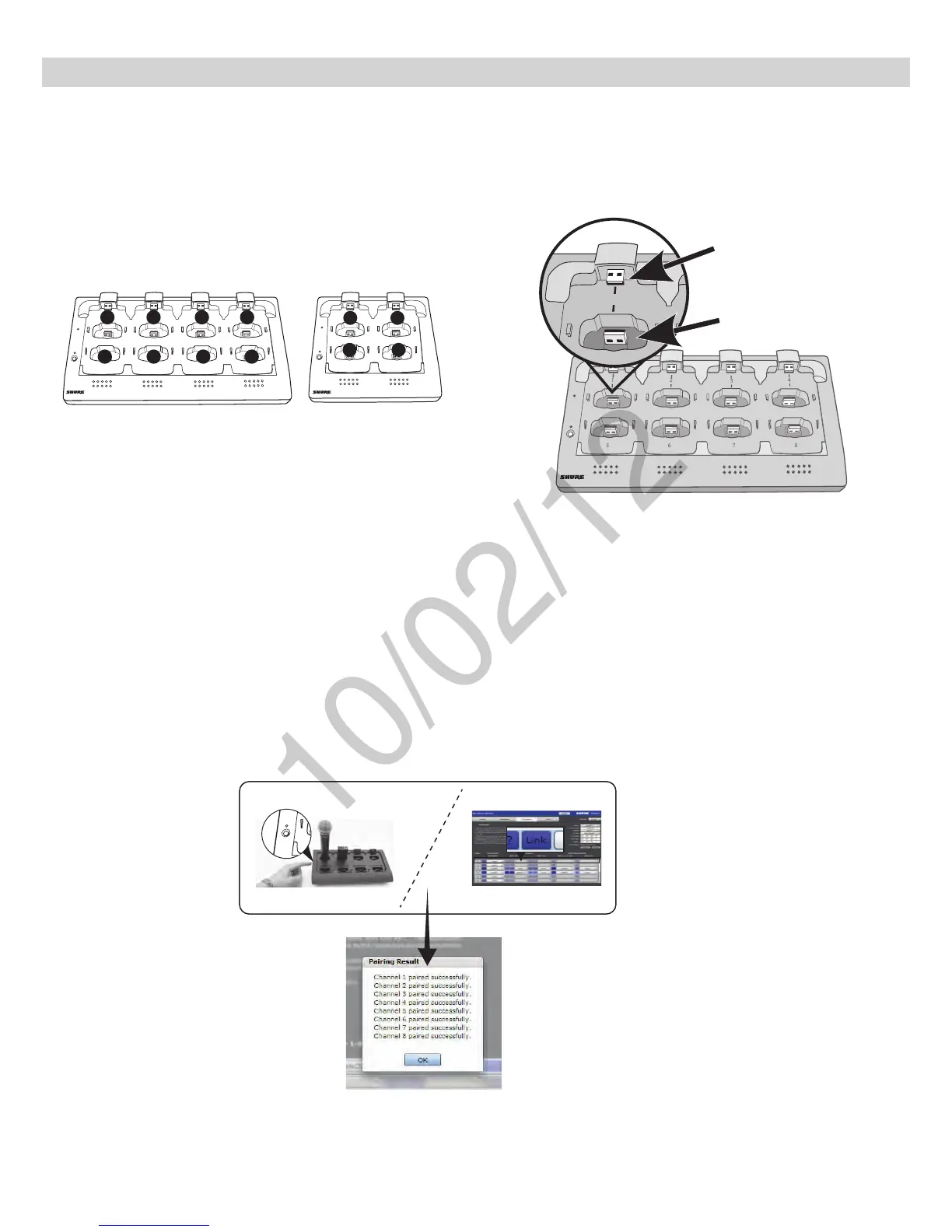
1. Arrange microphones in the charger.
Microphones are linked to channels according to the arrangement in the charger.
Charger Slots Correspond to Channels
Connecting the Microphone to the Charger Slot
For gooseneck mics
2. Link the microphones to channels.
The Link procedure can be done from two places:
•Charger: Press and hold the Link button for 6 seconds. The LEDs flash during the process and turn solid green once the link is successful.
•GUI: From the Configuration page, press the Link button in the group row.
For bodypacks, handhelds
and boundary mics.
7
8
6
5
1
2
3
4
2 3 4
5
6
7 8
1
Link
Power
Link
Power
2
3 4
1
Link
Power
8-Channel Charger
(NCS8)
4-Channel Charger
(NCS4)



 To Next Page