- 10 -
(4) Sensitivity Correction
1) Turn the scattering plate knob to the [SENSI. ADJ] position.
2) Confirm that [SPAN XXXCPM] appears in the lower left area of the screen.
The value displayed below [SPAN] is the standard scattering plate value for
calibration.
3) Leave the instrument in this state for at least one minute.
4) Press the START/STOP switch.
5) Measurement is performed for one minute.
6) The sensitivity correction value is calculated from measured values.
Sensitivity is automatically corrected starting with the next concentration
measurement.
7) Turn the scattering plate knob to the [MEASURE] position.
(5) Dust measurement
1) Turn the scattering plate knob to the [MEASURE]
position.
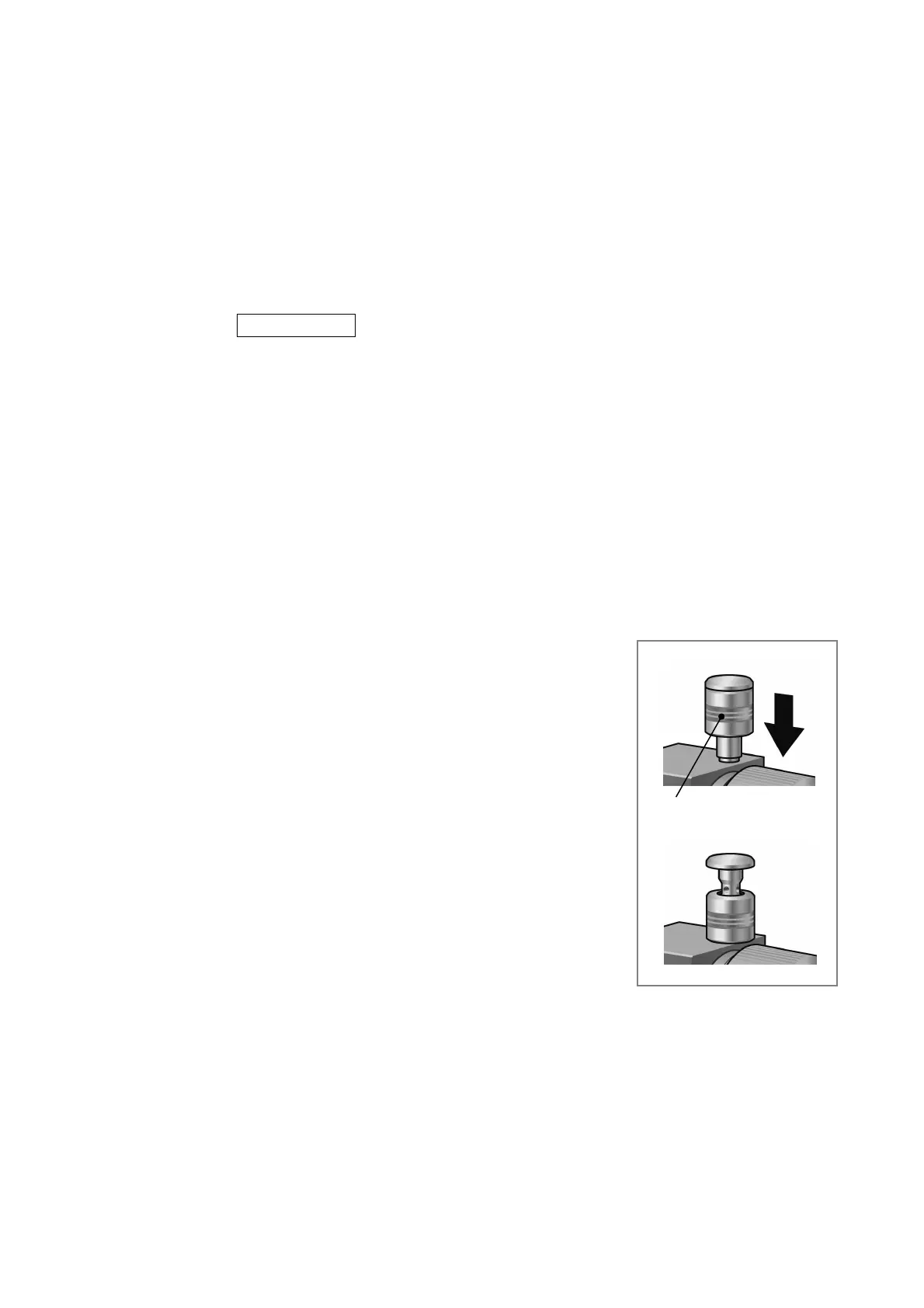
2) Lower the cap to open the PM2.5 cyclone (see figure
on right).
z Make sure the PM2.5 cyclone cap is completely
open before starting measurements.
After starting measurements (after pump intake
starts), if the cap is suddenly or not completely
opened, the pump speed (rpm) can become
unstable, resulting in a "TRBL" error display.
PM2.5 cyclone cap



 To Next Page