- 8 -
(2) Switch the LD-5 power ON
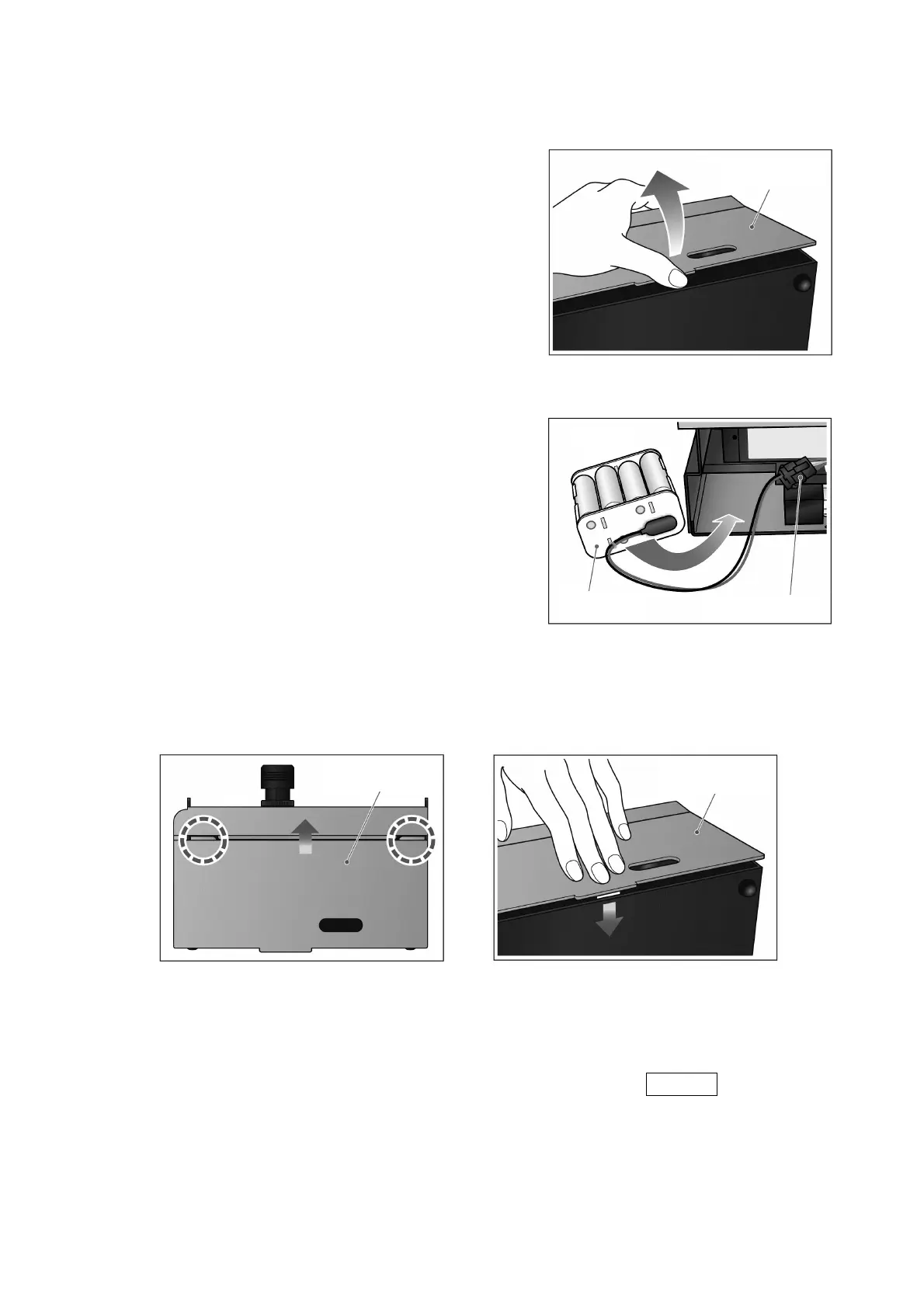
1) Make sure the LD-5 power is OFF, then
remove the battery holder panel by lifting the
protruding tab at the bottom of the panel, as
shown.
z Hold the unit securely. Due to a stiff latch,
the battery holder panel may release
suddenly and be thrown from the unit.
2) Remove the battery case and install eight
AA size alkaline batteries.
3) Return the battery case to its original
position.
z Insert the battery case oriented as shown.
Inserting it upside down could cause a
malfunction.
4) Reinstall the battery holder panel by inserting the two upper tabs into the main unit.
Then press on the battery holder panel to latch it in place.
z Press on the panel until it clicks to ensure it latches securely. If not latched
securely, it could come off during operation and cause an accident.
5) When the dry-cell batteries have been installed, press the POWER switch to turn
on the LD-5 power. When the power supply is turned on, the screen is displayed.
Battery holder
anel
Battery case
Battery connector
Top side
Battery holder
anel
Battery holder
anel



 To Next Page