- 14 -
(3) Background (BG) Measurement
1) Turn the scattering plate knob to the [MEASURE]
position.
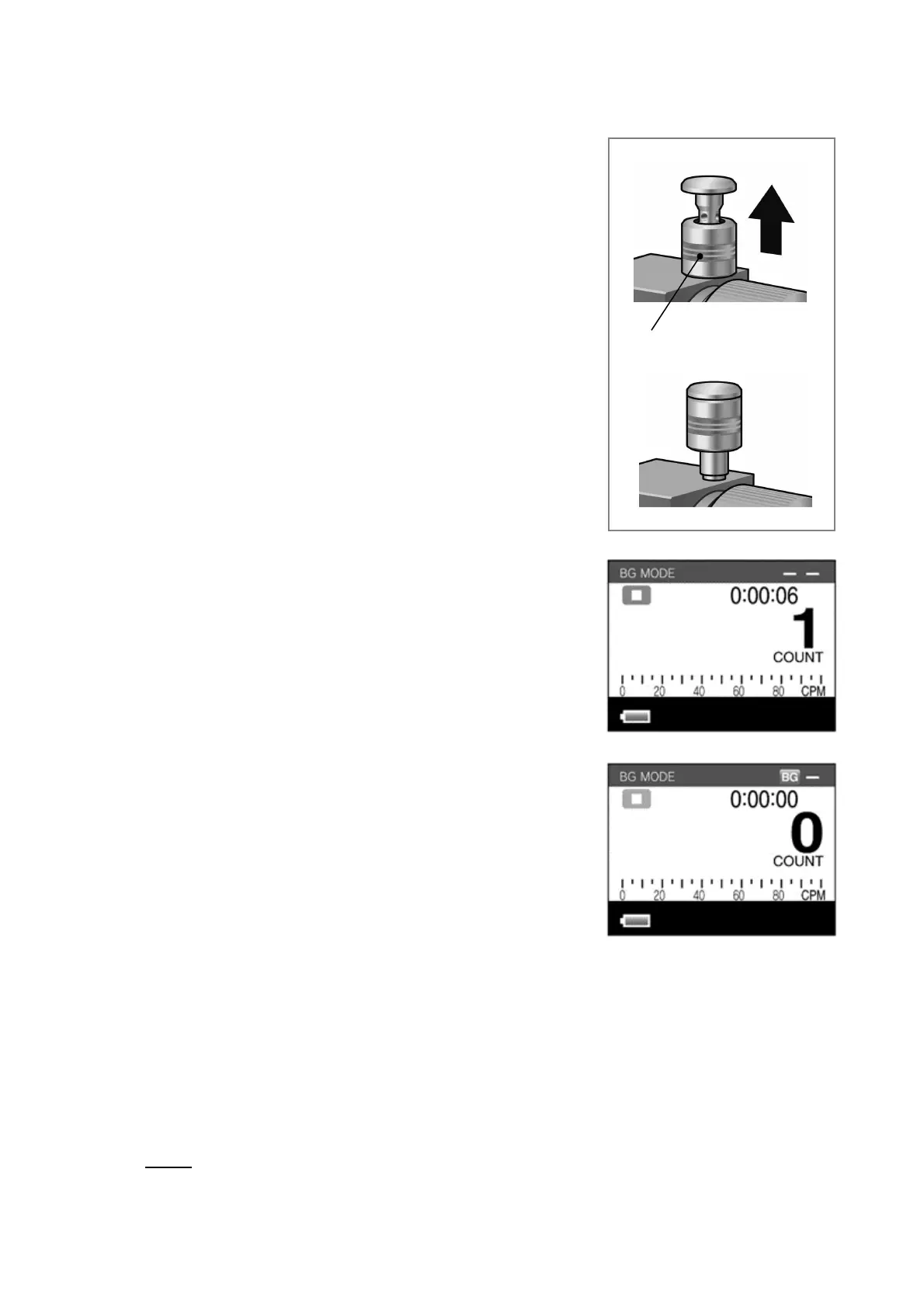
2) Lift up the cap to close the PM2.5 cyclone cap
(see figure on right).
3) Leave the instrument in this state for at least one
minute. (Switch the LD-5R power ON.)
4) Press the [START/STOP] switch.
5) The BG measurement will start after a cleanup
time of approximately eight seconds has elapsed.
6) Measurement will finish after six seconds. The
BG value will be recorded and the [BG] mark will
be displayed on-screen.
This BG measurement value will be cancelled
starting with the next concentration measurement.
z The BG value cannot be set properly if it is measured with the cap opened.
Doing so could affect measurement results, such as causing the instrument
to continue displaying a measurement value of zero. If the BG value has been
measured with the cap opened, close the PM2.5 cyclone cap and measure the
value again.
z The BG measurement can be aborted by pressing the [START/STOP] switch
twice during the six second measurement interval. If this is performed, the
BG subtraction function does not operate during the next dust measurement.
PM2.5 cyclone cap



 To Next Page