BAL S302 PFN RT 1.00 9/27
5 Quick start for numerical operation mode (INT32 format)
Quick-Start
The display is put into operation with the following steps. The display then shows the values sent via
PROFINET.
The screenshots were created with the following hardware and software. For other engineering
frameworks, the descriptions shown in this user's guide may differ from the screen display on your
device.
Siemens TIA Portal V13, Service Pack1 , Update 9
Microsoft Windows 7 Professional, 64 Bit, English
The quick start describes the parameterization of the display. Operation of the TIA Portal is required.
The devices are delivered with the PROFINET name 'siebert-display'.
Schritt
Step 1: Open project
Open your project in the Engineering-Framework.
Step 2: Switch to project view
Switch to project view.
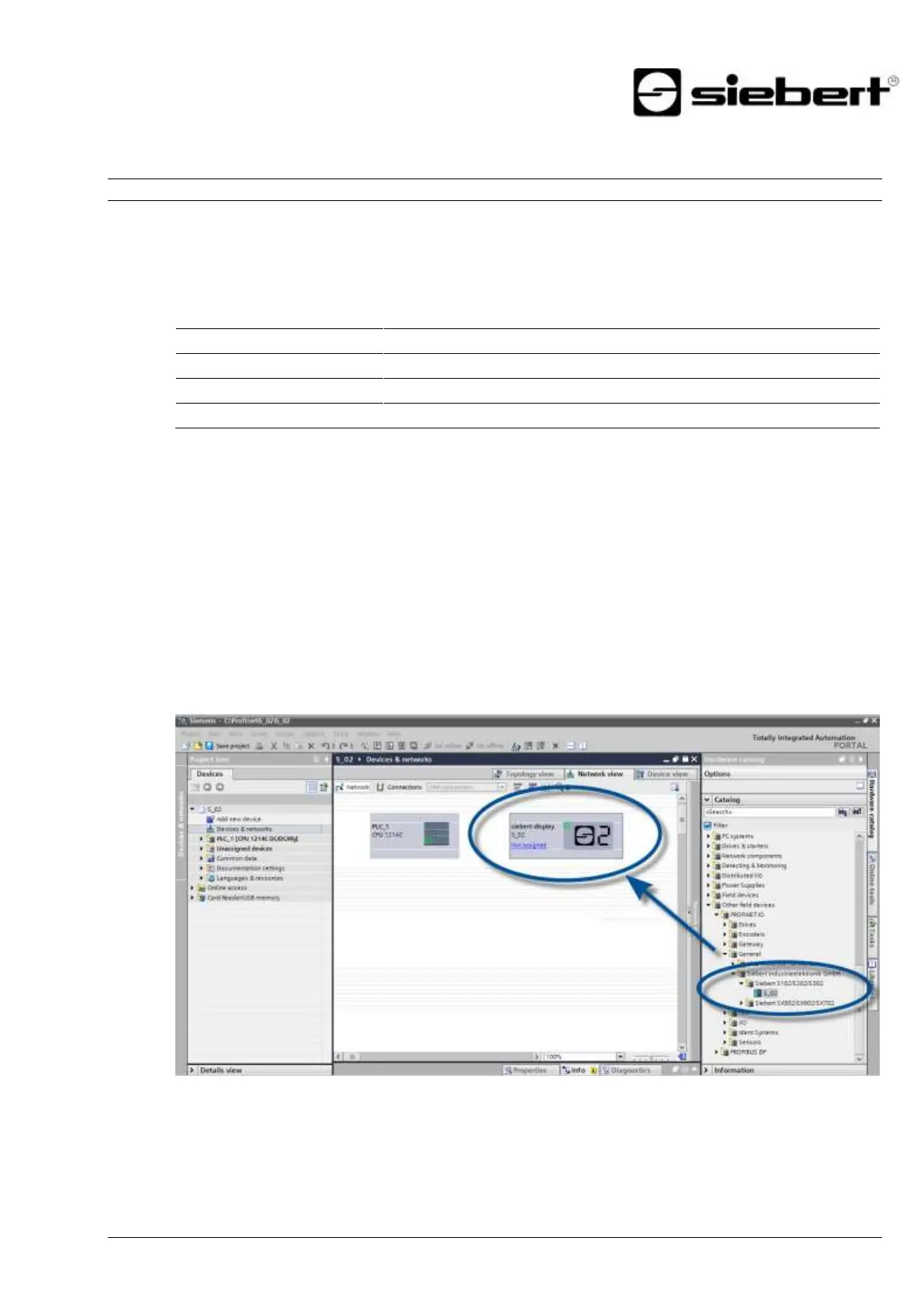
Step 3: Install the GSDML file of the ad and add the display
Install the GSDML file of the display. You find the file on the supplied data carrier or at www.siebert-
group.com. After installation, the display is listed in the hardware catalog. Add the module 'siebert-
display' to 'Devices & Networks/Network view'.


 To Next Page