5
Roomthermostat “Microcontrol”
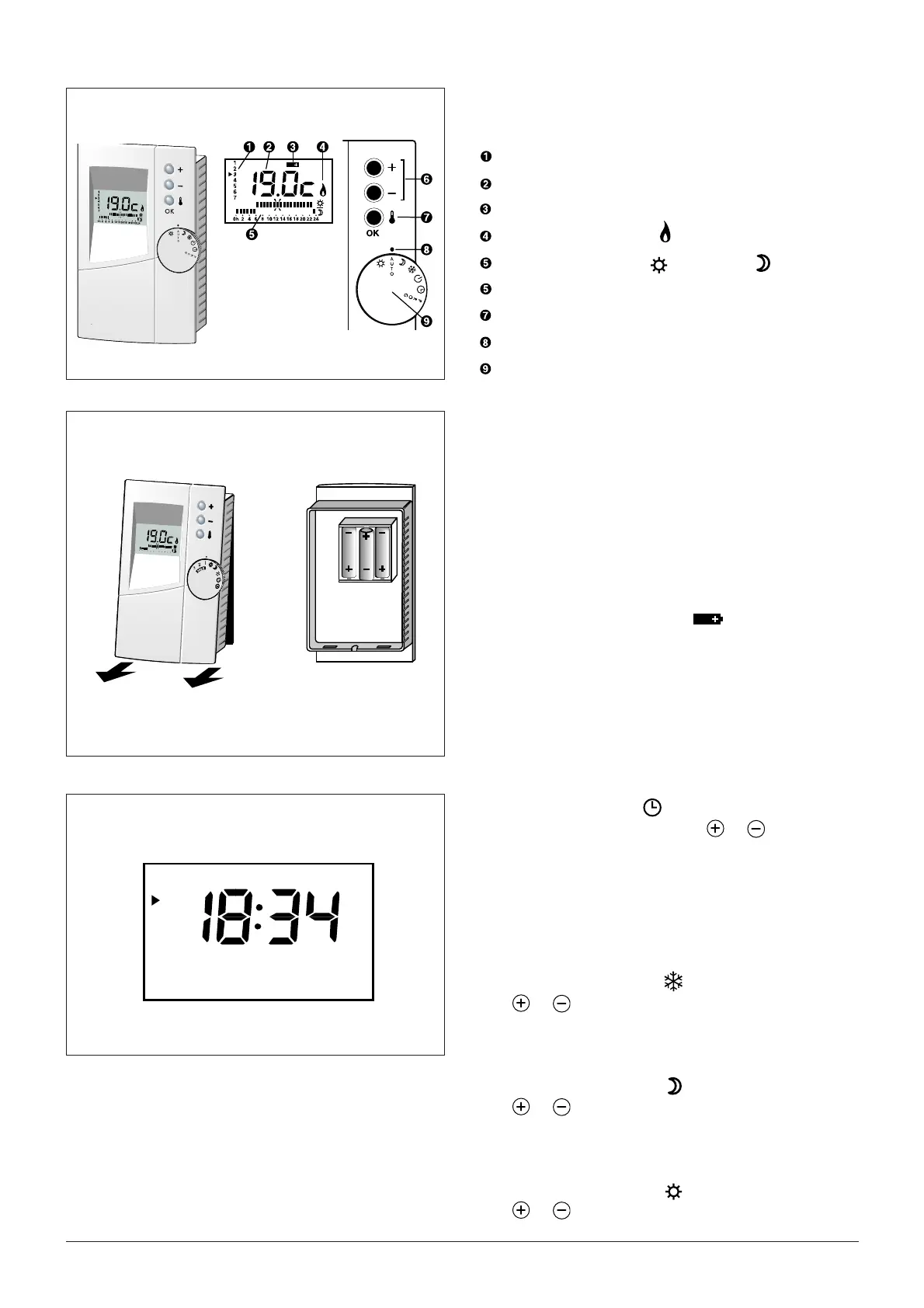
Description
Actual Day
Temperature display
Low battery indicator (Battery version)
Heating output status ( = On)
Daily program profi le (
= Comfort,
= Economy)
Modifi cation Keys
Press to display the measured
Selector switch index
Operating mode selector (7 positions)
Fitting the batteries (Battery version)
Three type LR03 or AAA1,5V alkaline batteries (life
time longer than 1 year).
Do not use rechargeable batteries.
To fi t the batteries, separate the thermostat from its
base. Insert the batteries, making sure they are the
right way round, then mount the thermostat back on its
base.
Battery replacement:
When the low battery indicator comes on, do not
leave the discharged batteries in thethermostat (the
garantee does not cover damage caused by leaking
batteries).
You have approximately 1 minute to fi t the new batte-
ries without losing your programming.
Settings the time
Turn the selector to the
position.
The time is adjusted by pressing
or
.
Short press: change in 1-minute steps
Press and hold: fast change
Settings the temperatures
Setting the frost-protection temperature
First use: Frost protection = 7°C
1 - Switch the selector to
2 -
or
set the temperature (5 to 15°C)
Setting the Economy temperature
First use: Economy = 16°C
1 - Switch the selector to
2 -
or
set the temperature (5 to 30°C)
Setting the Comfort temperature
First use: Comfort = 19°C
1 - Switch the selector to
2 -
or
set the temperature (5 to 30°C)
1
2
3
4
5
6
7
0
h
2
4
6
8
1
0
12
14
1
6
182
0
22
24





 To Next Page