APOLLO User Manual Page 17
BURGLARY, FIRE OR MEDICAL ASSISTANCE
The unit has the capability to send a help signal to the central station,
in case that you are threatened or you need medical assistance or when
there is a fire at your area.
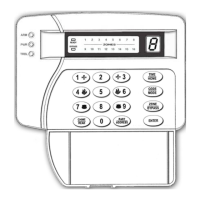
• In case you need medical assistance hold down at the same time keys
[1] and [3], for two seconds.
• In case of fire hold down at the same time keys [4] and [6], for two
seconds.
• In case of burglary hold down at the same time, keys [7] and [9], for
two seconds.
To cancel any of the above actions, type in your code and press
[ENTER].
AUTO ARMING AND DISARMING OF THE SYSTEM
When the system has been programmed to automatically arm or
disarm at a specific time, the keypad buzzer will start sounding at the auto
arm time for 4 minutes (exit delay for auto arm). On the display you will
be able to see the exit delay countdown. During the exit delay you may
leave the premices, transfer the auto arming time or cancel auto arm,
using the following methods:
¾ Enter [USER CODE] and press [ENTER]. This way you cancel
auto arming.
¾ To temporarily cancel auto arming, enter [USER CODE] and
press [ΗΟΜΕ]. On the Display you will have the indication: [t].
Enter the number of minutes (01-99) after which the system
should automatically arm and press [ENTER]. After this period
the system will automaticall arm and disarm again at the
preprogrammed time and day.
NOTE: During auto arming the system is fully armed. If after the
end of exit delay any zones are unbalanced they will be automatically
bypassed.
CHIME OPERATION
If you wish to be notified when a door or window in your premices


 To Next Page