APOLLO User Manual Page 11
1st telephone number of the 1st channel of the voice dialler (follow
me)
, using the following procedure:
• To program or edit the “follow me” telephone number,
press:[ADDRESS] [0][1] [TELEPHONE NUMBER] & [ENTER].
• To delete the “follow me” telephone number, press [ADDRESS]
[0][1] & [ENTER].
• To read the “follow me” telephone number, press: [READ]
[ADDRESS] [0] [1].
EXIT USER PROGRAMMING
After finishing user programming, press [USER CODE] &
[ENTER] to exit user programming menu. The system will exit
programming menu automatically if within two minutes, no key is
pressed.
OPERATING THE SYSTEM
The system may arm or disarm using 2 methods:
1. Fully arm the system including all zones.
2. Arm the systems using HOME arming (perimeter protection) or
arm the system with bypassed zones.
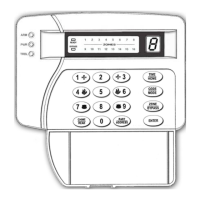
Arming and disarming of the system is done via the keypad by entering a
valid code.
Close all protected doors and windows before you try to arm the
system. When all zones are balanced, all zones LED’s will be off and
the LED “READY” will turn on. If there is one or more unbalanced
zones, the relative zones LED’s will be on and the LED “READY” will
turn off.
If you try to arm the system and the red LED "TROUBLE" is on,
check what might be, the trouble. If the yellow LED is off then, you have
Mains Power loss, if the yellow LED is blinking you have Battery low
voltage. Check the event list to see if the trouble will affect the system
during the arming cycle (telephone line failure, low battery voltage e.tc.).
The LED "TROUBLE" will turn off when the system is armed.
If there is a problem call the installer so he may perform
maintenance.


 To Next Page