Page 12 User Manual APOLLO
In case you have telephone line failure the keypad buzzer will sound
continuously, Press any key to silence it.
FULL ARMING OF THE SYSTEM
Use the following procedure to fully arm the system including all
zones.
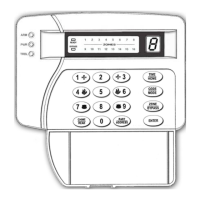
If all the zones are balanced the LED “READY” will be on. Enter
[USER CODE] and press [ENTER]. The LED “ARM” will change
status (will turn on or off, according to the programming of display type)
and the buzzer will sound during the exit delay. During the last 10
seconds of the exit delay the buzzer sounds faster to remind you to
exit the protected area as the exit delay is about to end, while in the
LED Display you can see the countdown of exit delay.
If you wish to extend the exit delay, without disarming the system,
just press the key [BYPASS], to restart the exit delay countdown. This
function can be used up to 3 times.
If the buzzer sounds while arming the system then:
¾ Maybe there is Mains Power Failure. On the LED Display you
will have the indication [Ρ] and the LED “POWER” will be off.
¾ Maybe there is telephone line failure. On the LED Display you
will have the indication [Lt].
ARMING THE SYSTEM QUICKLY
To arm the system, quickly, enter the quick arm single digit number
and press [ENTER]. The partition, in which the keypad, you use, belongs
to, will arm.
ARMING THE SYSTEM WITH BYPASSED ZONES
Use the following procedure to arm the system bypassing one or
more zones:
Enter the [USER CODE]. Press the key [BYPASS]. The LED
“ΒΥPASS” will start blinking. Enter the numbers of the zones you wish
to bypass (e.g. 01, 03, 08, 12, e.t.c.) and then press [ENTER]. The system
will arm, while the bypassed zones LED’s will blink during the exit


 To Next Page