APOLLO User Manual Page 3
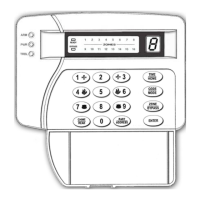
INDICATION LED's
• GREEN (ARM-DISARM): It turns on when the system is disarmed
and switched off when it is armed (this is a programmable function
and may change in the installer menu). During HOME arming it
will blink, if the entry zone(s) will operate as delay zone(s).
• YELLOW (POWER): Turns on to indicate that the panel is supplied
normally by the 220V mains power and turns off to indicate Mains
Power Loss. When the voltage of the battery is low it blinks as
follows:
1. Three short flashes and a longer flash, when there is Mains Power
and the battery’s voltage is low.
2. Three short flashes and a pause, when there is Mains power Loss
and the battery’s voltage is low.
• RED (TROUBLE): Turns on when there is a problem in the system
(alarm, power failure, drop of battery voltage, over-current, and time
loss).
• BYPASS: It blinks if there are Bypassed Zones or when you
program which zones will be bypassed.
• READY: It turns on if all zones of the system are balanced, and the
system is ready to arm.
• ZONE 01 - ZONE 16: They indicate the zone(s) status. When they
are off the zones are balanced. When a LED is on the relative zone is
unbalanced or has a problem. If during arming one or more are
blinking along with the LED "BYPASS", then the relative zones
will be bypassed.
• During programming, on the LED DISPLAY, you may see the
programmed values.
ATTENTION: At the end of exit delay, the keypad LED's turn
off. It turns on if a delay zone is unbalanced or if a key is pressed.
The illumination LED's also turn off if within 1 minute, no key is
pressed.
KEYS
• 0 - 9: Numeric keys. They are used to enter numbers, during arming,


 To Next Page