Page 4 User Manual APOLLO
disarming, or programming the system.
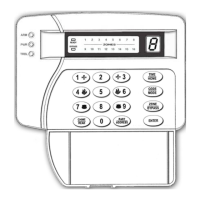
• ΗΟΜΕ / TIME: Used to program or check the time related values of
the control panel. Also used during telephone programming to add a
pause between numbers dialing.
• BYPASS / ZONE: Used to program, control or bypass zones.
• CODE / MODE: Used to program or read codes [CODE] and to
program the function type of zones [MODE].
• READ / CHIME: Used to read a programmed value or to activate –
deactivate CHIME.
• PART / ADDRESS: Used to select partition or address during
programming.
• ENTER: Used to accept programmed values or commands.
NOTICE: If any false action takes place, there is an ERROR
sound, from the keypad’s buzzer. The verification of a correct action
is indicated by four short ΒΕΕΡs.
PROGRAMMING THE SYSTEM
Use the system keypad to program, edit or delete several system
functions. In order to do so the system must be disarmed.
If the system is armed, or in downloading procedure, or you use
invalid code, or the digital communicator is in operation, you can not
program the system. In any of these cases the keypad buzzer will sound
continuously to indicate error.
In order, to arm or disarm, the system, for the first time, press [1] [7]
[7] [7] and [ΕΝΤΕR].
ENTER USER PROGRAMMING
Use the system keypad to program, edit or delete several system
functions. In order to do so the system must be disarmed.
In order to program the system, press: [ΕΝΤΕR] [MAIN USER
CODE] & [ENTER]. The dot on the LED Display will start blinking to
indicate the panel is in programming mode. The main user code is 1777.
This code must be changed using the CODE editing procedure.


 To Next Page