IT
ES
PT
GB
78
RUS
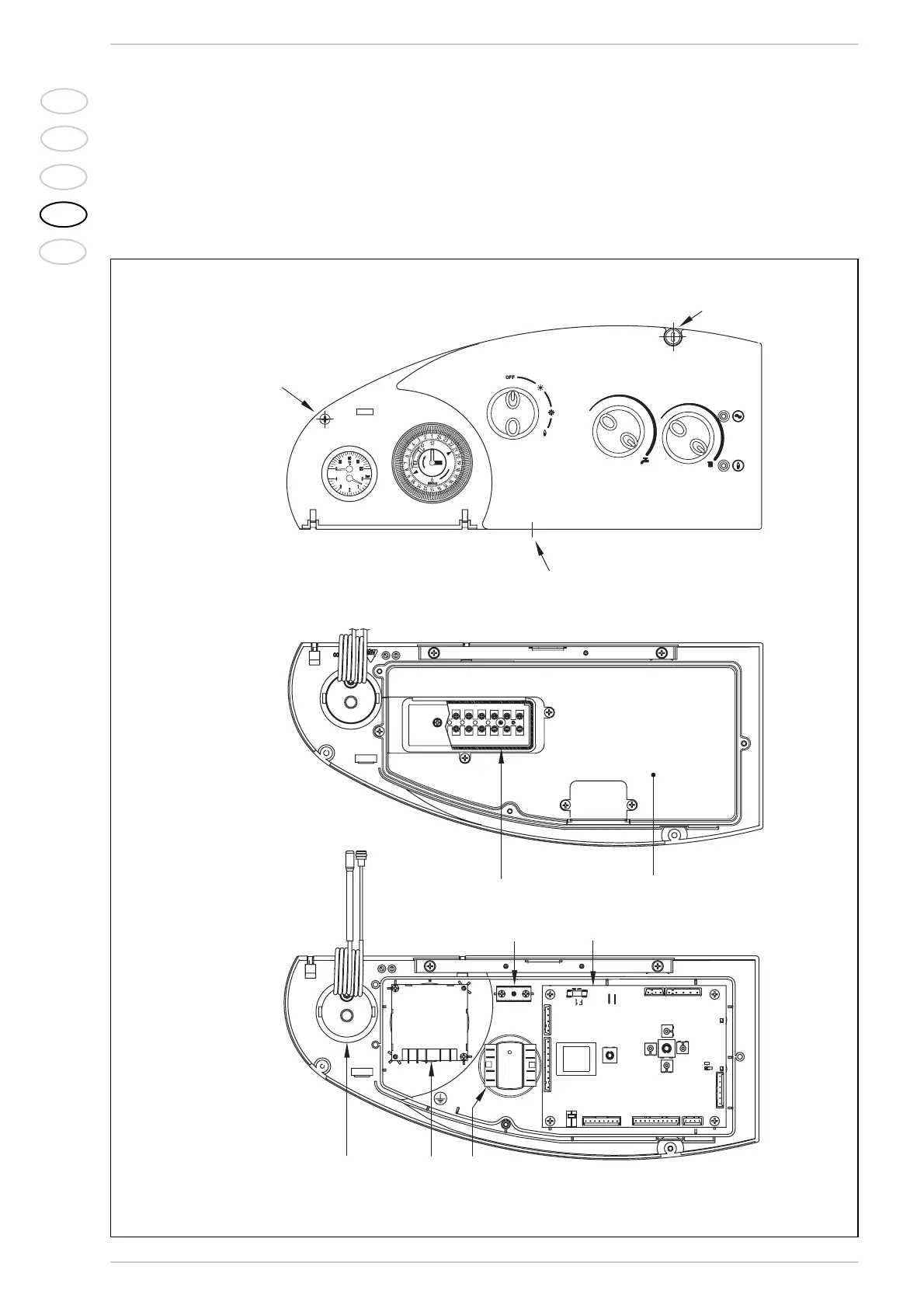
2.11.1 Electrical panel (fig. 14)
Before any intervention, disconnect the
power supply. Remove the three screws (7)
that secure the control panel and pull the
panel forward to tilt down. To access switch-
board components, remove the four screws
that secure the cover (6).
2.11.2 Room stat
connection (fig. 14)
Electrically connect the time thermostat to
thermals 1-2 on the terminal strip (5) after
removing the existent bridge
The recommended time thermostat for
best room and comfort regulation must be
class II in accordance with regulation EN
60760.1 (clean electrical contact).
Fig. 14
KEY
1 Heat water gauge
2 Optional programming clock
(daily mechanical code 8092231
or weekly digital code 8092214)
3 Ground faston
4 Electronic board
5 9 pole terminal strip
6 Control panel cover
7 Fixing screw
8 Selector OFF/EST/INV/RESET
WARNING: After removing the three screws (7) pull the panel
forward to tilt down.




 To Next Page