10
EN
4 USE
4.1 Start-up
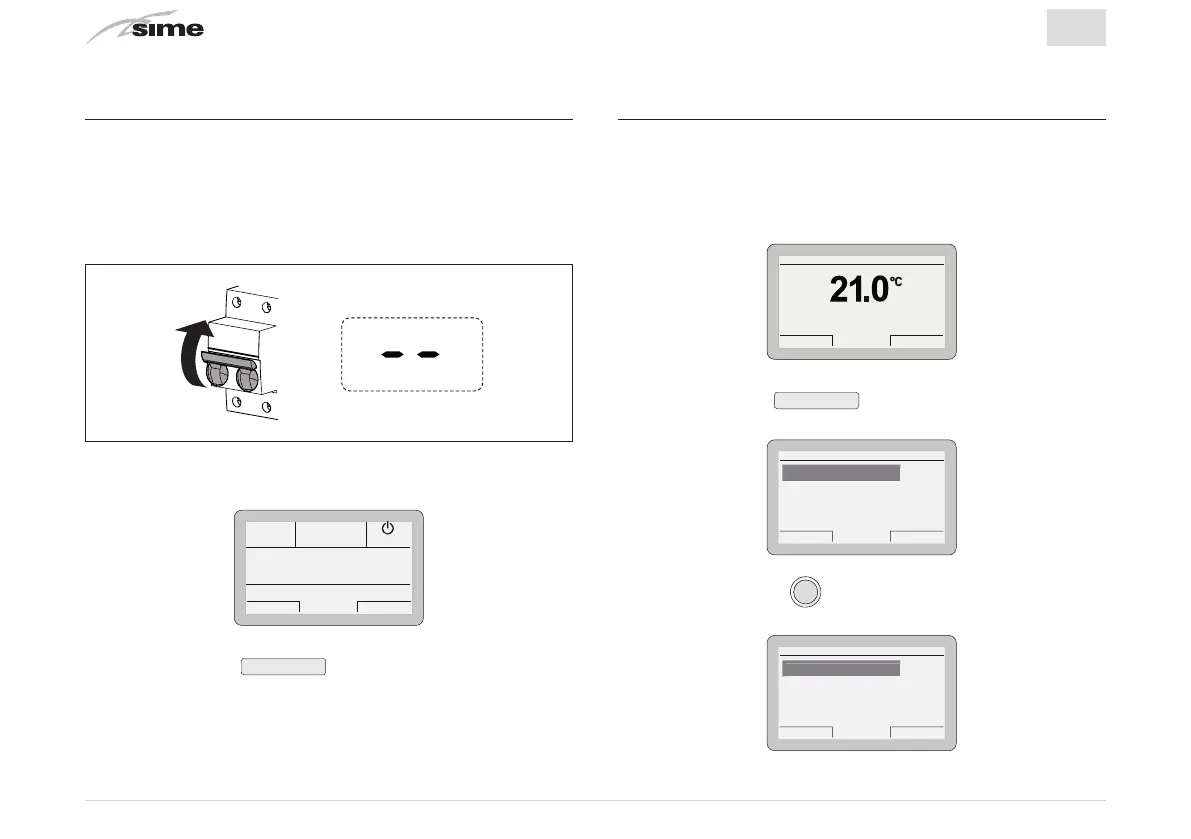
Once installation of the
Sime HOME PLUS
Remote Control has
been completed, proceed as follows:
– Set the main system switch to ON (on)
– From the boiler control panel, set "Stand-by" mode
ON
– The
“main screen”
appears on the
Sime HOME PLUS
Remote
Control.
Es
ack
Off
– Press the button
Esc
to view the “main screen” for
“OFF” operating mode.
4.2 Settings from the MENU button
4.2.1 GENERAL SETTINGS Menu
From the
“main screen”
of the
Sime HOME PLUS
Remote Con-
trol, proceed as follows:
Gi 18 Set 2014Zona 10:30
Menu Modo
Off
– Press the button
Menu
to go into the screen to select
“Menu”
Es
ack
GENERAL SETTINGS [...]
INFORMATION [...]
TECHNICAL [...]
ENERAL
ETTIN
MENU
– Press the encoder
to confirm the Menu highlighted
and go into the submenu
Es
ack
Language ITA
Date and time [...]
an
ua
e
GENERAL SETTINGS
Visualization [...]
Factory settings [...]


 To Next Page