13
EN
4.2.2 INFORMATION Menu
The INFORMATION menu is for display purposes only and no
modification of the data can be made.
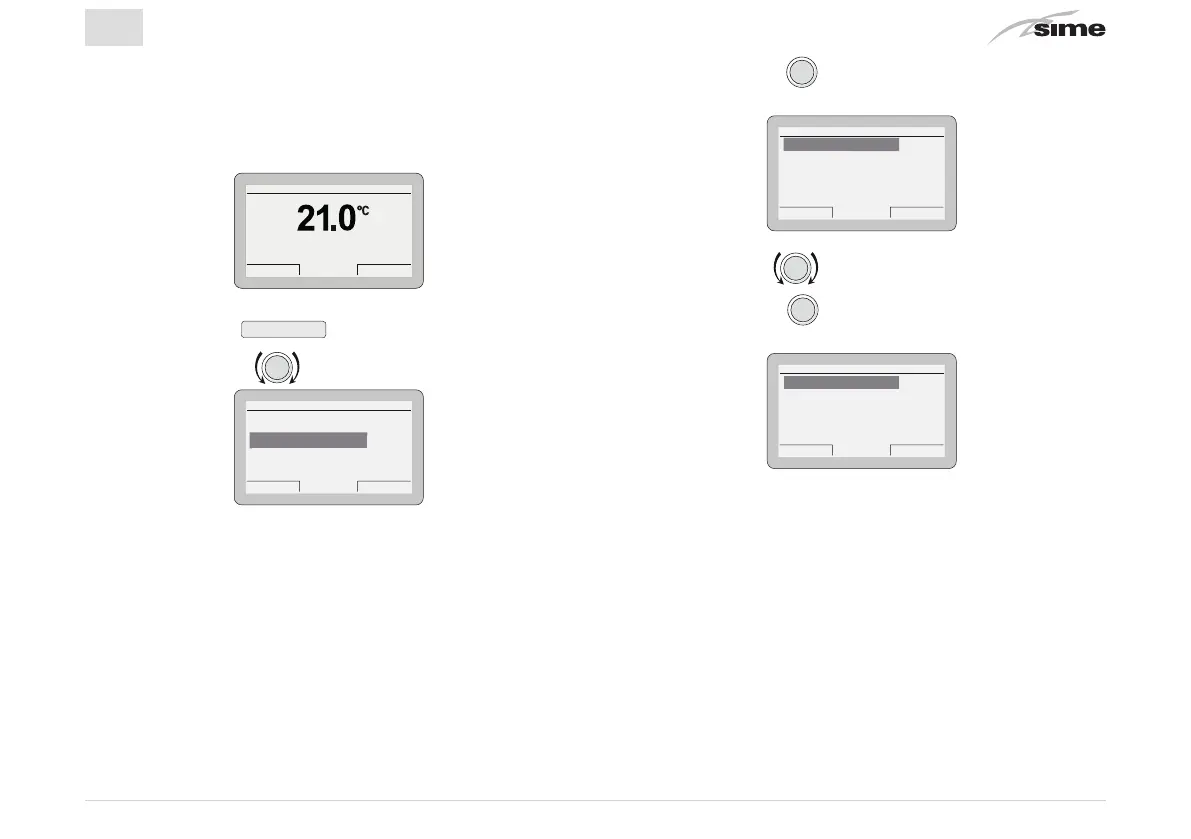
From the
“main screen”
Gi 18 Set 2014Zona 10:30
Menu Modo
Off
– Press the button
Menu
to go into the screen to select
“Menu”
– Rotate the encoder to select the menu
“INFORMATION”
Es
ack
GENERAL SETTINGS [...]
INFORMATION [...]
TECHNICAL [...]
MENU
NFORMATION
– Press the encoder
to confirm
“INFORMATION”
and go
into the submenu
Es
ack
INFORMATION
Zone heating [...]
Boiler [...]
Hot water [...]
Alarms [...]
one
eat
n
Rotate the encoder to select the required submenu
– Press the encoder
to confirm the submenu selected
and go into the display area for the relevant data
Es
ack
INFORMATION
Room temperature 20.0°C
Heating set 80°C
Heating temp. 30°C
oom tem
erature


 To Next Page