22
EN
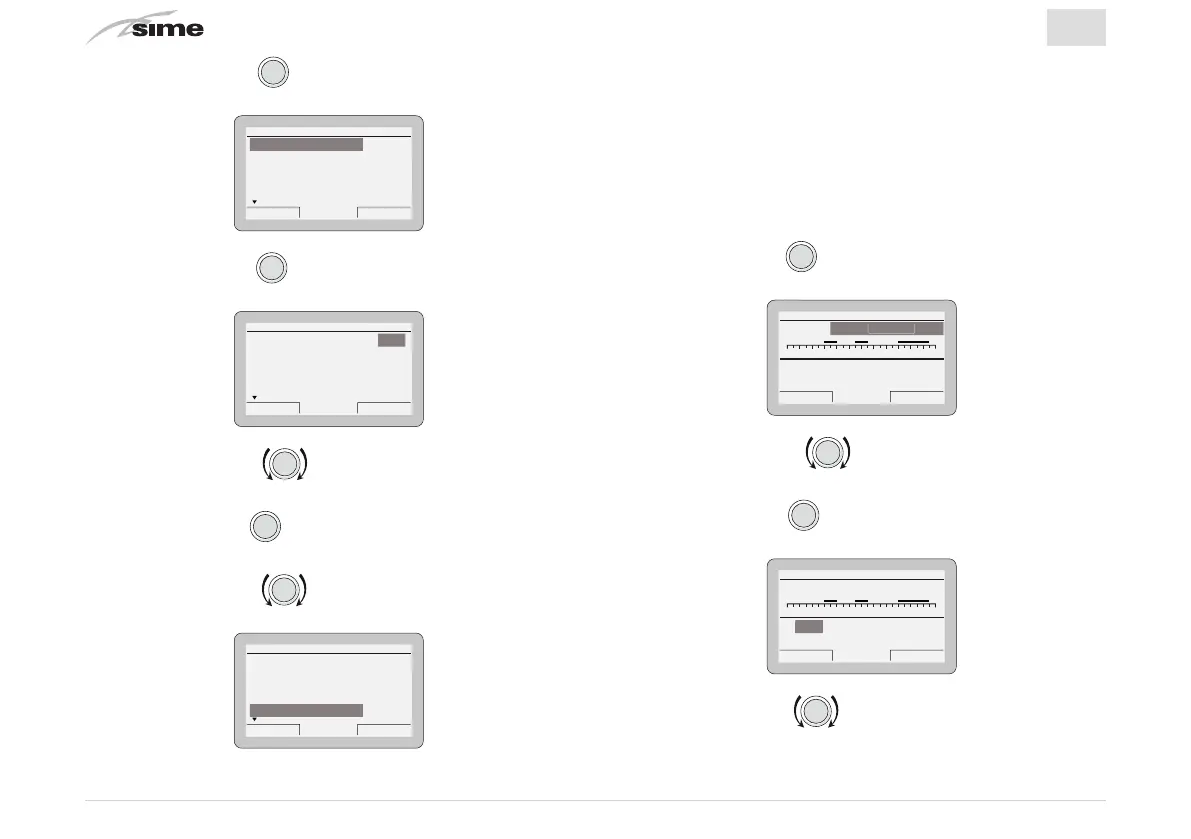
– Press the encoder
to confirm
“Heating”
and go into
the
“rows”
Es
ack
Heating
Function Mode MAN
Set AUTO comfort 20.0°C
Set AUTO reduced 18.0°C
Set MAN 20.0°C
Program. Time 20.0°C
n
n
– Press the encoder
to confirm the highlighted
“Row”
and go into the modifiable area
Es
ack
Heating
Function Mode MAN
Set AUTO comfort 20.0°C
Set AUTO reduced 18.0°C
Set MAN 20.0°C
Program. Time 20.0°C
– Rotate the encoder to modify the
“data/value”
in the
permitted field (eg. MAN - AUTO - OFF)
– Press the encoder
to confirm any modifications made
and go back to the row
“Function mode”
– Rotate the encoder to select another
“row“
(eg.
Pro-
gram. Time
)
Es
ack
Heating
Function Mode MAN
Set AUTO comfort 20.0°C
Set AUTO reduced 18.0°C
Set MAN 20.0°C
Program. Time 20.0°C
Pro
ram. Time
4.3.1 Program. time
The
Sime HOME PLUS
Remote Control allows up to four time
bands to be managed for the domestic hot water function and
the heating function described below.
During the programmed time band, the boiler works in COM-
FORT heating mode while outside the programmed time band
it works in REDUCED heating mode.
– Press the encoder
to confirm
“Program. time”
and go
into the modifiable area
Es
ack
HEATING TIME PROGRAM
024681012141618202224
Day/s:
[1] 06:00 - 08:00
[2] 11:00 - 13:00
[3] -
[4] 18:00 - 23:00
MONDAY M
NDA
– Rotate the encoder to select the
“Single days”
or
the
“Group of days”
– Press the encoder
to confirm the required selection
and go into the first
“adjustable time” [1]
HEATING TIME PROGRAM
024681012141618202224
Day/s:
[1] 06:00 - 08:00
[2] 11:00 - 13:00
[3] -
[4] 18:00 - 23:00
MONDAY
06:00
Cancel Confirm
– Rotate the encoder to modify the
“data/value”
on the
basis of the required time


 To Next Page