TIME PROGRAMMER (optional)
With the selector in the “AUTO” position,
the boiler operation is regulated according
to the temperatures set for the program-
med time periods.
During start-up, the second selector must
be in the “RUN” position. Programming:
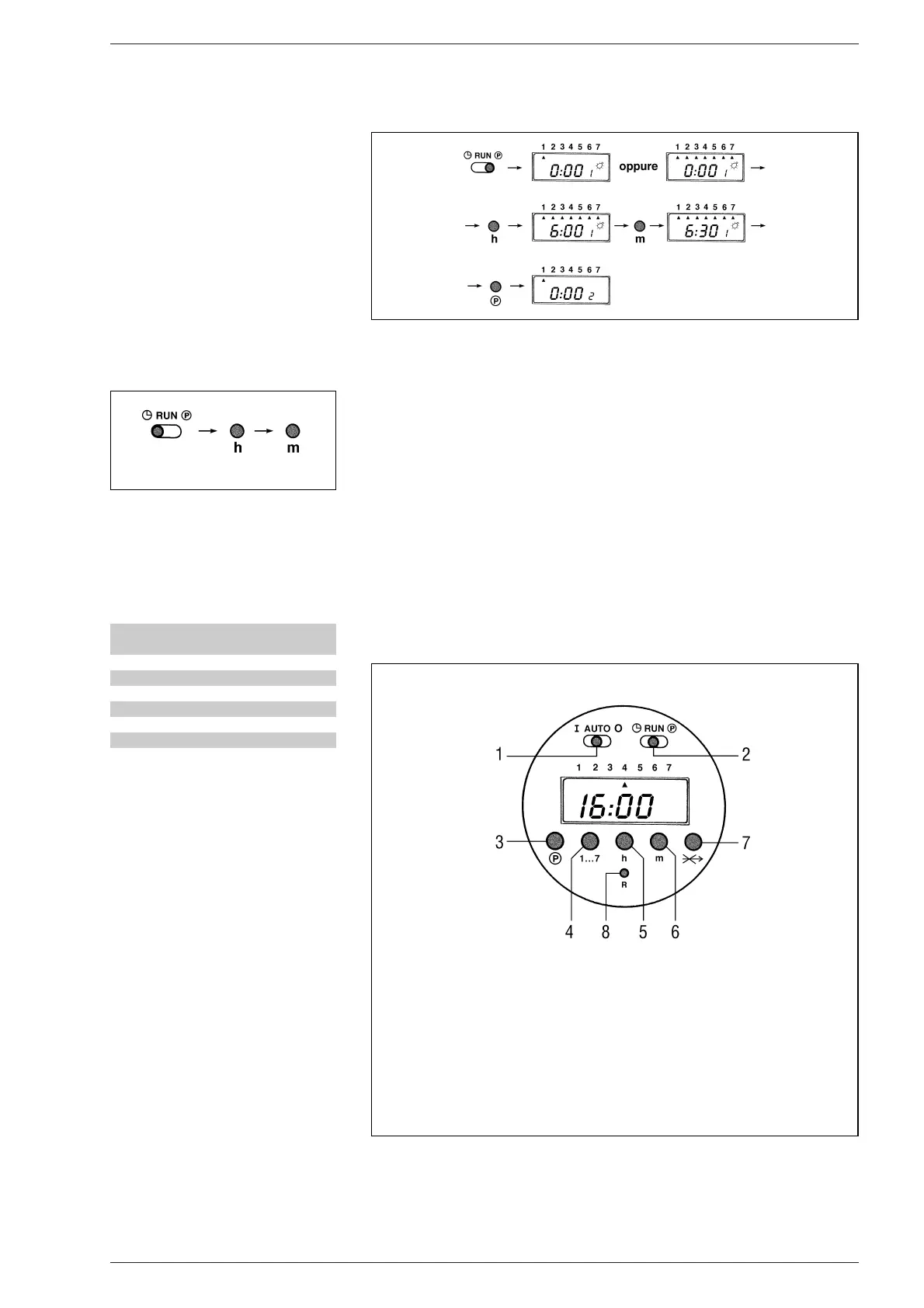
– Setting the time (fig. 6)
Move the selector to “”. To change the
hour on the display, press the “h” button,
to change the minutes, press the “m”
button. To set the day, press button
“1...7” until the arrow points to the cor-
rect day (1 = Monday ....... 7 = Sunday).
– Setting the programme (fig. 7)
The programmer has 8 start-up pro-
grammes and 8 shutdown options.
To make programming easier, 3 start-up
and 3 shutdown programmes have
already been set up for each day of the
week, as follows:
NOTE: Programmes from 7 to 16 are not
pre-set.
To select programmes other than those
pre-set, move the selector to the “P”
position: “0:00 1” will appear on the
display: the first three figures indicate
the hour and minutes, the fourth figure is
the number of the programme.
Programmes with odd numbers are swit-
ch-on times (daytime temperature) and
are indicated on the display by a light bulb
symbol. Programmes with even numbers
indicate the temperature reduction
(night). Use button “1...7” to select the
day of the week (from 1 to 7), or the
period (1 ÷ 5, 6 - 7; 1 ÷ 6; or every day if
the programme has to be repeated every
day of the week). Set the hour and minu-
tes using buttons “h” and “m”.
The operation in memorized by pressing
button “P”
The display then changes to the further
programme. Repeat the same opera-
tions to set the successive programmes.
At the end of the programming. Move the
selector to the “RUN” position.
– Cancelling one or more
programmes (fig. 8)
The programmed switch-on time and
switch-off time must be cancelled for
each individual programme by moving
selector (2) to the “P” position.
Select the required programme with but-
ton (3), press button (4) to cancel the
settings for that day (the triangular day
indicator should disappear).
If a part of the programme is cancelled,
when selector (2) is returned to the
“RUN” position, an error message will
appear on the clock display together with
an indication of the incorrect program-
me. To cancel all the programmes, move
the selector to the “P” position and press
buttons (3) and (5) simultaneously.
– Setting the “SKIP” function (fig 8)
The SKIP function defused the program-
mes when going out for the day, during
which no heating is required.
To start this function, press button (7);
the button is only active when selector (2)
is in the “RUN” position.
Once selected, the SKIP function beco-
mes active at 0:00 of the following day
and lasts for 24 hours.
Once activated, it cannot be defused.
Consequently the normal programme
will only be resumed after 24 hours.
90
KEY
1 Manual/automatic operation selector
2 Programmer/timer setting selector
3 Programme button
4 Day button
5 Hour button
6 Minute button
7 SKIP function button
8 Reset button
Fig. 7
Fig. 8
Program Ignition Turn off
time time
1 06,00 -
2 - 09,00
3 12,00 -
4 - 14,00
5 18,00 -
6 - 22,00
Fig. 6



 To Next Page