8
SD7PK digital drum kit User manual
The First Name in Electronic Drums.
•All the drum pads and cymbal pads use a single trigger sensor for the whole pad,
except the dual zone snare pad that uses one trigger for the head and another trigger
for the rim.
•Allthe padsarevelocitysensitive.Some voicescan change soundsdependingonthe
velocity level (striking force).
•Thetriggerareaofthecymbalpads(Ride,CrashorHi-Hat)isneartheedgeofthepad.
•Similartoanacousticdrumkit,theHi-Hatsoundvariesdependingonthepositionofthe
pedal(Hi-HatControl):
•OpenHi-Hat:StriketheHi-Hatpadwithoutpressingthepedal
•HalfOpenHi-Hat:StriketheHi-Hatpadwiththepedalpressedhalf-way
•ClosedHi-Hat:StriketheHi-Hatpadwiththepedalpressedallthewaydown
•FootClose:Pressthepedalallthewaydown
•Splash:Stepfullyonthepedalandreleaseitimmediately
metronome
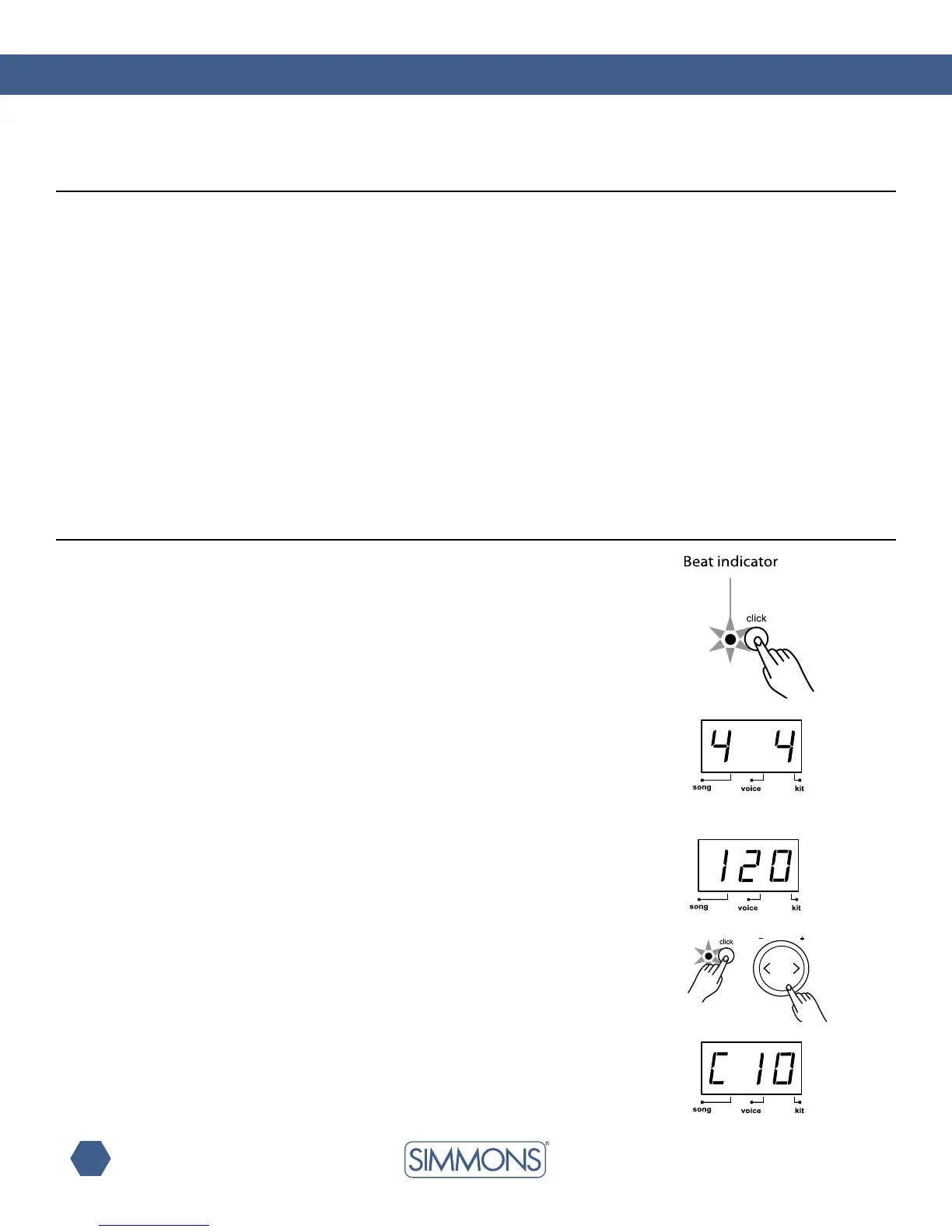
The SD7PK includes a Metronome feature with two types of sounds: Click (Bell sound on
therstbeat,andClicksoundontheotherbeats)orVocalCounting(“one”,“two”,“three”,
“four”,…).
Press the [CLICK] button to start the metronome with Click sound.
Press the [CLICK]buttonasecondtimetochangethemetronometoVocalCounting.
Press the [CLICK] button again to stop the metronome.
While the metronome is playing, the Beat indicator flashes at the current tempo.
Whilethemetronomeisplaying,theLEDshowsthecurrenttimesignature.
The time signature of the metronome can be changed using the [+] and [-] buttons. There are
veavailableoptions:2/4,3/4,4/4,5/4and6/8.
The SD7PK returns to the previous display when the metronome is stopped.
Press the [TEMPO +] or [T -]buttonstochangethe tempo (30—280). The LEDshows
the current tempo and returns to the previous display after about 2 seconds if there is no
operation of the Tempo [+] and [-] buttons.
The volume of the metronome can be adjusted by holding down the [CLICK] button
and pressing the [+] or [-] buttons. The LED shows “Cxx” (xx = metronome volume:
0 — 16), and returns to the previous display about 2 seconds after releasing the
[CLICK] button. The metronome volume resets to its default value when turning
off the SD7PK.
using the SD7PK pads
Playing the pads



 To Next Page