5
www.simmonsdrums.net
The First Name in Electronic Drums.
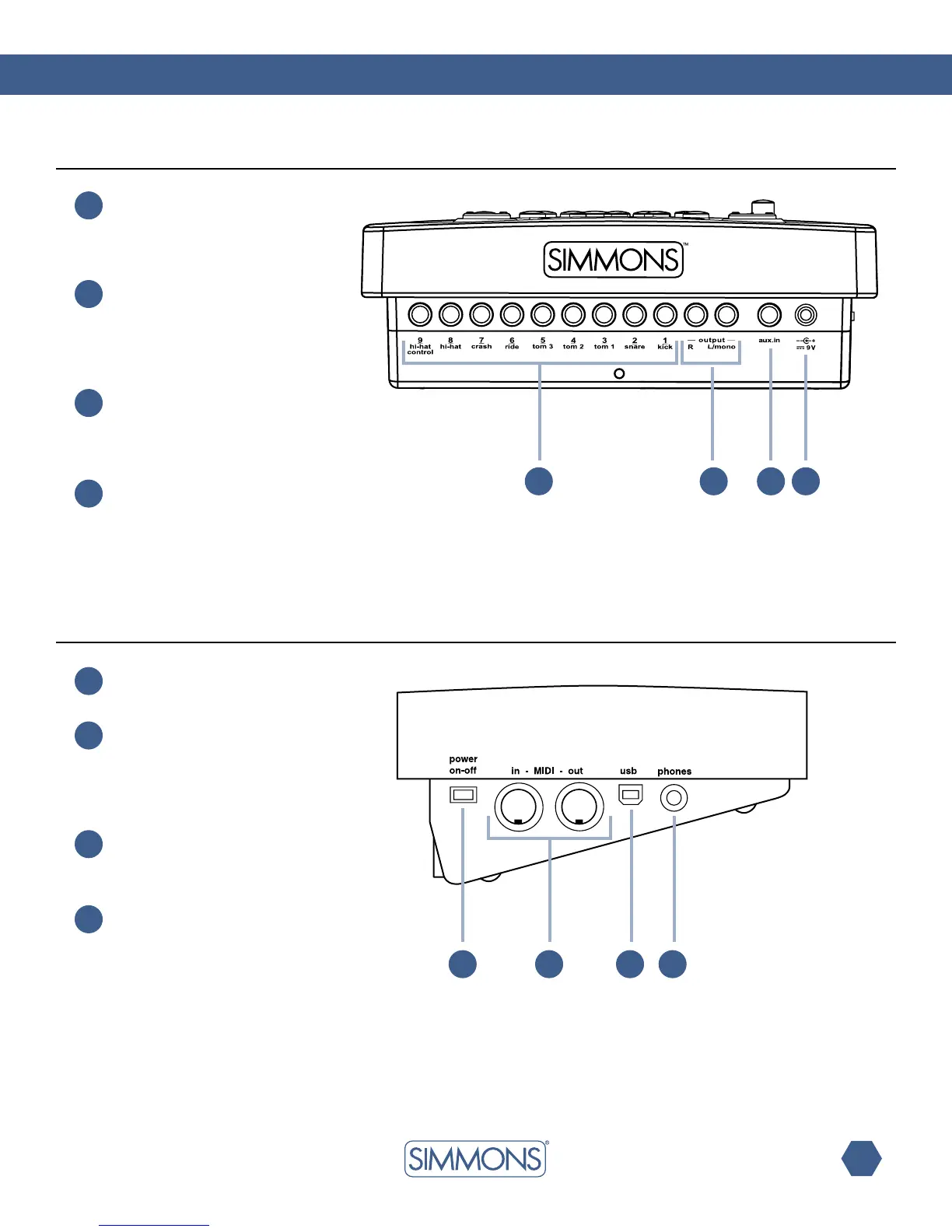
Rear panel
side panel
17
14
Pad input jacks
Input connections for kick,
snare, tom, cymbal pads and
Hi-Hatcontrolpedal.
Line output jacks
Stereo output connection to an
audio system or drum amplifier
such as the Simmons DA50 or
DA200S.
AUX input jack
This stereo input jack is for an
external sound source such as
an MP3 or CD player.
DC input
Connection for the DC 9V
power adapter.
15
16
21
19
18
Power switch
This switch turns the power on and off.
MIDI in and out
These ports allow communication with
other products equipped with a MIDI
interface. Please see the MIDI section
of this manual for details.
USB port
This port is used to connect to a
computer.(MIDIIn/OutviaUSB)
Phone jack
This stereo jack is used to
connect headphones.
20
14 15 16 17
18 19 20 21



 To Next Page