SDHB2 User’s Manual
Hybrid electronic add-on pack
equa
lizat
ion
vo
lume
inp
ut
righ
t
lef
t
/m
ono
d
ru
m
i
n
p
u
ts
aux
drum
aux
low
mid
hig
h
lin
e
in
h
ea
d
p
h
o
nes
equa
lizat
ion
vo
lume
inp
ut
righ
t
lef
t
/m
ono
d
ru
m
i
n
p
u
ts
aux
drum
aux
low
mid
hig
h
lin
e
in
h
ea
d
p
h
o
nes
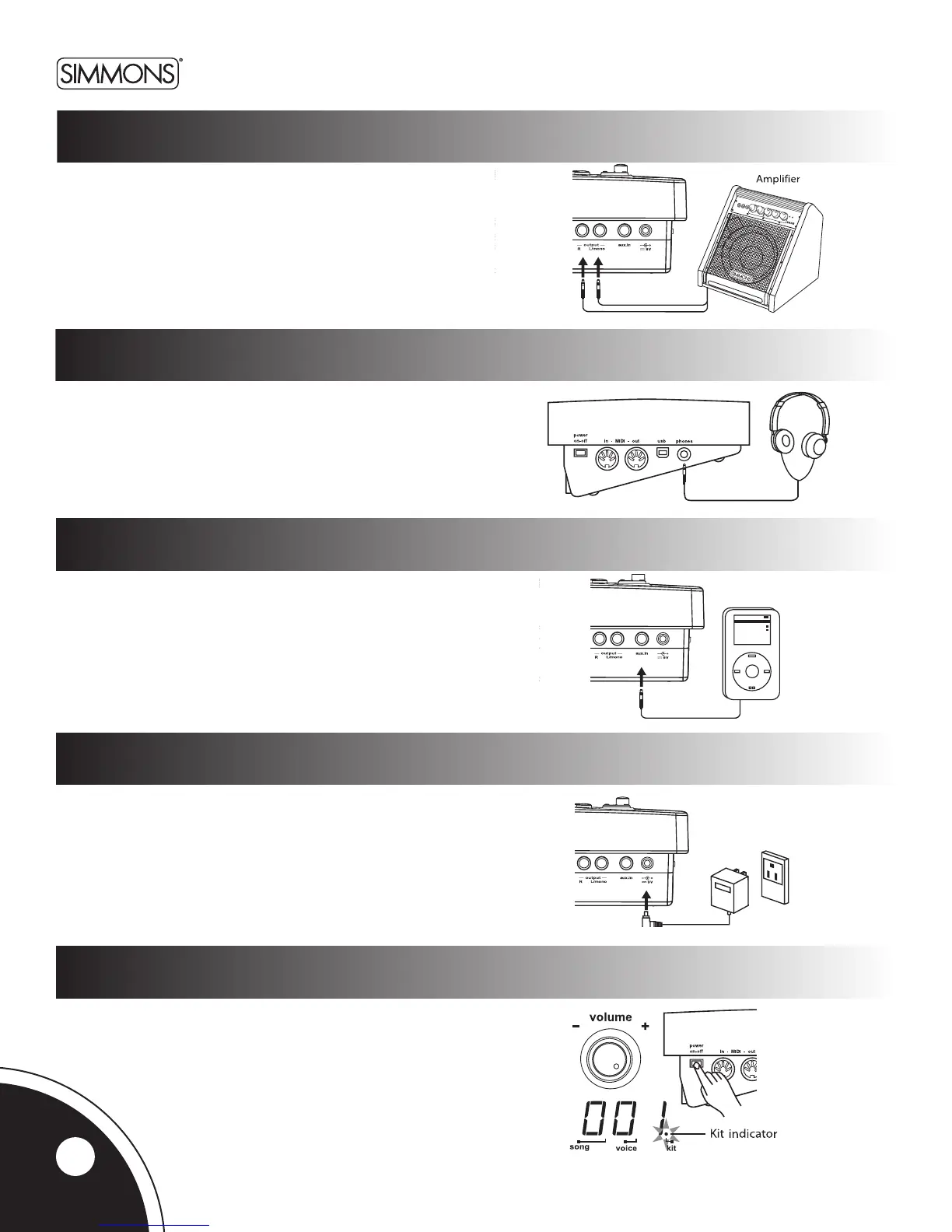
audio equipment
Whenusinganamplier-suchastheSimmonsDA50orDA200S-
connecttheOutputL/MONO and Rjacksontherearpaneltothe
inputoftheamplier.(Formonoplayback,usetheL/MONOjack;
forstereoplayback,connectbothL/MONO and Rjacks.)
headphones
Anoptionalsetofstereoheadphonescanbeconnectedtothe
PHONESjacklocatedonthesideofthedrummodule.
MP3/cd player
1.ConnecttheaudiooutputofanMP3/CDplayerorotheraudio
source to the stereo AUX IN TRSjackontherearpanel.
2. The input signal is now mixed with the drum signal,
so that you can play along.
power supply
Connect the power adapter to the DC INjackontherearpanel.
Note:
MakesurethepowerisswitchedOFF when connecting the
drum module with external devices.
Power Switch
Afterconrmingthatallconnectionshavebeencompleted,
rotatethevolumeknobtotheleft(itsminimumvolumelevel)
before switching the power on.
SetthepowerswitchtotheONposition.Thekitindicator
willlightupandthedisplaywillshowkitnumber001.
equa
lizat
ion
vo
lume
in
p
ut
righ
t
lef
t
/m
ono
d
ru
m
i
np
u
ts
aux
drum
aux
low
mid
hig
h
lin
e
in
h
ea
d
p
h
o
nes
equa
lizat
ion
vo
lume
in
p
ut
righ
t
lef
t
/m
ono
d
ru
m
i
np
u
ts
aux
drum
aux
low
mid
hig
h
lin
e
in
h
ea
d
p
h
o
nes
equa
lizat
ion
vo
lume
inp
ut
righ
t
lef
t
/m
ono
d
ru
m
i
n
p
u
ts
aux
drum
aux
low
mid
hig
h
lin
e
in
h
ea
d
p
h
o
n
es
8



 To Next Page