SDHB2
www.simmonsdrums.net
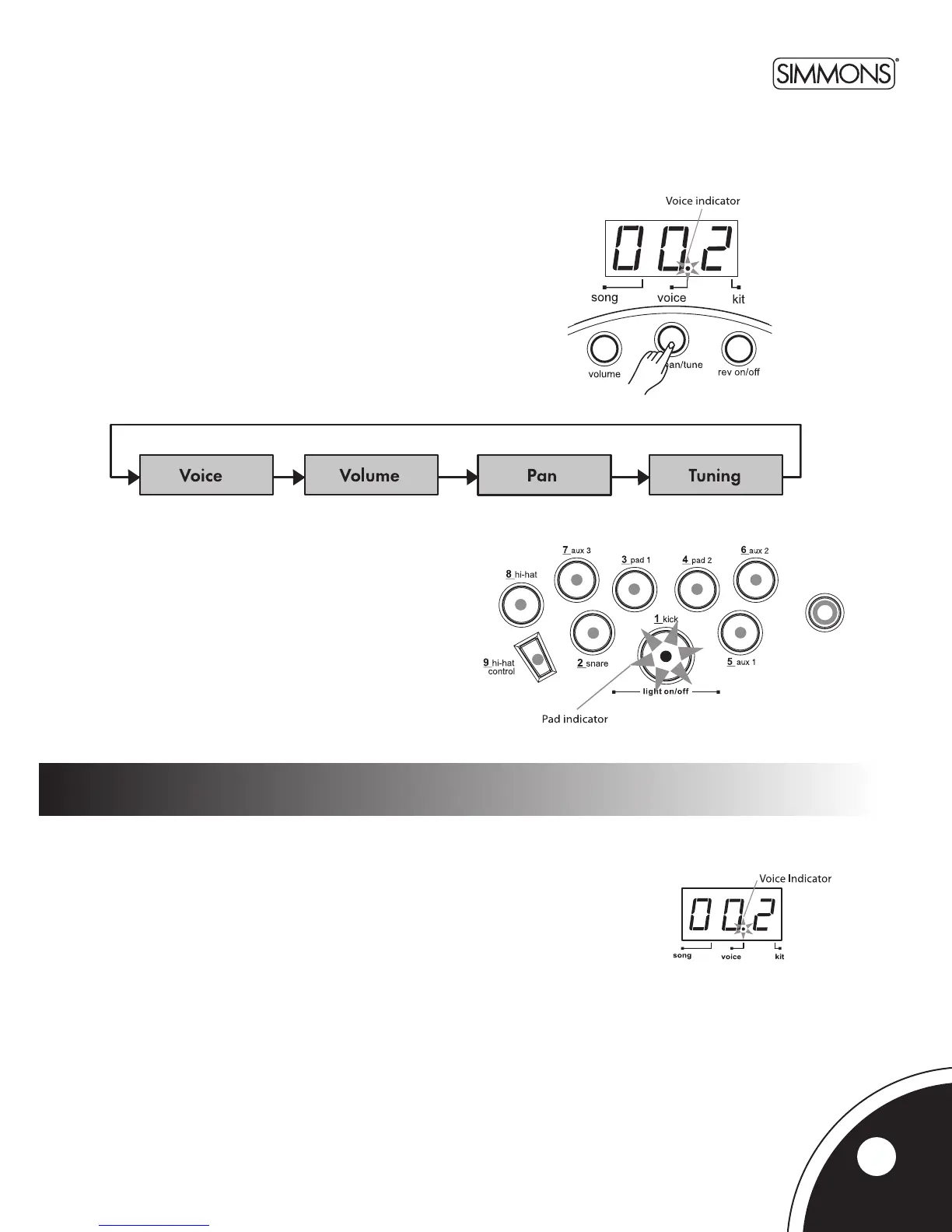
IftheSDHB2isnotyetinVoiceMode,pressthe[VOICE] button to
entertheVoiceMenu.TheVoiceindicatorwilllightup.Nowthe
[VOICE]buttonwillpagethroughtheVoiceMenu.
IntheVoiceMode,youcanselectthevoiceforeachtrigger/padand
adjustthelevel,pan,andtuning.
selecting the drum voice
IntheVoiceNumberpage,the3-digitLEDshowsthecurrentvoicenumberfortheselect-
edtrigger/pad.Usethe[+] and [-]buttonstoselectanyvoice(1300,looped)forthe
currenttrigger/pad.TheSDHB2includes300voicessortedbycategory(Kick,Snare,
Tom, Cymbal, Hi-Hat, Percussions). Each category includes a variety of acoustic, electric,
andeectsvoices.(SeeVoiceListonpages19-20.)
voice mode
The current trigger or pad to be edited can be selected either
bypressingitsPadSelectbutton,orbystrikingthepaditself.
The Pad Select indicator lights up to show which pad is currently
selected.
Note:WhileeditingVoiceVolume,level,pan,andtuning,you
can also preview the result of the current settings
by pressing the Pad Select button to play the edited voice.
11



 To Next Page