SDHB2
www.simmonsdrums.net
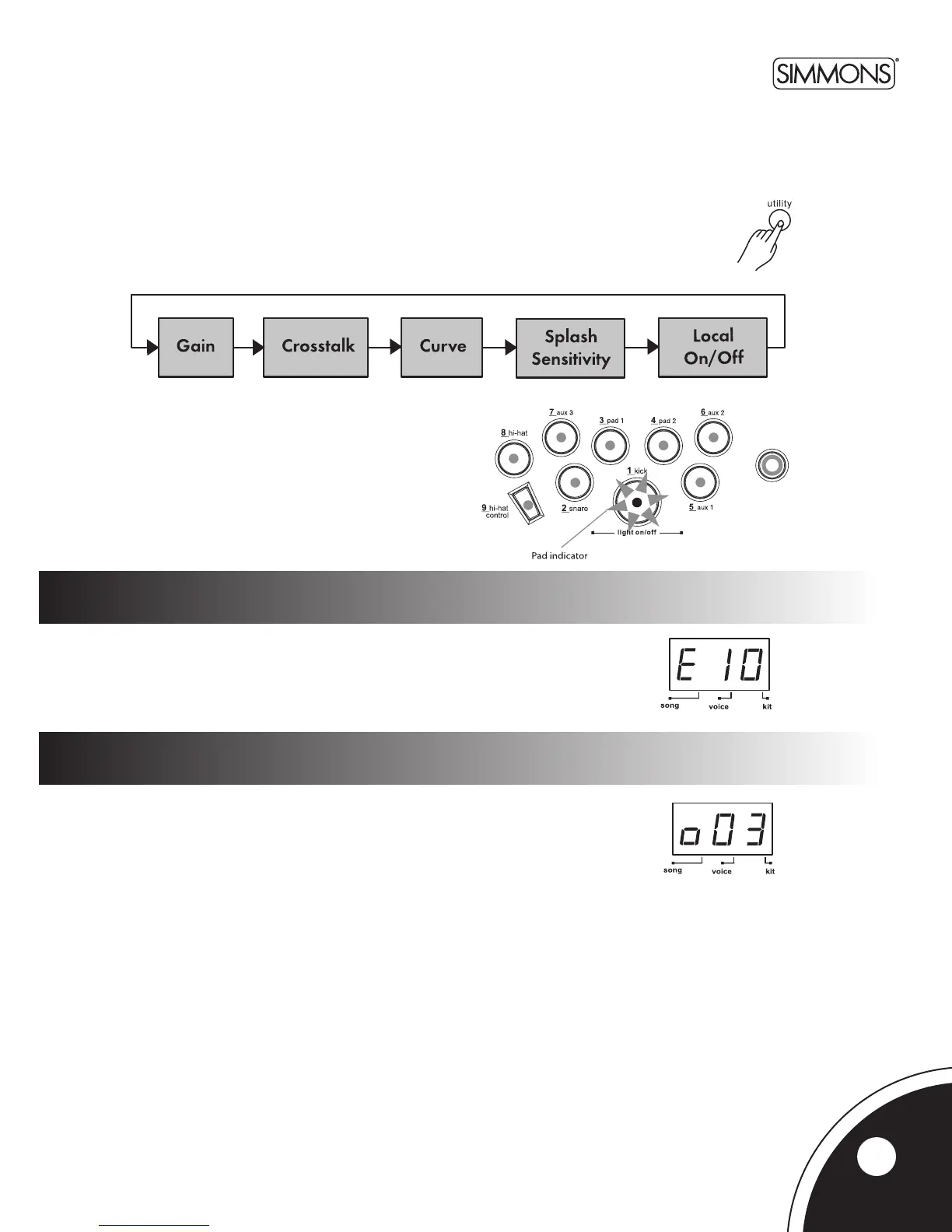
Press the [UTILITY]buttontoentertheUtilityMode.Nowthe[UTILITY] button
willpagethroughtheUtilitymenu.
InUtilityMode,youcanadjustthetriggerparameters(gain,crosstalk,curve)foreachpadandtrigger.
Thoseparametersarecommontoallkits.
IntheTriggerGainpage,therstdigitofLEDwilldisplaytheletter‘E’,followed
by the gain value (1~16, not looped). Greater gain will allow you to trigger a signal,
evenifyoustrikethepadlightly.
IntheTriggerCrosstalkpage,thelast2digitswillshowthecrosstalkvalue(1~16) of the
currentpadwithaletter‘o’displayedontherstdigitoftheLED.Hittingonepadmay
trigger the sound from another pad unintentionally. This effect can be eliminated by
setting this parameter to a higher value than the mistriggered part.
Pad and trigger sensitivity (gain)
crosstalk
Utility menu
Thecurrenttrigger/padtobeadjustedcanbeselected
eitherbypressingitsSelectbutton,orbystrikingthe
trigger/paditself.ThePadSelectindicatorlightsupto
showwhichtrigger/padiscurrentlyselected.
13



 To Next Page