SDHB2 User’s Manual
Hybrid electronic add-on pack
Selecting a drum kit
kit mode
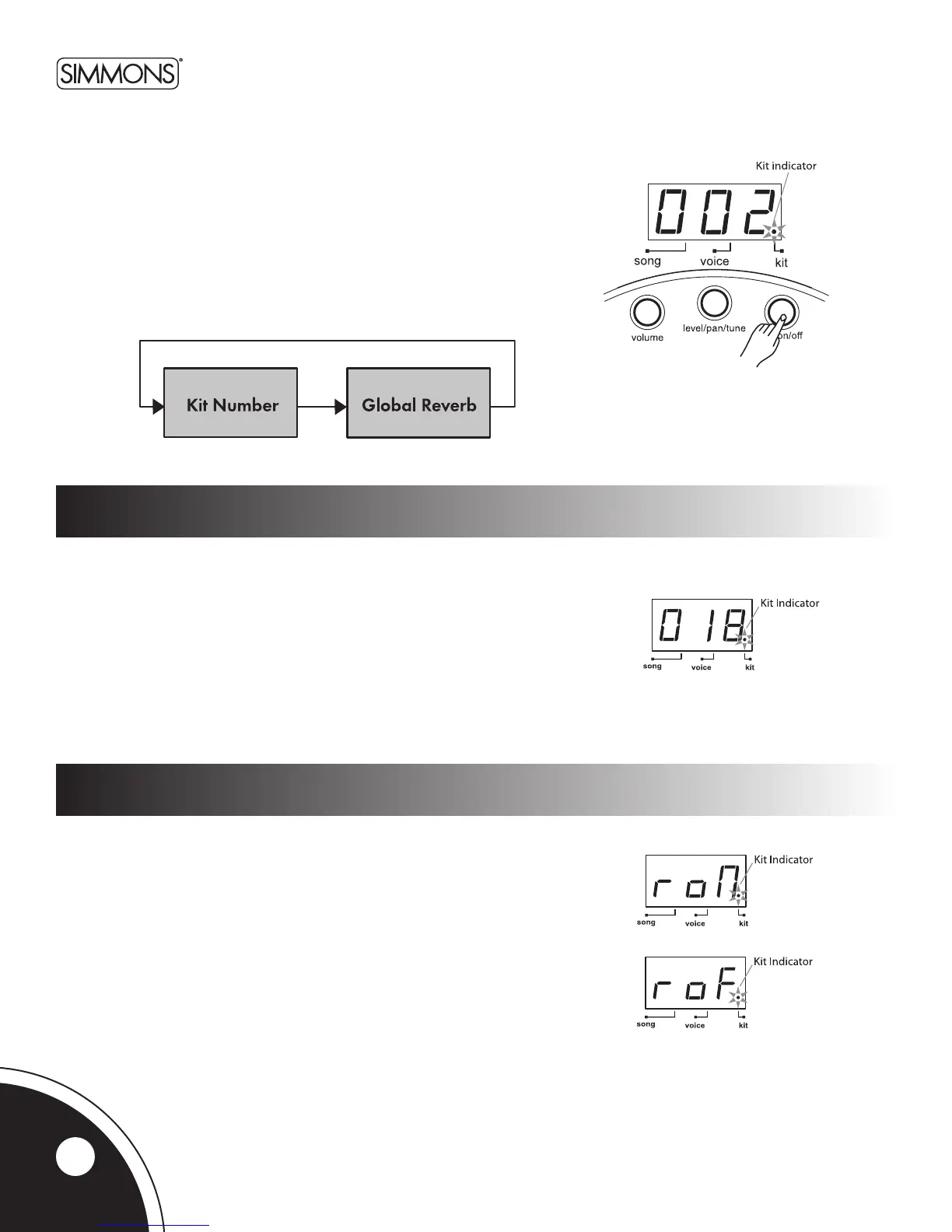
IntheKitNumberpage,the3-digitLEDshowsthecurrentkitnumber.
Usethe[+] and [-]buttonstoselectanykit(1~50,looped)asthe
currentkit.
TheSDHB2includes20factorypresetkits(1~20)and30Userkits
(21 ~50).(SeeKitListonpage21.)
Note:InKITmode,youcanusethePadSelectbuttonstoplaythe
voicesassociatedwiththepadsofthecurrentlyselectedkit.
IftheSDHB2isnotyetinKITMode,pressthe[KIT]buttontoenterKitMode.
TheKitindicatorwilllightup.
IntheKITMode,youcanselecttheDrumorPercussionKittoplay.
You can also turn on or off the Reverb effect.
Global reverb
WhentheSDHB2isintheKitNumberpage,pressthe[KIT] button
again to access the Global Reverb page.
IntheGlobalReverbpage,theLEDshowsthecurrentReverbstatus
(“roN”forReverbOnor“roF”forReverbO).
GlobalReverbcanbeturnedOnorOusingthe[+] or [-] buttons.
Press the [KIT]buttonagaintoreturntotheKitNumberpage.
10



 To Next Page