SDHB2 User’s Manual
Hybrid electronic add-on pack
local mode
saving trigger settings
Afteradjustingthetriggersettings(gain,crosstalk,curve,splashsensitivity),youcansavethemintomemory.
WhileintheUtilitymode,pressthe[SAVE] button to store all trigger settings.
Note:
1.Ifyouturnothepowerwithoutsaving,youwilllosethetriggersettingchangesyouhavejustmade.
2.Theseparametersaectallkits.
restoring the factory preset
To restore the factory preset hold down both TEMPO+ and TEMPO-whentheSDHB2ispoweredup.Thisfunctionwill
replace the current settings of the following parameters by their default preset values:
•Alluserkits(includingVolume,Voice,Pan,Reverb,andTuningsetting)
•Utilityparameters(includinggain,crosstalk,curveandsplashsensitivity)
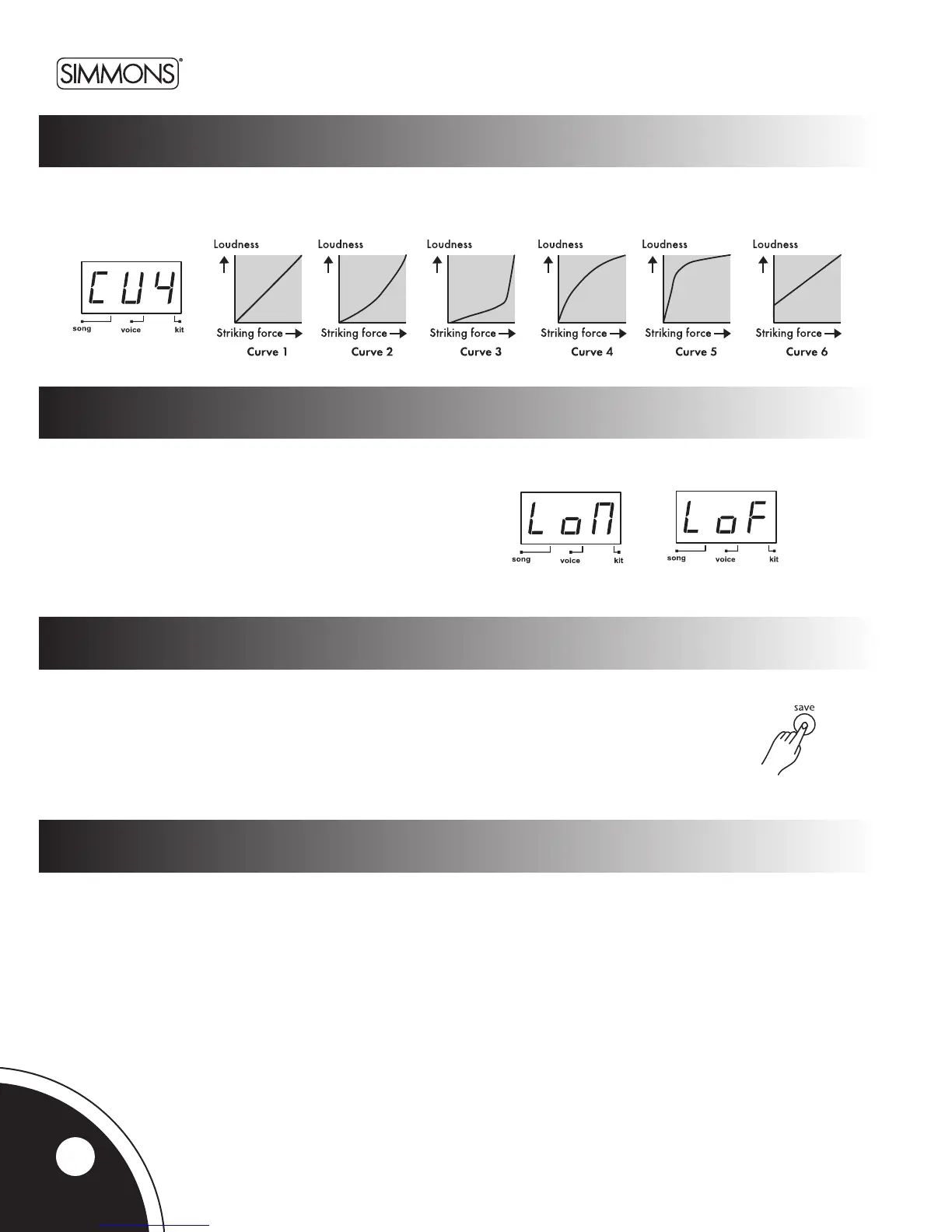
IntheVelocityCurvepage,thecurvesettingallowsyoutocontroltherelationshipbetweenthevelocity(strikingforce)and
loudness (the dynamic curve). The last digit will show the curve number (1~6)ofthecurrentpadwithletters‘CU’displayed
onthersttwodigitsoftheLED.
curve
Inlocalcontrolpage,theLEDshowsthelocalcontrolmode.
LocalONisthedefaultfunctionmode(‘LoN’).Theinternallink
betweenpadtriggersandsoundgeneratorwillbebrokenwhen
selectingLocalOFF(‘LoF’).FormoredetailsregardingtheLocal
Mode,pleaseseetheMIDI/USBsectionofthismanual.
Note:LocalControlModealwaysreturnstoOwhen
poweringuptheSDHB2.
14



 To Next Page