EasyManua.ls Logo

Simplicity 1003 - Adjustments; Belt Stops

Simplicity 1003
25 pages
Print Icon
To Next Page IconTo Next Page
To Previous Page IconTo Previous Page
Loading...
fjimuliciiu
Adjustments
CONTENT
OF
SECTION
This
section
contains
adjustment
procedures
for
the
rotary
tiller.
These
adjustments
are
made
during
assembly
and
thereafter
are
normally
performed
only
to
correct
specific
problems.
Follow
all
in¬
structions
in
the
order
given.
WARNING
To
avoid
serious
injury,
perform
adjustments
on
tiller
only
when
the
engine
is
stopped
Al¬
ways
remove
spark
plug
or
remove
spark
plug
wire
and
insert
terminal
in
V-notch
on
cylinder
For
access
to
some
adjustment
points,
the
belt
guard
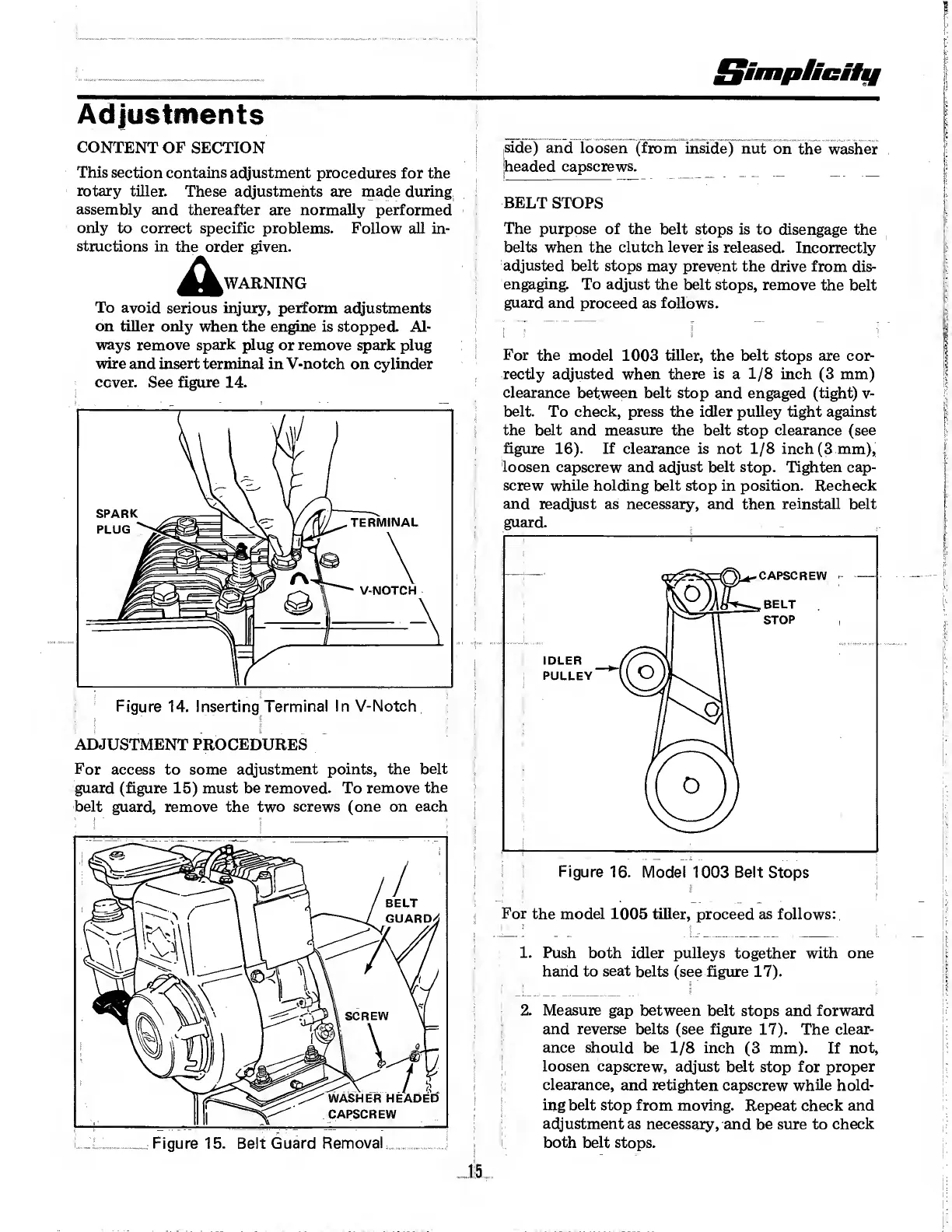
(figure
15)
must
be
removed.
To
remove
the
belt
guard,
remove
the
two
screws
(one
on
each
side)
and
loosen
(from
inside)
nut
on
the
washer
headed
capscrews.
BELT
STOPS
The
purpose
of
the
belt
stops
is
to
disengage
the
belts
when
the
clutch
lever
is
released.
Incorrectly
adjusted
belt
stops
may
prevent
the
drive
from
dis¬
engaging.
To
adjust
the
belt
stops,
remove
the
belt
guard
and
proceed
as
follows.
1
f
f
.
|
For
the
model
1003
tiller,
the
belt
stops
are
cor¬
rectly
adjusted
when
there
is
a
1/8
inch
(3
mm)
clearance
between
belt
stop
and
engaged
(tight)
v-
belt.
To
check,
press
the
idler
pulley
tight
against
the
belt
and
measure
the
belt
stop
clearance
(see
figure
16).
If
clearance
is
not
1/8
inch
(3
mm),
loosen
capscrew
and
adjust
belt
stop.
Tighten
cap¬
screw
while
holding
belt
stop
in
position.
Recheck
and
readjust
as
necessary,
and
then
reinstall
belt
For
the
model
1005
tiller,
proceed
as
follows:
1.
Push
both
idler
pulleys
together
with
one
hand
to
seat
belts
(see
figure
17).
2.
Measure
gap
between
belt
stops
and
forward
and
reverse
belts
(see
figure
17).
The
clear¬
ance
should
be
1/8
inch
(3
mm).
If
not,
loosen
capscrew,
adjust
belt
stop
for
proper
clearance,
and
retighten
capscrew
while
hold¬
ing
belt
stop
from
moving.
Repeat
check
and
adjustment
as
necessary,
and
be
sure
to
check
both
belt
stops.
15