GD1 Page 24 of 76 850-816926-EN R06
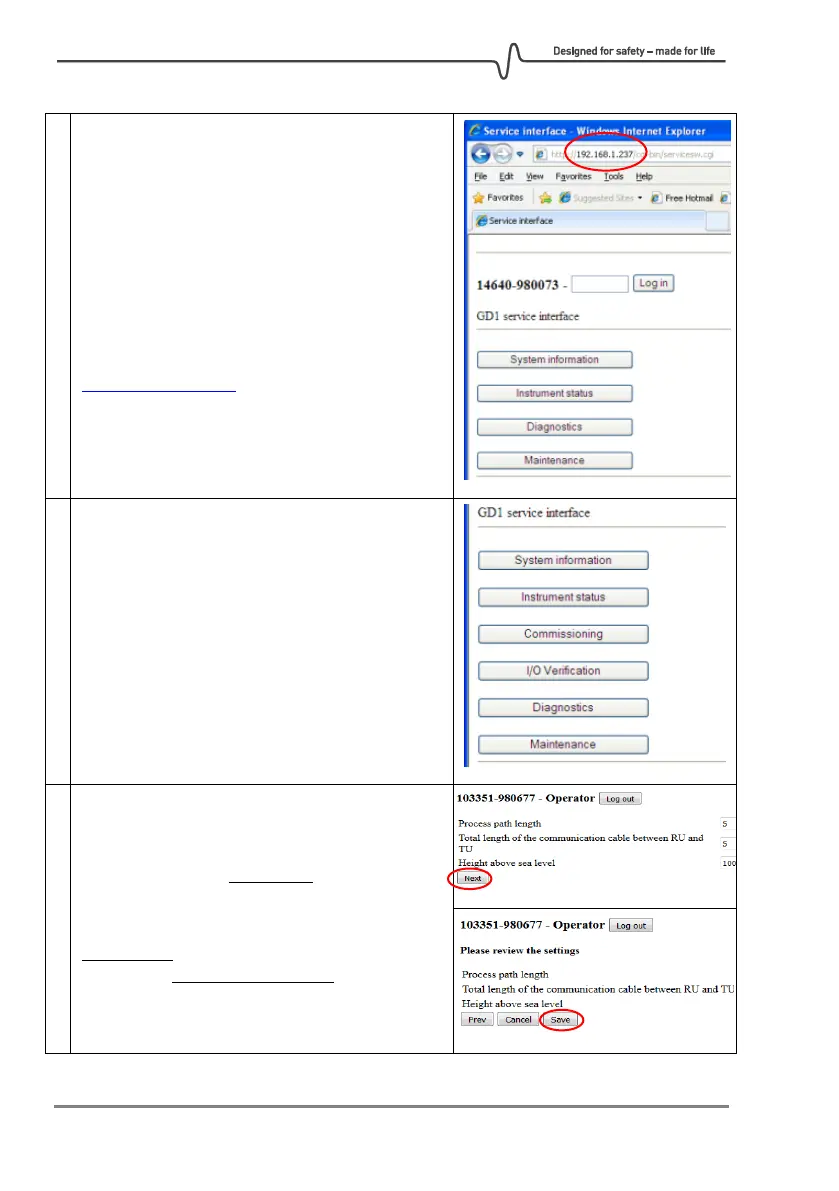
Use a device having Web browsing capabilities,
for example laptop, to connect with the wireless
router or Ethernet cable. If using the wireless
router, from your device connect to the network
SSID: “GD1”
In the web browser of your device, enter the
GD1 Service Interface on the address
http://192.168.1.237
Log into the Service Interface with the Operator
password: "gd1tlc"
After logging in as Operator more functions are
accessible as illustrated in the right image.
Click “Commissioning” followed by “Alignment”
to get into the alignment page.
Enter the parameters for path length, cable
length and altitude. Path length does not affect
the H
2
S measurement and is only used for
troubleshooting.
Cable length shall have a precision of better than
±100 m and height above sea level shall better
than ±300 meters.
Click “Next” followed by “Save”.



 To Next Page