GD1 Page 25 of 76 850-816926-EN R06
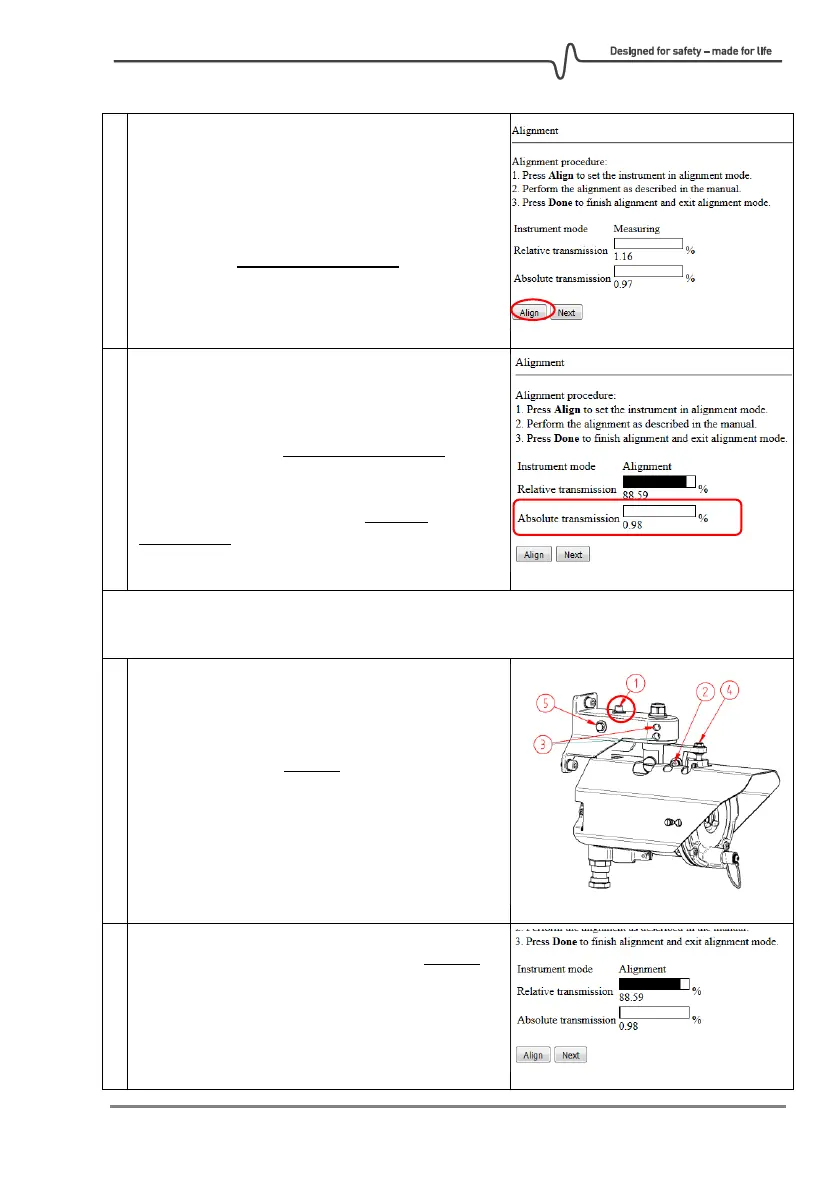
Clicking the “Align” button sets the system in
Alignment Mode. If sufficient laser light is
collected by the RX, the signal strength will be
shown in the Absolute transmission field.
The relative transmission is automatically set to
100% when entering alignment mode.
Notice that it is the Absolute transmission that
shall be optimized. The Relative transmission is
only used to assist in the alignment process since
it will “remember” the highest absolute
transmission seen since going into align mode.
A new reference can be set at any time by pressing “Align” again. This reference is than
used as 100% relative transmission until alignment is improved and is used as reference.
Slightly loosen only screw 1 just enough for the
alignment mechanism to be able to move in the
horizontal direction.
Align in horizontal direction by turning screw 5.
Turn very slowly in the direction whereby the
absolute transmission increases. The relative
transmission will stay close to 100% as long as
the absolute transmission is increasing.



 To Next Page