EasyManua.ls Logo

Singer 6233 - Thread Tension and Balance Adjustment

Singer 6233
36 pages
Print Icon
To Next Page IconTo Next Page
To Previous Page IconTo Previous Page
Loading...
Ad
ju
sti
ng T h read Te n
sio
n
Some
Special Stitch
patterns
may
proper
tension
for
your
application,
be using.
require looser thread tension than
others. To find
the
make a test sample with the thread
and fabric
you
will
C_-l
::"lH
I
:llli
ll!
J
:"F I
.ill
Adjusting Stitch
Balance
You
can
change the appearance of Special Stitch
patterns
11,12 and
13/14, numbered in
red
on
the display
panel,
byturning
the stitch
balance
ring.
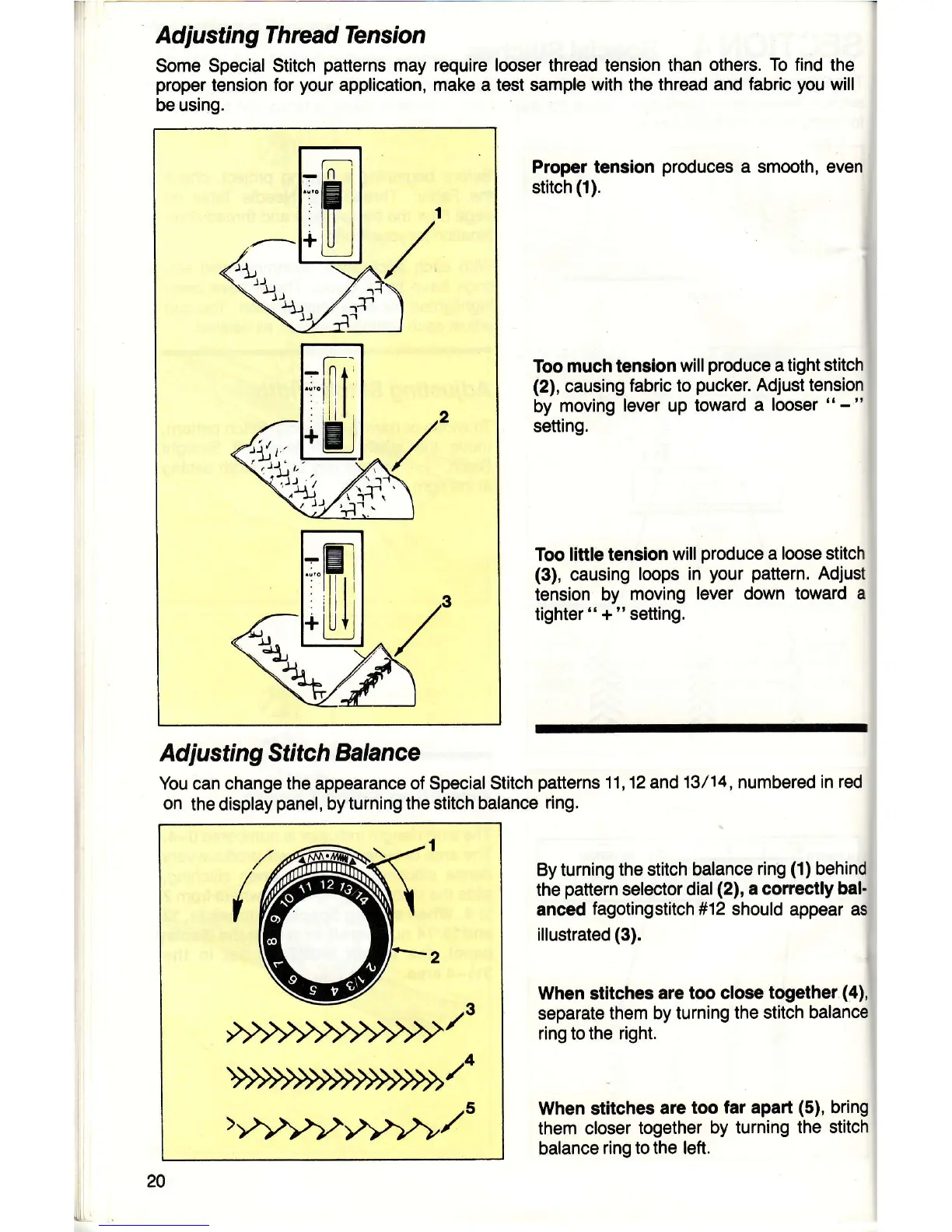
Proper tension
produces
a
smooth, even
stitch
(1).
Too
much
tension
will
produce
a tight
stitch
(2),
causing
fabric
to
pucker.
Adjust tension
by moving
lever up
toward a
looser
"
-
"
setting.
Too
little tension
will
produce
a
loose stitch
(3),
causing
loops in
your
pattern.
Adjust
tension by
moving
lever down toward
a
tighter"+"setting.
By turning
the stitch balance
ring
(1)
behind
the
pattern
selector
dial(2),
a correctly bal.
anced
fagotingstitch #12 should
appear as
illustrated
(3).
When stitches
are too close
together
(4),
separate them
by turning
the stitch balance
ring to the
right.
When stitches
are
too far apan
(5),
bring
them
closer
together
by turning
the stitch
balance
ring to the left.
20

Other manuals for Singer 6233

Related product manuals