SECTION4
Speciatstltches
The 9
Special Stitches on
your
machine
have a variety of
practical
and decorative uses. In
this
section are
recommended
applications for each
stitch.
However,
these stitches
can be used
for many other
sewing
projects.
Before beginning a sewing
project,
check
the
Fabric, Thread
and
Needle Table
on
page
5
for
the best
needle
and thread com-
bination for
your
fabric.
With
each application,
recommended set-
tings
have
been
given.
These have
been
highlighted for easy identificalion.
You
can
adjust
each
setting, however, as desired.
Adjusting
Stitch
Width
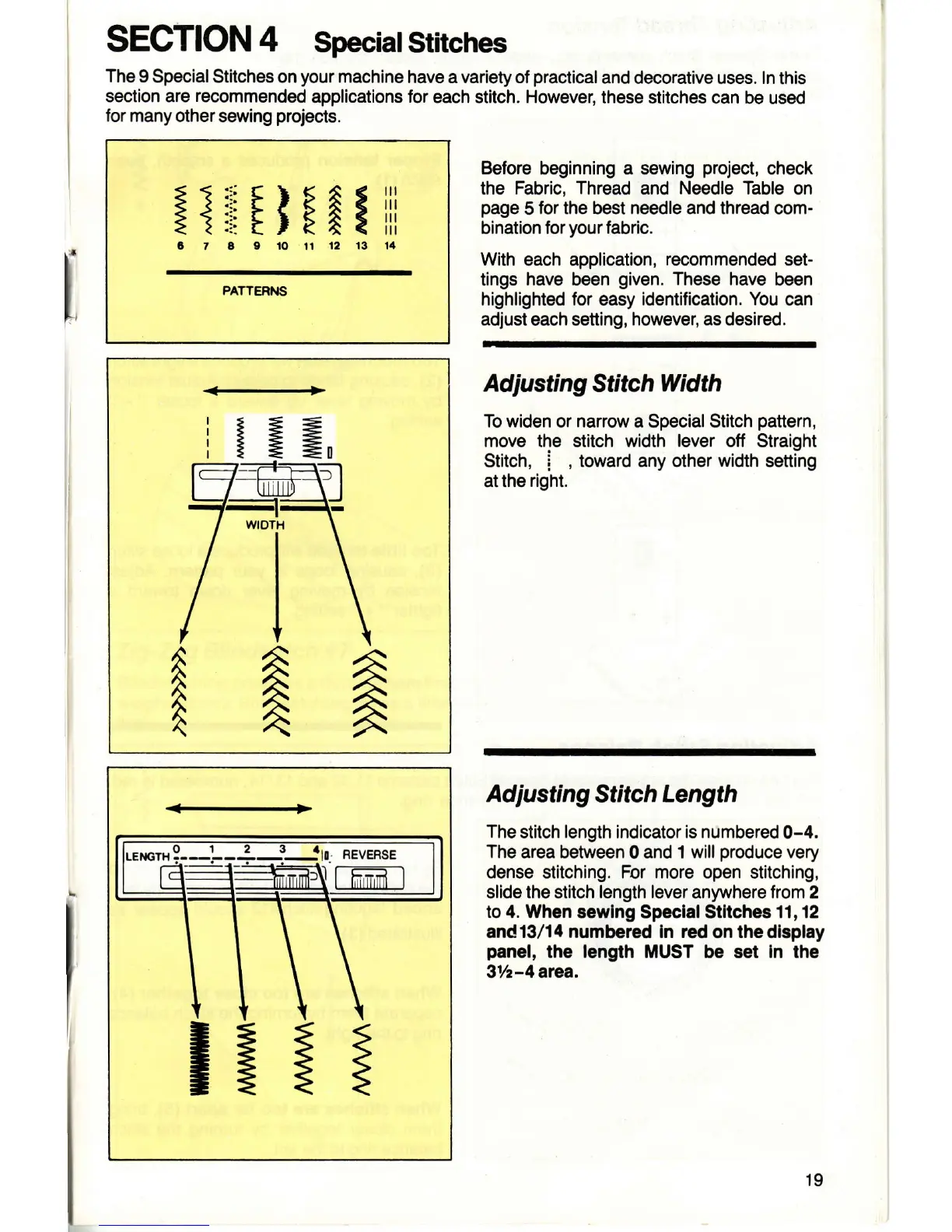
To widen or narrow a Special Stitch
pattern,
move the stitch width
lever
off Straight
Stitch,
i
,
toward any other width sefting
at the
right.
Ad
justing
Stitch Length
The
stitch length indicator is numbered
0-4.
The
area between
0
and 1 will
produce
very
dense stitching. For more open stitching,
slide the stitch length lever
anywhere
from 2
to 4. When sewlng
Speclal Stltches
11,12
and13/14 numbered In
rcd on
thedisplay
panel,
the
length
MUST be set
In
the
3r/z-4 area.
:lrffFn:i!
PATTEFIS
I
A
!!lr-
ReveRse
-=
=:
19



 To Next Page