M
MEMORY
M
M
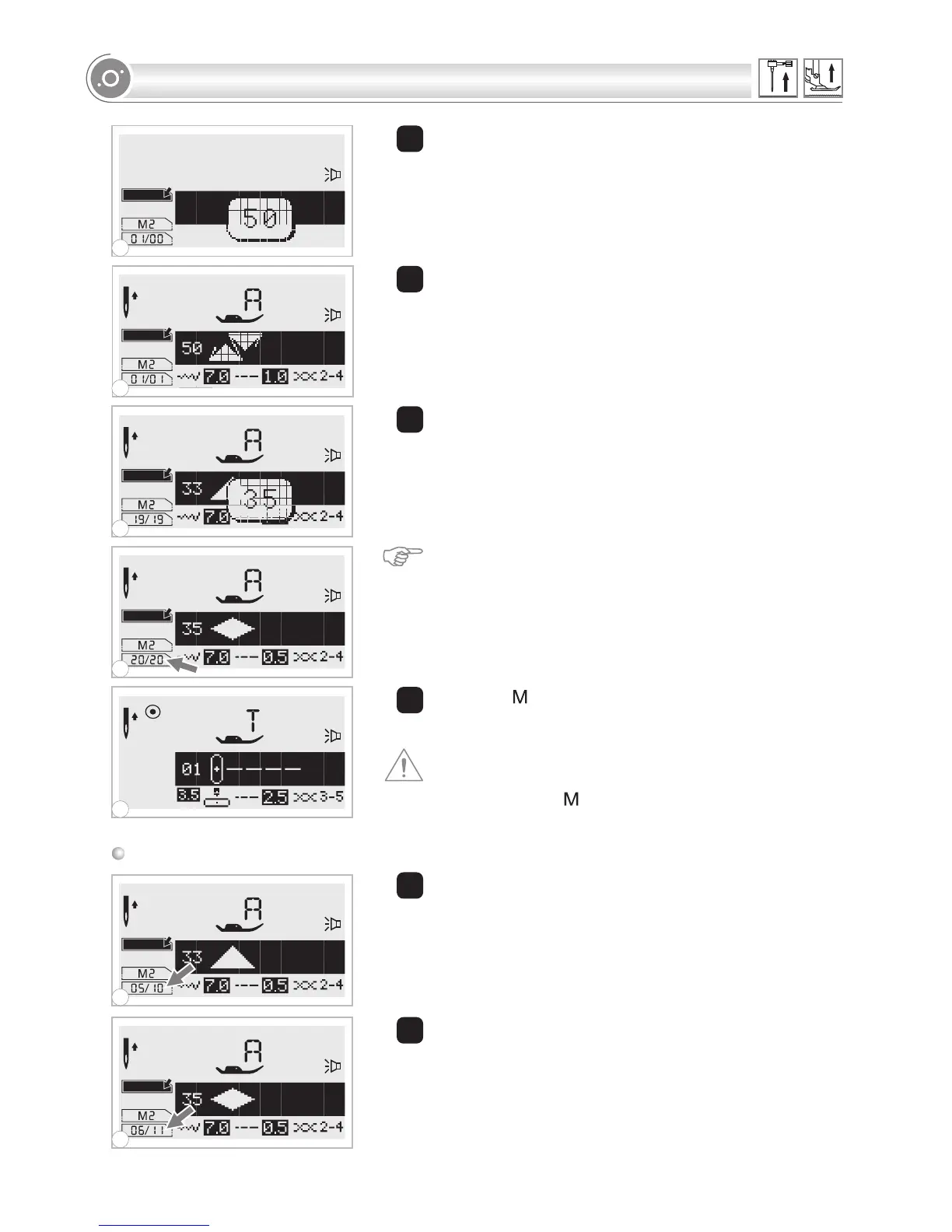
6 The selected pattern displays on the LCD screen.
7 Repeat step 5, 6 for more patterns to be stored in the
memory.
Please Note:
One memory module will hold up to 20
patterns. When 20 patterns have been selected, the
machine will beep to signal that the memory is full.
5 Press the desired pattern number. (e.g. 50)
8 Press the " " button to leave the memory mode and
return to the normal screen.
Attention: The selected pattern will be cleared from
the memory module after closing the machine if you do
not press the " " button again when you have
completed your selection.
Adding patterns or letters
5
6
7
9
M
M
M
1 stitch width adjustment
button
While in the memory mode, press
until the stitch number you have selected is
displayed, then add the new stitch.
2 Press pattern No. (e.g. 35) The selected pattern will be
inserted.
1
2
8
7
1
2
5
6
9
71


 To Next Page