14
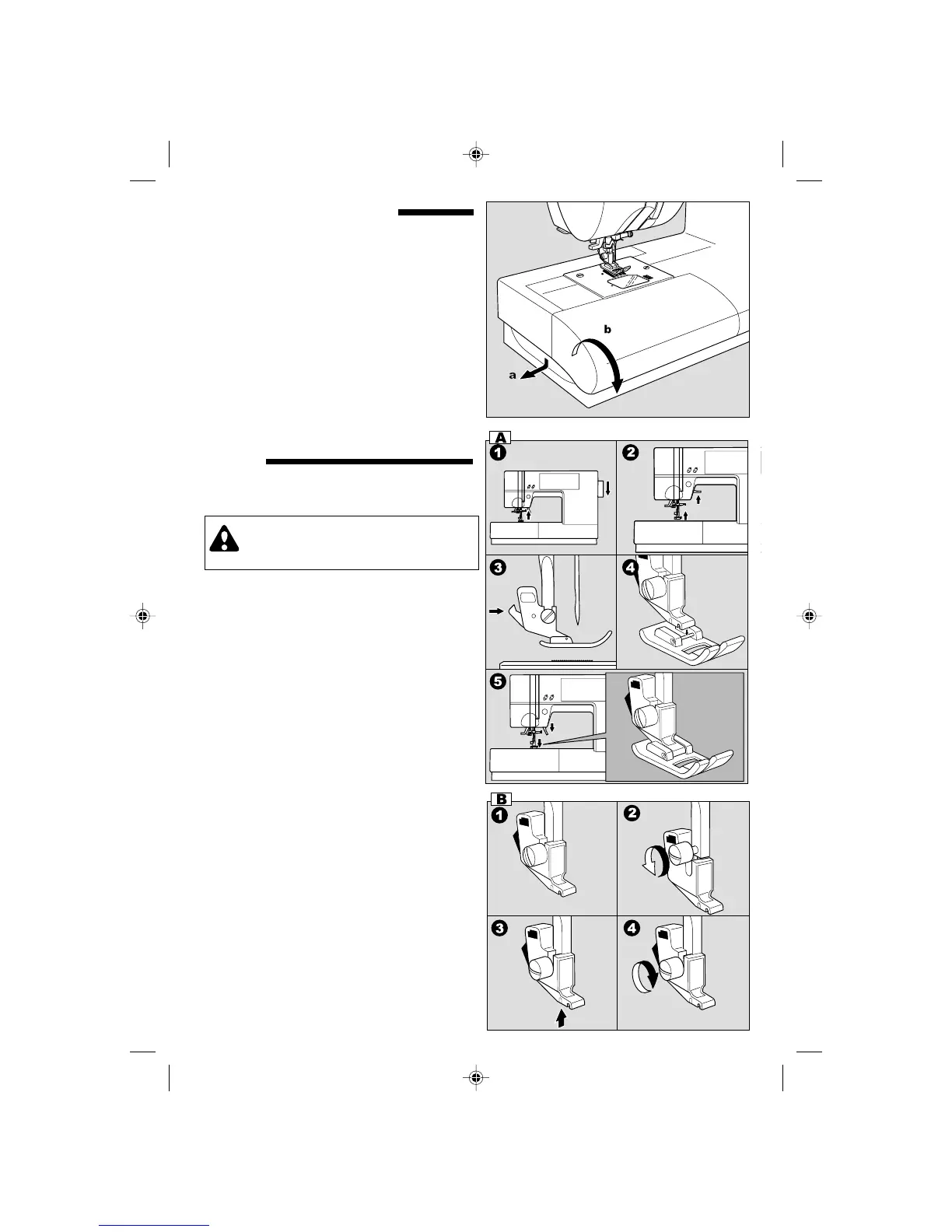
EXTENSION TABLE
a. REMOVING THE EXTENSION TABLE
Hook your finger to the bottom of extension
table and slide it to the left. To attach, insert to
the right.
b. OPENING THE ACCESSORY CASE
Hook your finger to the left side of accessory
case and pull toward you.
CHANGING THE PRESSER
FOOT
The presser foot must be changed according to
the stitch you sew, or work you do.
A.Changing the presser foot
1. Turn the hand wheel toward you until the
needle is at its highest point.
2. Raise the presser foot lifter.
3. Remove the presser foot by pushing the
presser foot release lever toward you.
4. Place desired foot with its pin directly under the
slot in presser foot holder.
5. Lower the presser foot lifting lever and the
presser foot will snap into place.
CAUTION: To prevent accidents.
Turn off the power switch before you change
the presser foot.
B.Removing the presser foot holder
When attaching the special presser foot or
cleaning the machine, you should remove the
presser foot holder.
1. Remove the presser foot.
2. Loosen the presser foot thumb screw and
remove the presser foot holder.
3. To replace the holder, pull up the holder as far
as it will go from bottom of presser bar.
4. Tighten the thumb screw.
9910EFSt.pm6 2003.9.10, 8:45 PM14



 To Next Page