Sinterit LISA PRO User Manual | 20
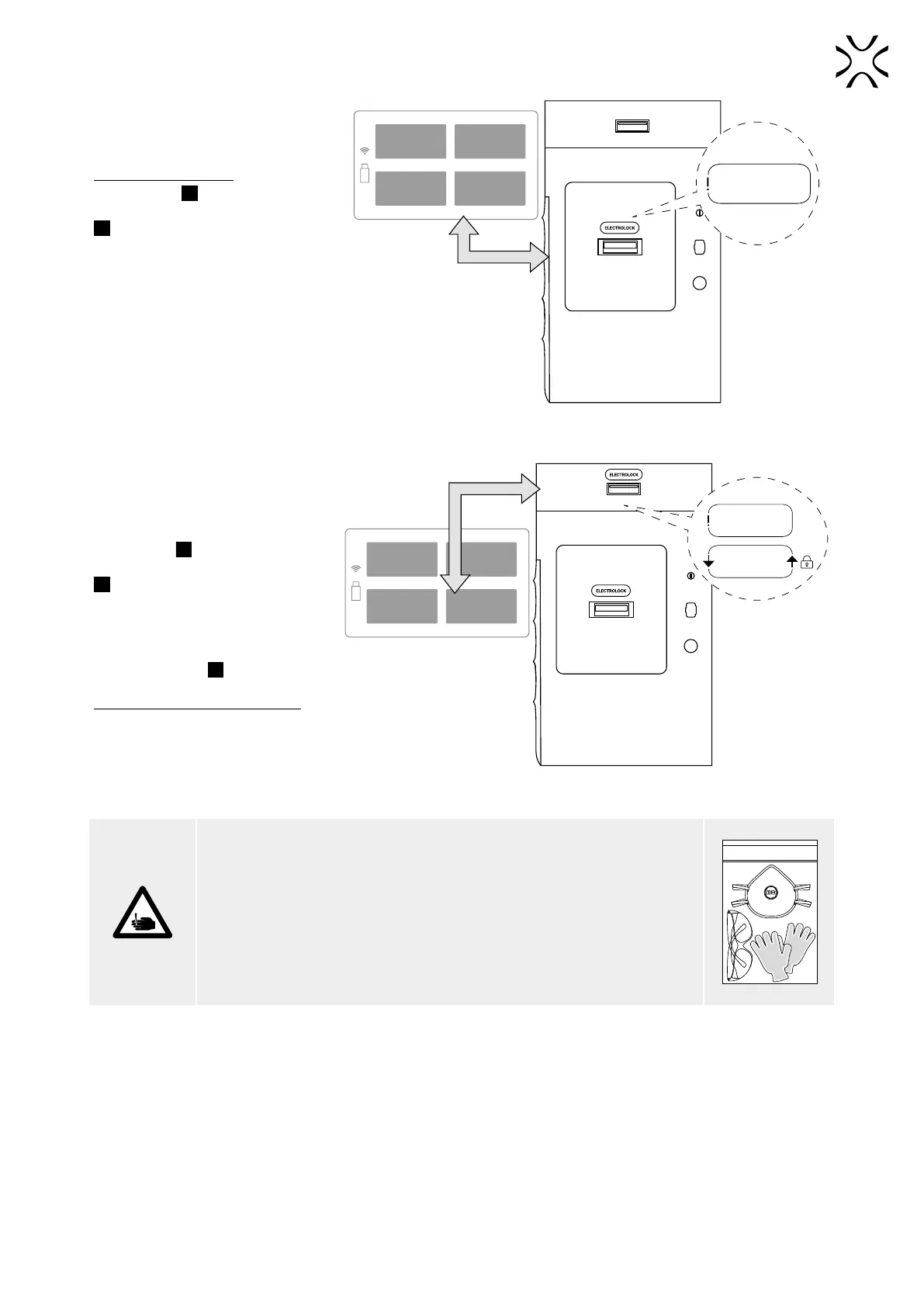
8. UNLOCK THE OVERFLOW
BIN AND REMOVE THE
PROTECTION FOIL FROM IT
Attention, Electrolock! To unlock the
Overow Bin
7
press UNLOCK LID/
OVERFLOW BIN button on the screen
2
. The magnetic blockade deactivates
for 10 seconds. After 10 seconds, it
will re-activate.
Grab the Overow Bin handle, pull and
open it. Remove the protective foil
from the lid. Put the Overow Bin back
in.
CONTROL
PANEL
START
NEW PRINT
UNLOCKED/
OVERFLOW
CLEAN
PRINTER
ELECTROLOCK
CLICK AND OPEN
Unlocking the Overow Bin.
9. OPEN THE PRINTER’S LID
AND REMOVE THE SECURITY
FEATURES FROM THE INSIDE
Attention, Electrolock! To open the
printer’s lid
5
press UNLOCK LID/
OVERFLOW BIN button on the screen
2
. The magnetic blockade deactivates
for 10 seconds. After 10 seconds, it
will re-activate.
Softly press the lid and then lift it
using Lid’s handle
6
.
Be careful! The lid is quite heavy!
Remove the protection from the
printer’s inside.
CONTROL
PANEL
START
NEW PRINT
UNLOCKED/
OVERFLOW
CLEAN
PRINTER
CLICK AND OPEN LID
ELECTROLOCK
PRESS & LITF UP
Unlocking the printer Lid.
CAUTION!
Beware of sharp edges. Put on Protection Gloves to protect yourself from
injuring hands against the edge of the Heating module. The Protection Gloves
are included in the plastic bag (”Personal Protection” kit) with the Advanced
Accessories.
PERSONAL PROTECTION



 To Next Page