6 | Sinterit Lisa printer SHORTENED USER GUIDE
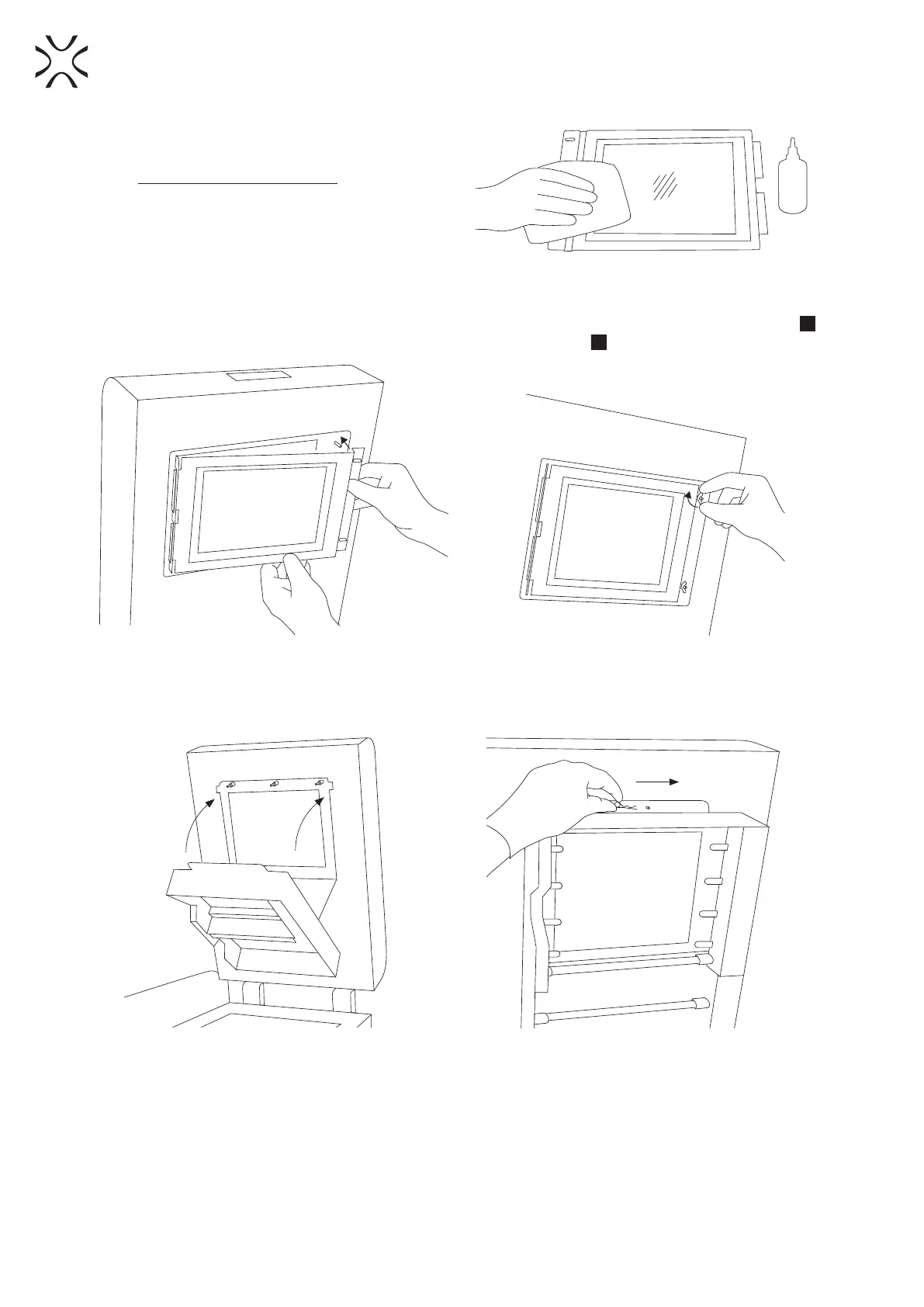
11. Rub the surface of glass carefully with a cotton
cloth soaked with 2% salicylic spirit (ethanol
solution) or any other ethanol-based solution.
Do not use isopropyl alcohol! Pay attention to
any bres left on the surface. Clean both sides
(Image 10).
Remember to wipe the LASER PROTECTIVE
GLASS with a dry piece of cloth afterwards.
Image 10. Cleaning of the LASER PROTECTIVE GLASS module.
12. Mount the glass: holding the glass behind the metal frame, slide the tabs into the holes on the left side
36
,
press gasket gently, after obtaining the perfect t, screw the wingnuts
35
bolt on the right side (Image 11).
Image 11. Correct placement of the LASER PROTECTIVE GLASS on the Heating module.
13. Join the Heating module with the Lid – using the metal Split pin (Image 12).
14. Clean the Glass one more time from any nger marks or stains if present.
Image 12. Correct closing of the Heating module.
15. The printer is ready to work. Turn the printer on and let’s get started!



 To Next Page