11
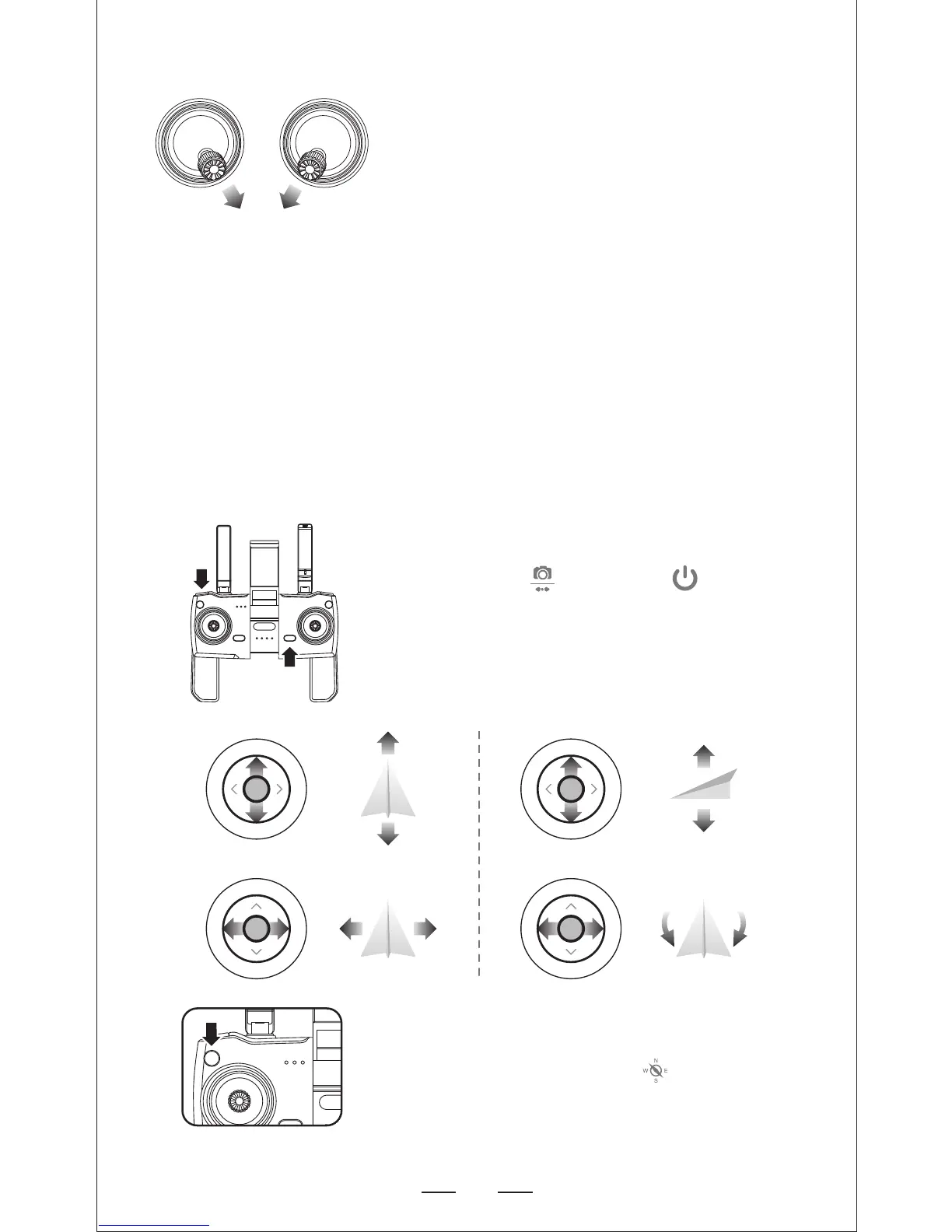
— Push the joysticks into 5 & 7 o’clock position.
— Motors are starting automatically, push the
left joystick to take off; or short pressing to
take off.
NOTE: Starting the motors should be set before
the drone take off.
— Stopping Motors:
1. Pushing the joysticks into 5 & 7 o’clock position
again, motors stop working.
2. The motors will stop woring if the motors
starting are not operated after 20 seconds.
Starting/Stopping motors
Once the lights have switched to all solid, you are ready to fly!
— Blue (back) and white (front) lights are all solid (no blinking).
— App Drone Status: “Ready to fly”.
— Firstly press then pressing at the same
time --- “DI” ”DI” sounds means now the Right
Joystick change to the throttle stick. Turn off the
transmitter and turn on again, Left Joystick is the
throttle stick.
Dual Remote Controller Mode
Note: When the aircraft in the indoor environment
with weak GPS signal, lights rapid-blinking -- Blue
(back) + White (front); Press to turn off GPS
mode, and the aircraft can be operated under the
normal mode, now all the GPS functions will be
cancelled.
UP
DOWN
T
u
r
n
L
e
f
t
T
u
r
n
R
i
g
h
t
F
o
r
w
a
r
d
Left
Right
B
a
c
k
w
a
r
d
Left Stick Right Stick


 To Next Page