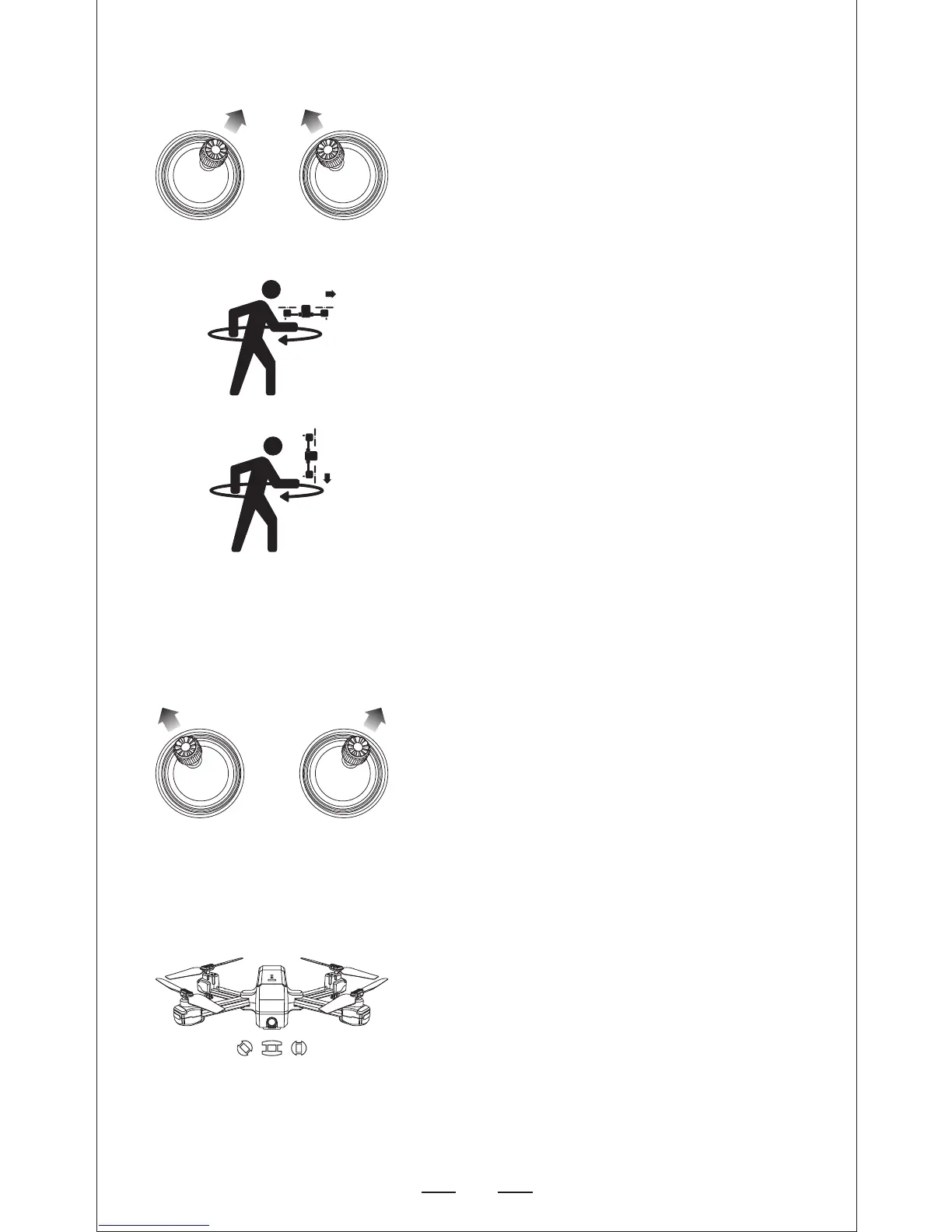
1. Compass Calibration Part 1
— Push the joysticks into the 1 & 11 o’clock
position.
— Lights rapid-blinkingBlue/red (back) and
White/red(front).
— App drone status: “Compass calibration”.
Step 4: Compass Calibration
2. Compass Calibration Part 2
— Keeping the drone level, pick up he drone
from the back and rotate your body in one
full circle (360°).
— Back lights will turn to solid blue.
3. Compass Calibration Part 3
— From the bottom, hold the drone vertically
and camera is facing to the ground, rotating
your body in one full circle(360°).
— Front lights will turn to solid white.
— App drone status: “Compass calibration
okay”.
— Push the joysticks into the 11 & 1 o’clock
position.
— Lights rapid-blinking blue (back) and white
(front).
— App Drone Status: “Gyroscope is being
calibrated” “Gyroscope okay”.
Step 5: Reset to factory Setting/Calibrate
Gyroscope
— Set the drone back down to level surface.
— Lights return to rapid-blinking blue (back)
and white (front) --This means the drone
is searching the GPS signal.
— This process can take a few minutes.
— App Drone status: “Waiting for GPS signal”.


 To Next Page