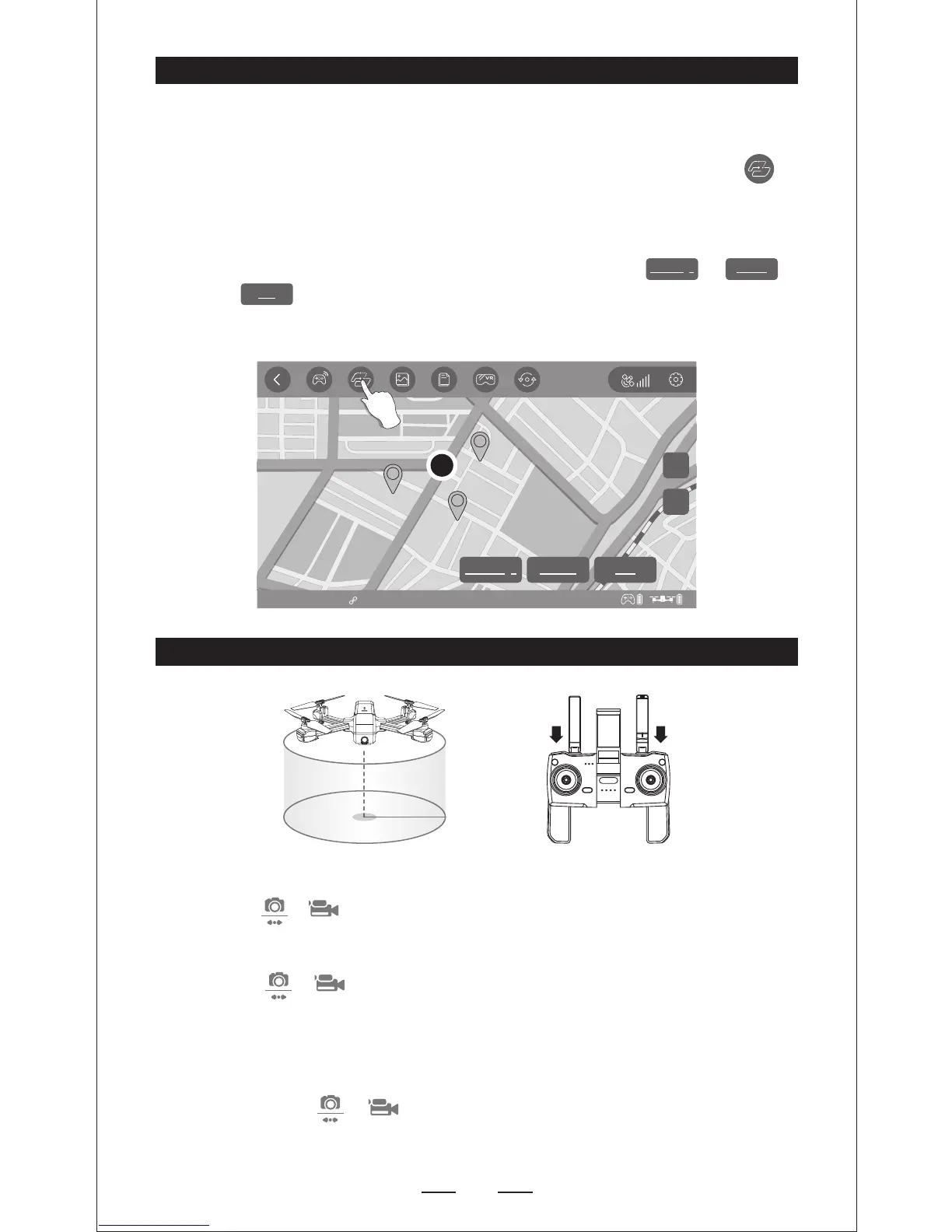
1. Hovering the aircraft around the center point.
2. Press “ + ”on the transmitter at the same time.
3. Moving and setting the aircraft surround radius range (within 2 meters-10
meters)by the Direction Joystick.
4. Press “ + ” on the transmitter at the same time again, then the
aircraft starts to fly arround according to the radius range you set in STEP
2 (Note: If the surround radius range less than 2 meters, the aircraft will fly
to 2 meters automatically) . Move the Direction Joystick to cancel the
Point of Interest mode.
NOTE: Press “ + ” on the transmitter at the same time, Point of
Interest Function” can be activated if the aircraft and transmitter
sucessfully paired and the aircraft flies up .
— Firstly, make sure to download and save the local map in your smart phone,
then you can start the Way point flight.
— Successfully connect the aircraft WIFI with your smart phone, click on
the App, then you can find a RED CIRCLE(LIMITTED FLIGHT RANGE)/TAKE-
OFF POSITION/AIRCRAFT CURRENT POSITION on the map, mark the points
(16 points at most) you plan to fly within the RED CIRCLE range on the map.
If you would like to reset the points or flight path, click or .
Click ,confirm to start Way Point Flight. Pushing the Right Joystick
to cancel the Way Point Flight Function.
Delete all
Waiting for GPS Signal D:00 H: 0.0 DS: 0.0 VS: 0.0
Location
2D
E
E
E
Delete single
Send
Delete all
POINT OF INTEREST


 To Next Page