Press on the Transmitter or tap on APP, the red indicator on camera
will flash once, indicating the camera takes one photo.
Press on the Transmitter or tap on APP, the red indicator will keep
flashing, indicating the camera is taking video.
Press again to save the video.
DO NOT take photo during taking video.
TF
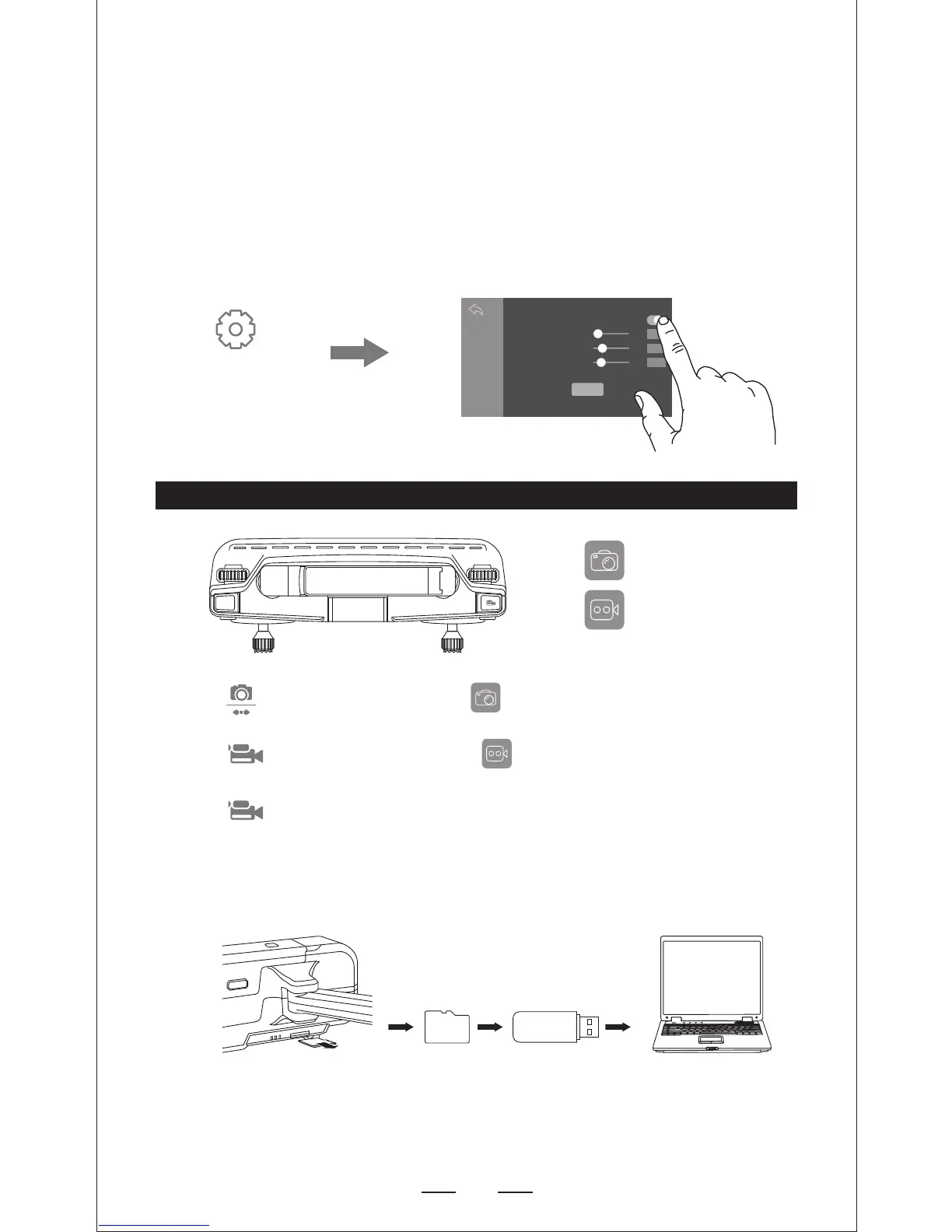
Flight Setting
On APP
30
30
25
Flight parameter settings
BEGINNER
Off after the custom mode, the default novice mode
Flight distance
Default 30m, (20-500m)
Flight altitude
Default 30m, (10-120m)
Cruise-in altitude
Remark: Return altitude shall not be greater than flight!
Save
Default 25m, (10-120m)
The Default GPS Mode is BEGINNER MODE, Under BEGINNER MODE:
1.Flight Distance is limited between 0-30 M.
2.Flight Altitude is limited between 0-30 M.
3.RTH Altitude is under 25 M.
You can Turn-off the BEGINNER MODE to modify the parameters in the APP on
your phone.
CAMERA FUNCTIONS
Take Photo
Take Video
ICON ON APP
NOTE: When using the ”SJ-GPS” app, the original photos and videos will be
compressed and saved to smartphone.
The Original images and videos are saved in the TF card. Press the TF card
slightly to take it out, then insert the card into the card reader and insert into
the USB outlet of a computer to read the data from TF card.
The images can be also viewed in the App.
TF CARD (Sold seperated)


 To Next Page