Supported audio sources and file formats - Swing
Supported audio sources
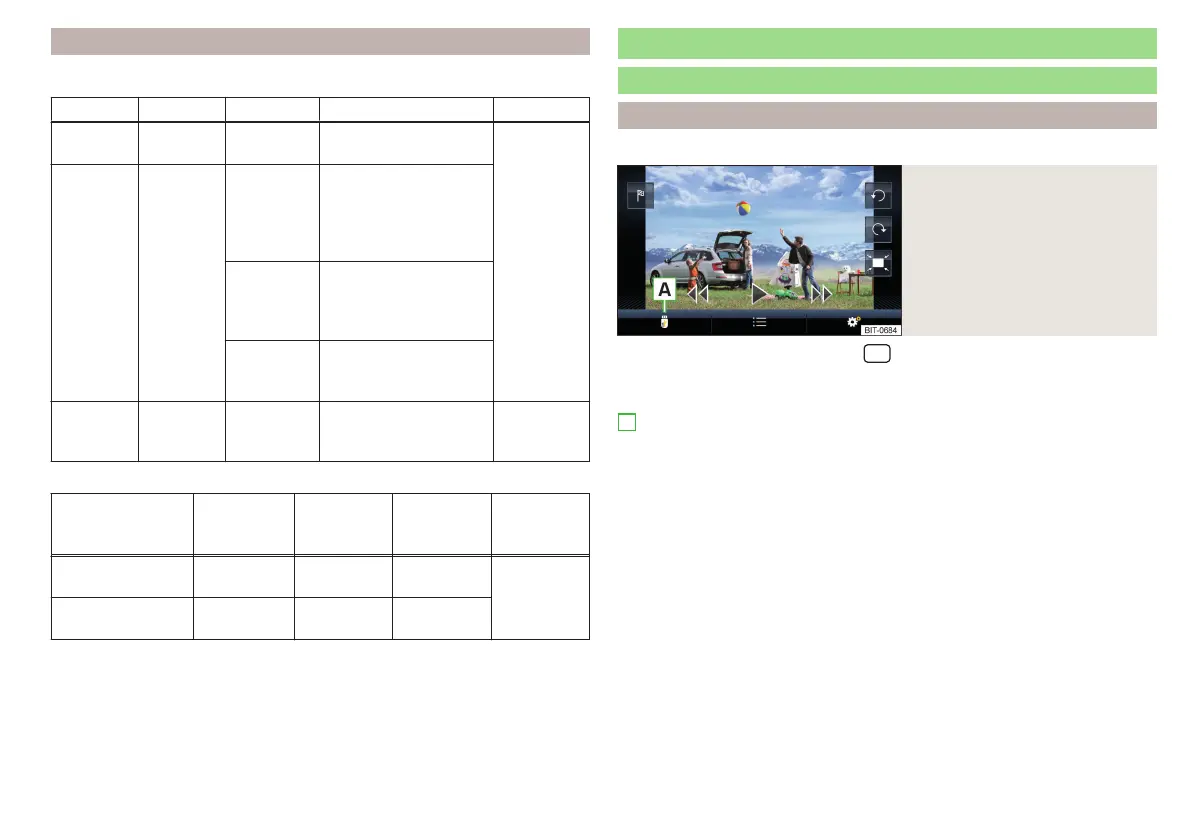
Source Interface Type Specification File system
SD card SD reader
Standard
size
SD, SDHC, SDXC
FAT16
VFAT
FAT32
exFAT
USB
devices
USB 1.x; 2.x
and 3.x or
higher with
support of
USB 2.x
MSC
USB stick;
HDD (without any spe-
cial software);
USB devices supporting
MSC mode
MTP
Devices with the An-
droid operating system
or Windows mobile
(mobile phone, tablet)
Apple
Devices with the iOS
operating system
(iPhone, iPod, iPad)
Blue-
tooth
®
-
Player
- -
Bluetooth logs A2DP
and AVRCP (1.0-1.5)
-
Supported audio file formats
Codec type
(File formats)
File suffix Max bit rate
Maximum
sampling
rate
Playlists
Windows Media
Audio 9 and 10
wma 384 kbit / s 96 kHz
m3u
pls
wpl
asx
MPEG-1; 2 and 2.5
(Layer-3)
mp3 320 kbit / s 48 kHz
The GPT standards (GUID partition table) method structured audio sources
are not supported by Infotainment.
Files that are protected by Digital Rights Management (DRM) technology can-
not be played back by Infotainment.
Images
Image viewer
main menu
Applies to Infotainment Columbus, Amundsen, Bolero.
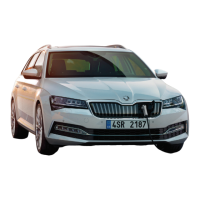
Fig. 195
Images: main menu
›
To display the main menu, tap the
sensor field and then tap the function
surface
.
Main menu » Fig. 195
Select the image source
Folder / Image List
Display the previous image
Switching on the slideshow
Switching off the slideshow
Display of the next image
Menu settings for Images » page 137
Rotate the image 90° anticlockwise
Rotate the image 90° clockwise
Display the initial image size while retaining the aspect ratio
Guidance to GPS coordinates (Amundsen; the display only occurs if the
image contains GPS coordinates) (applies to Infotainment Columbus,
Amundsen) » page 187
A
153
Images







 To Next Page