Instruments and warning lights
Instrument cluster
Introduction
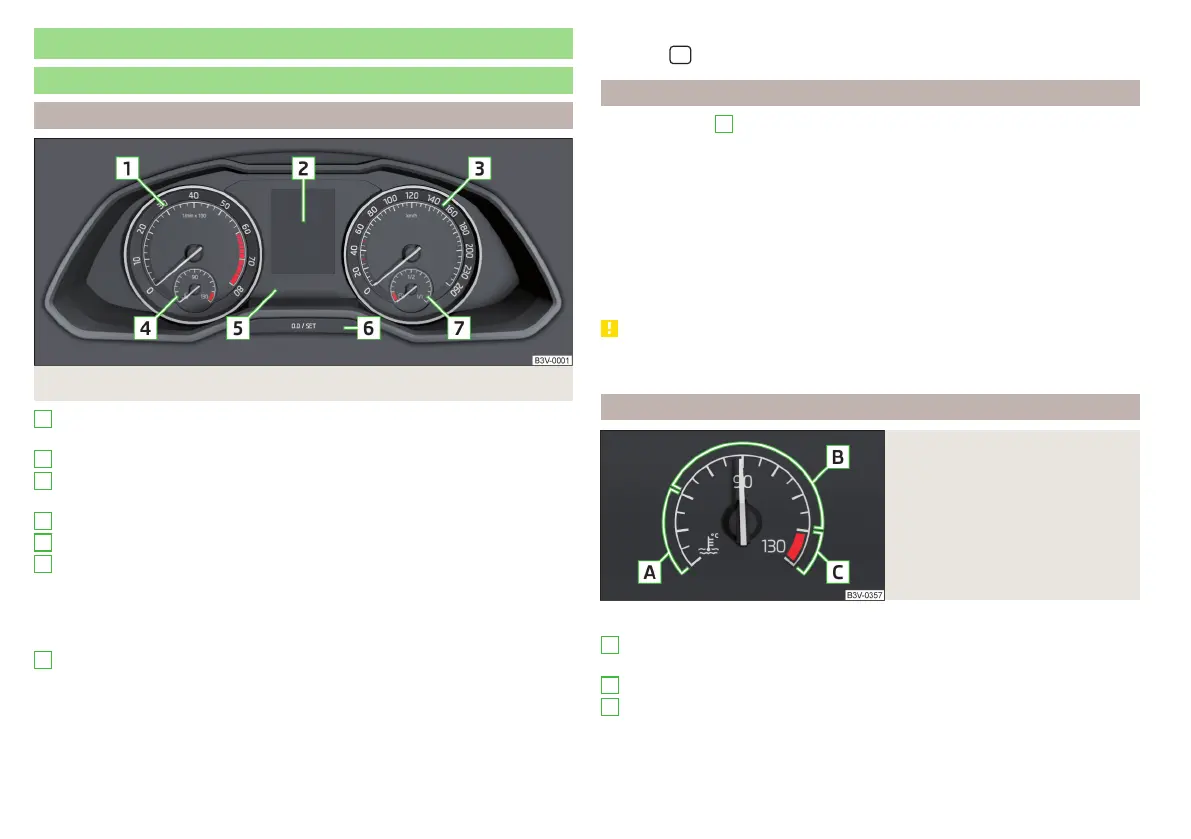
Fig. 29
Instrument cluster
Engine revolutions counter » page 36
▶
with warning lights » page 37
Display » page 47
Speedometer
▶
with warning lights » page 37
Coolant temperature display » page 36
Bar with warning lights » page 37
Operation button
▶
Set the time » page 47
▶
Reset counter for distance travelled (trip) » page 47
▶
Displaying the distance and days until the next service interval
» page 53
Fuel gauge » page 37
The brightness of the instrument illumination is set automatically depending
on the ambient lighting throughout. If the visibility is poor and the lights are
not on, the brightness of the instrument lighting reduces to alert the driver to
switch on the lights in due time.
1
2
3
4
5
6
7
The brightness of the instrument lighting can be adjusted in Infotainment in
the menu
/ → →
Light
.
Engine revolutions counter
The tachometer
1
» Fig. 29 on page 36 shows the actual engine speed per
minute.
The beginning of the tachometer red scale range indicates the maximum per-
mitted speed for an engine that has been driven-in and has reached operating
temperature.
You should shift into the next highest gear before the red scale of the revolu-
tion counter is reached, or select mode D/S on the automatic gearbox.
The gear recommendation is important to note in order to maintain the opti-
mum engine speed » page 47.
CAUTION
The pointer of the engine revolutions counter must reach the red area for only
a short time - there is a risk of engine damage!
Coolant temperature gauge
Fig. 30
Coolant temperature gauge
The display only works if the ignition is switched on.
Cold area, The engine has not yet reached its operating temperature.
Avoid high speeds and high engine loads.
The operating range
High temperature range, the warning light illuminates in the instrument
cluster » page 43.
A
B
C
36
Using the system



 To Next Page