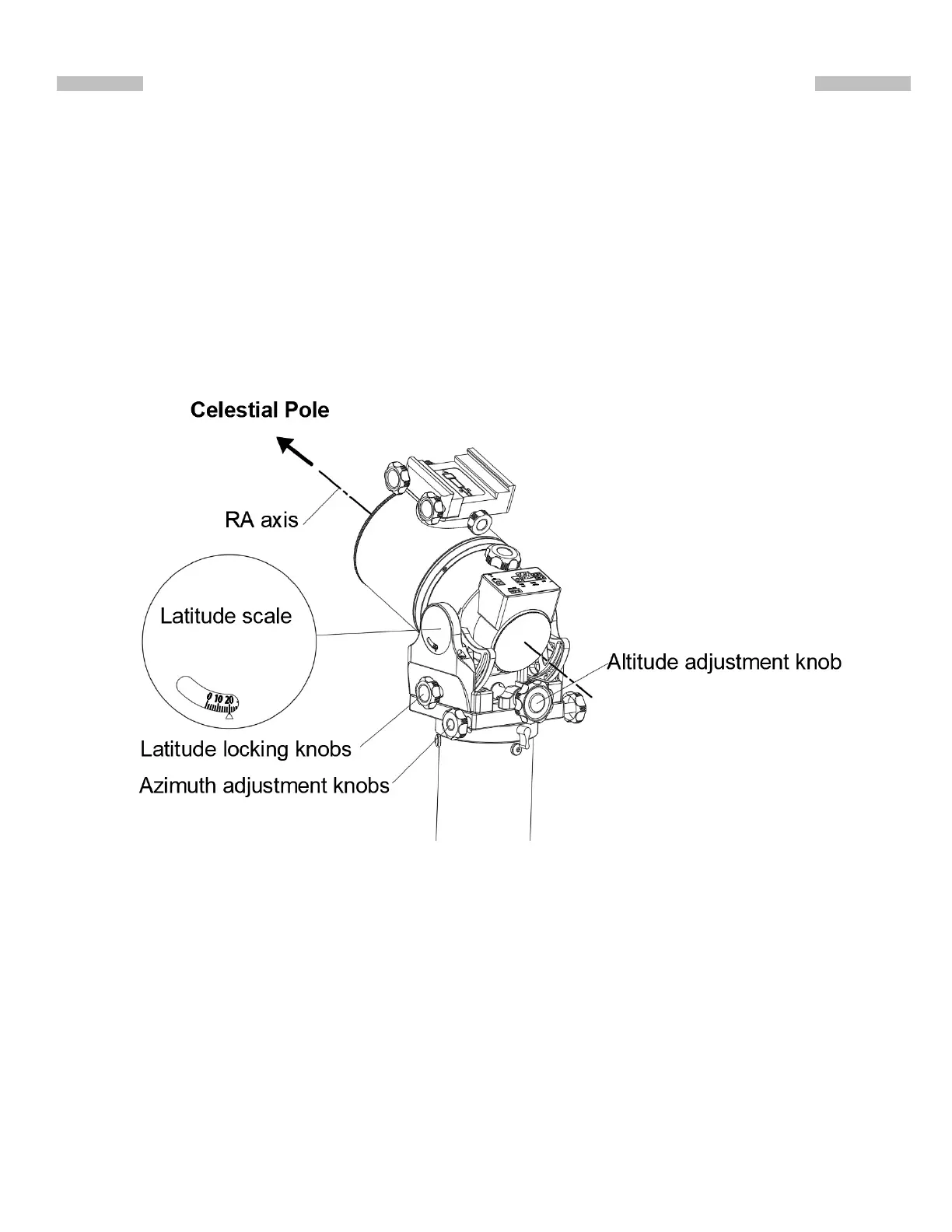
Part II:Polar alignment of the WAVE100i Mount
9
2.1 General Process
1.Slightly loose the two Latitude Locking knobs.
2.Turn the Latitude Adjustment Knob to let the latitude scale read the local latitude.
3.Roughly point the RA axis to the pole.
4.Use one of the following means in section2.2 or2.3 to do the polar alignment.
5.Use the latitude knob to adjust the tilt of the R.A. axis, use the azimuth knobs to tighten the
the Latitude Adjustment Knob and the Azimuth Adjustment Knobs at the end of the polar
alignment.
2.2 Polar Alignment based on Star Alignment
1.Run a 2-Star alignment with the SynScan Pro app or the SynScan hand contoller.
2.Run the polar alignment process.
3.Repeat the above steps for two or 3 times.
2.3 Polar Alignment based on Imaging
Many application, like the SharpCap Pro and the PHD2, provide high accurate imaging based
polar alignment, please refer to the instruction manual of those software for details.
)LJ13











 To Next Page