e660 29 ·e660 · 28
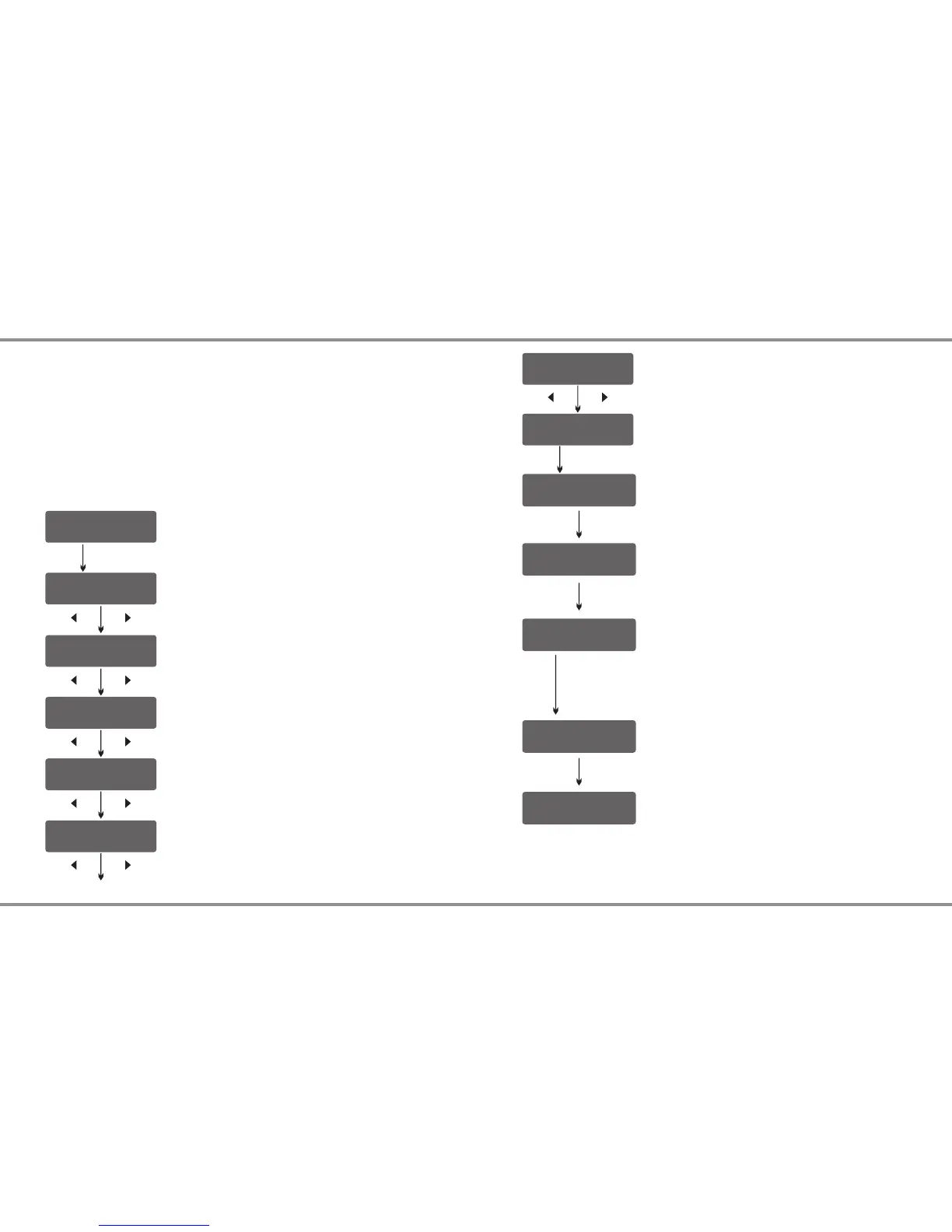
Battery Memory Set and Call Out
The charger can store up to 10 different charge/discharge profiles for
your convenience, and the stored profiles can be recalled quickly
without having to go through the setup process.
When you are willing to alter the parameter value in the program, press
START/ENTER to make it blink then change the value with INC or DEC.
The value will be stored by pressing START/ENTER once.
Note: All following screen are taking 2S(7.4V) LiPo battery for example.
[ B AT T M EM O R Y 1 ]
E NT E R SE T - >
B AT T T YP E
L iP o
B AT T V OL T S
7 .4 V ( 2 S )
C HA R GE CU R RE N T
4 .9 A
D SC H C UR R E NT
2 .0 A
D SC H V OL T A GE
3 .0 V /C E L L
T VC = YOU R R IS K
4 .2 0 V
Enter the battery memory program.
(10 different charge/discharge profiles can be
stored).
Set the battery type(LiPo/LiFe/LiIon/LiHV/NiMH/
NiCd/Pb).
Set the voltage and number of cells(1S-6S).
Set the charge current(0.1-6.0A).
Set the discharge current (0.1A-2.0A).
Set the discharge voltage(3.0-3.3V/Cell).
Set the terminal voltage(4.18-4.25V).
1. Battery Memory Set
START/ENTER
DEC INC
DEC INC
DEC INC
DEC INC
DEC INC
DEC INC
S AV E P RO G R AM
E NT E R
Press ENTER to save program.
START/ENTER
E NT E R C HA R G ER
L OA D
L iP o B A LA N C E CH G
4 .9 A 7 . 4V ( 2 S)
S AV E P R OG R A M
S AV E .
[ B AT T M E MO R Y 1 ]
L iP o 7 . 4V ( 2 S )
[ B AT T M E MO R Y 1 ]
C :4 . 9 A D: 2 . 2A
Indicate the battery type and battery cell of the
saved profile.
Indicate the charge and discharge current of the
saved profile.
Press the START/ENTER for 3 seconds to call
out the memory.
2. Battery Memory Call Out
Load the memory set
Press START/ENTER for 3 seconds to start the
process.
START/ENTER
>3 Seconds
Battery Memory Set and Call Out


 To Next Page