e660 15 ·e660 · 14
Lithium Battery Program (LiPo/LiFe/Lilon/LiHV)
A memory profile is available for setting and storing pertinent
information for up to 40 different program sets; each channel can
store 10 sets. Once a battery program is stored into memory, it will
be retained until changed again manually. Recalling a program
memory number makes the charger instantly ready to go!
If you do not wish to use the battery program memories, this charger
can be manually set before each use.
(1)
(2)
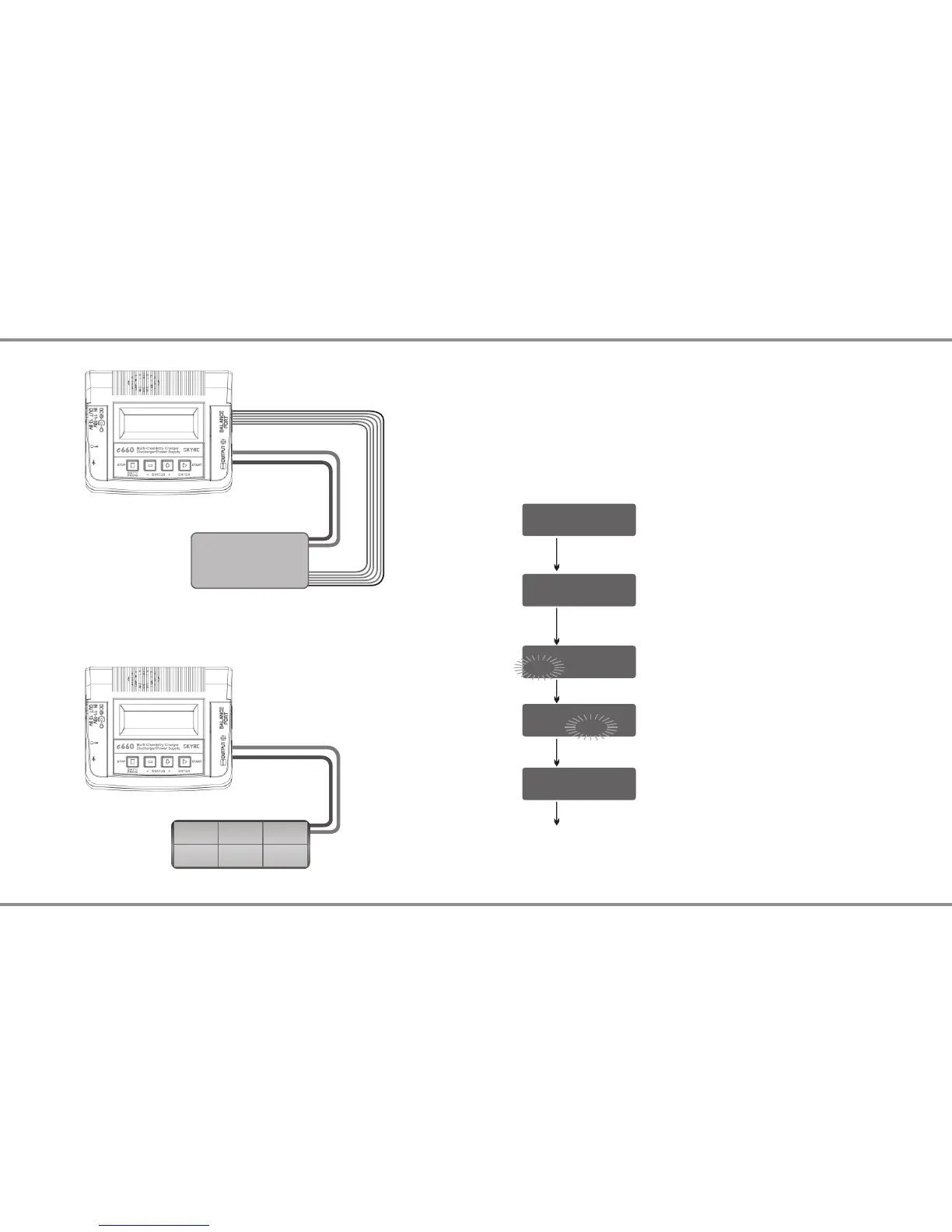
The following flowchart shows how the program is set manually:
BATT/PROGRAM
LiPo BATT
LiPo BALANCE CHG
2.0A 11.1V (3S)
LiPo BALANCE CHG
2.0A 11.1V (3S)
LiPo BALANCE CHG
2.0A 11.1V (3S)
LiPo BALANCE CHG
2.0A 11.1V (3S)
START/ENTER
START/ENTER
START/ENTER
START/ENTER
START/ENTER
> 3 Seconds
BATT/PROGRAM Select
Mode Select
Program Start
Press INC and DEC to go through all the
programs and press START/ENTER to enter
LiPo BATT Program.
Battery Setting
Press INC and DEC to go through all the modes
and press START/ENTER to enter LiPo Balance
Charge Mode.
Press START/ENTER, the present value will
start to blink. Press INC and DEC to change the
value and press START/ENTER to confirm your
setting.
At the same time, the battery pack’s cell count
will start to blink, press INC and DEC to change
the value and press START/ ENTER to confirm
your setting.
Press and hold START/ENTER for 3 seconds to
start the program.
Warning:
Failure to connect as shown above may damage the charger.
Connection
Lithium Battery Connection
NiMH/NiCd Battery Connection
Lithium Battery Pack
Lithium Battery Pack


 To Next Page