20
After checking all the conditions listed above, repeat the control solution
test with a new test strip. If your results still fall out of the range indicated
on the test strip vial label, your meter or test strips may not be working
properly. DO NOT use the system to test blood. Contact Smart Meter
Customer Support Monday-Friday 9:00AM-5:00PM EST 844-445-8267.
Please contact your healthcare provider for assistance after normal
business hours.
To turn your meter o, just remove the test strip. Dispose of the used test
strips as medical waste. The result will be automatically marked and
stored in the meter memory. Control results will be not included in your
blood glucose averages.
Your meter automatically stores up to 500 results with time, date and
meal marker. Test results are stored from the newest to the oldest. The
meter will also calculate the average values of blood Glucose records
from the last 7, 14 and 30 days.
Check the expiration dates and discard dates of the test strip and
control solution. Make sure that the test strip vial and the control
solution vial have not been opened for more than 6 months. Discard
any expired test strips or control solution.
Conrm the temperature in which you are testing is between 50-104°F.
Make sure that you stored strip and control solution at 36-86°F, 10-90%
RH.
Make sure that the test strip vial and the control solution vial have
been tightly capped.
Make sure the test strip was used immediately after removing from the
test strip vial.
Make sure the control solution was mixed well.
Conrm that you are using iGlucose®Essential brand control solution.
Make sure that you followed the test procedure correctly.
Understanding Your Control Test Result
Using the Meter Memory
Note:
If your control test result is out of range:
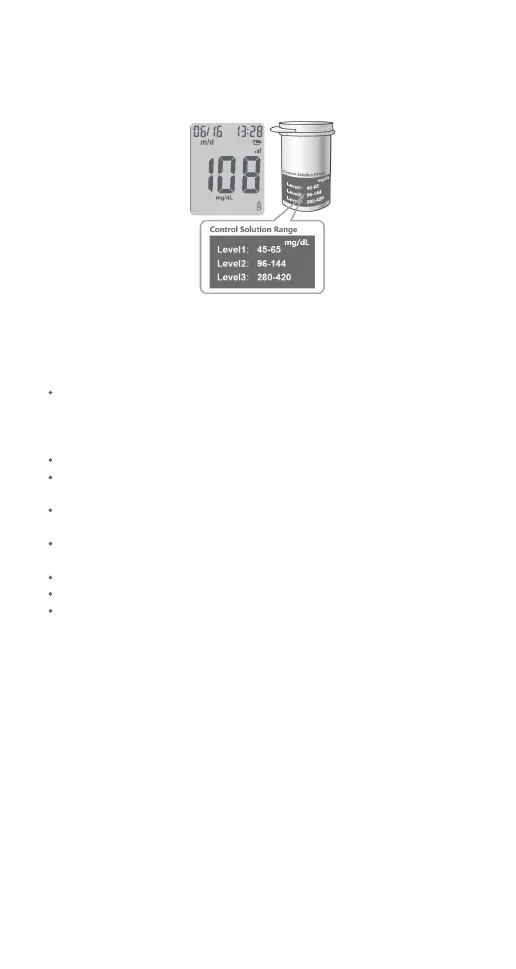
Compare your control test result with the ranges printed on the test strip
vial label.
The ranges in the picture above are only examples and the ranges on the
vial in use should be referenced.



 To Next Page