SECTION 1: UNDERSTANDING YOUR
TESTING TOOLS
Note: The iGlucose®Essential Blood Glucose Test Strips, iGlucose®Essential
Control Solution, iGlucose®Essential Lancing Device and iGlucose®Essential
Lancets are not included in the meter box but are necessary for use, please
contact Smart Meter Customer Support Monday-Friday 9:00AM-5:00PM EST
844-445-8267.
Please contact your healthcare provider for assistance after normal business
hours
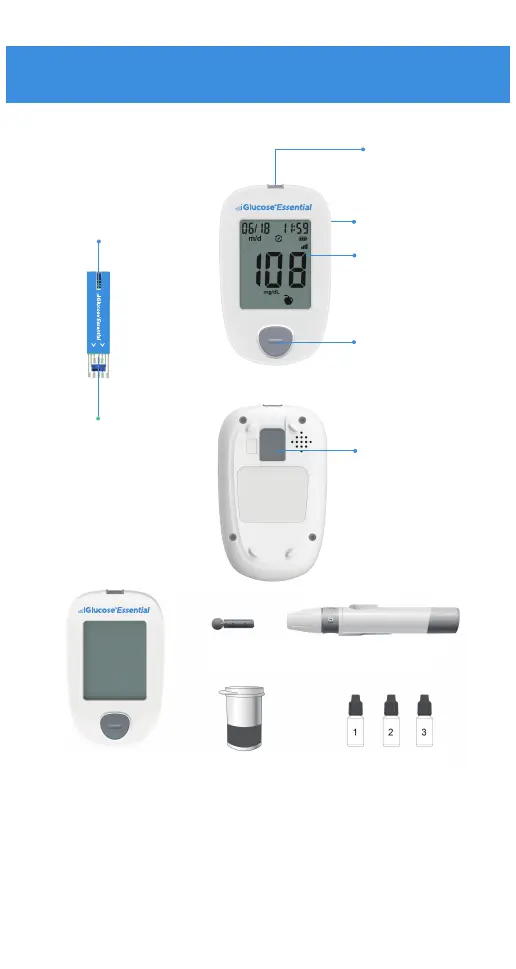
Your System Overview
1
Sample tip:
Where the blood is
drawn in.
Electrode end:
This end is inserted into
the strip port on the meter,
facing upwards, in the
direction of the arrows.
Test strip port
Micro USB:
Charging port.
Display:
Shows test results.
and related
information
Button:
Press to turn meter
on/o
Switch dierent
function
Strip ejector
Push up button
to eject testing strip
from meter.
Blood Glucose Meter Blood Glucose Test strip
Lancets Lancing Device
Control Solution



 To Next Page