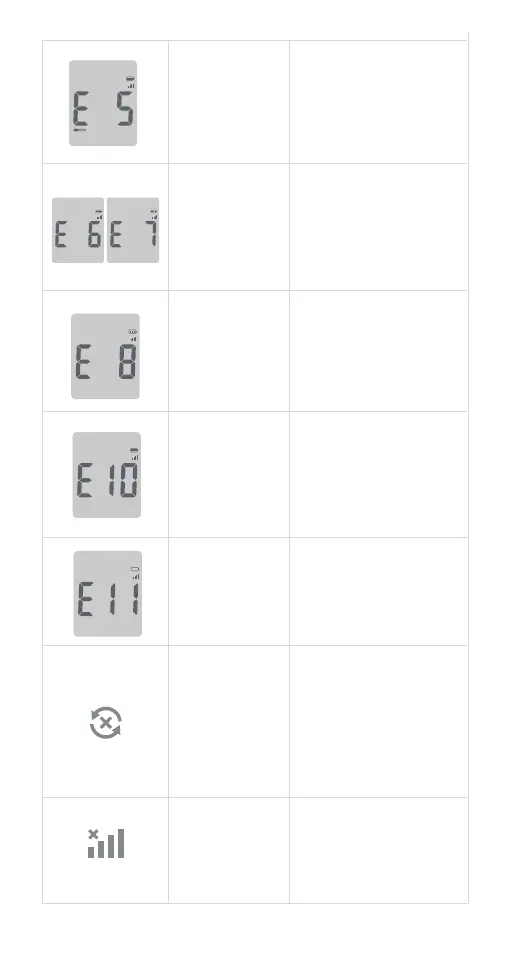
Move to an area that is
within the operating range
for the meter. Let the meter
adjust to this temperature
for 20 minutes before
performing a test.
Temperature out
of range.
Restart the meter. If the problem
continues, contact Smart Meter
Customer Support
Monday-Friday 9:00AM-5:00PM
EST 844-445-8267. Please contact
your healthcare provider for
assistance after normal business
hours.
Potential hardware
error.
When the charge is
completed (about 3 hours
for charging an empty
battery), remove the Micro
USB cable from the meter,
and then take a test.
A test strip was
inserted while the
meter was
connected to a
computer or wall
outlet.
Repeat the test and apply
enough sample to ll the
test strip check window.
Insucient sample.
Charge the battery.
Running out of
battery.
Please check network connection.
Then discard the test strip and
repeat the test with a new test
strip. If the problem continues,
contact Smart Meter Customer
Support Monday-Friday
9:00AM-5:00PM EST 844-445-8267.
Please contact your healthcare
provider for assistance after
normal business hours.
Data not
transmitted
Restart the meter. If the problem
continues, contact Smart Meter
Customer Support Monday-Friday
9:00AM-5:00PM EST 844-445-8267.
Please contact your healthcare
provider for assistance after
normal business hours.
No signal
26



 To Next Page