4
Features
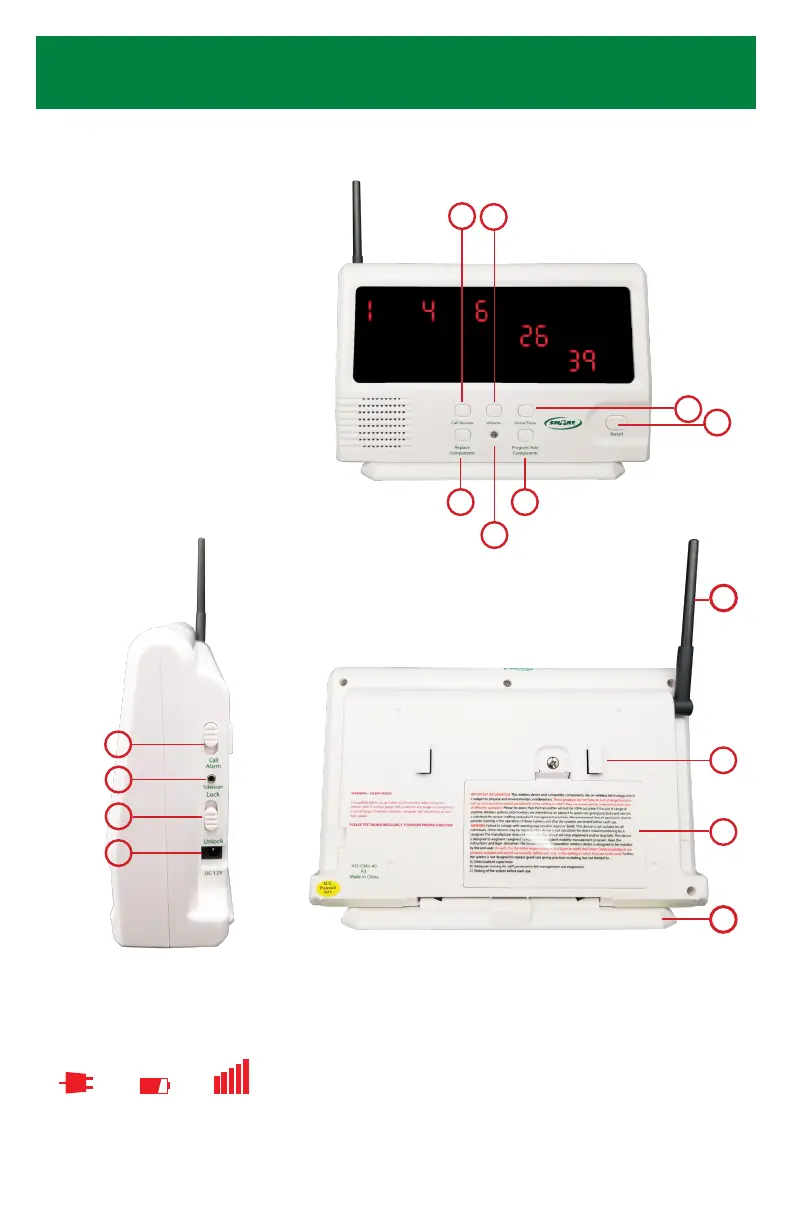
1. Call Review Button
2. Volume Button
3. Replace Components Button
4. Programming Light
5. Program/Add Components Button
6. Voice/Tone Button
7. Reset Button
8. Call/Alarm Switch
9. Silencer Port
10. Lock/Unlock Switch
11. AC Adapter Input
12. Antenna
13. Hook for Wall Mounting Bracket
14. Battery Compartment
15. Base/Wall Mounting Bracket
Adjust volume by pressing “Volume” button
on Central Monitor. Choose from 3 volume
options by repeatedly pressing “Volume
Button” until you nd desired volume.
Monitor is shipped with alarm volume set
at 90 decibels (90 decibels is the legally
accepted occupational noise allowance).
Unlock CMU to adjust language or select a
tone, then press the “Voice/Tone” button
on the Central Monitor. Press “Voice/Tone”
button repeatedly to scroll through the
available options. When you nd your
desired selection, stop pressing the button.
Lock when complete.
Language Setting:
Volume Setting:
8
9
10
11
Front
BackSide
1 2
4
3
6
5
7
Important Icons:
AC Adapter
In Use
Batteries
Low
Signal
Received
13
15
14
12


 To Next Page