EasyManua.ls Logo

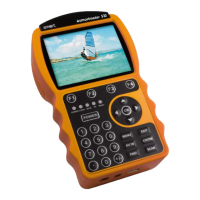
SMART S10 - User Manual

SMART S10
76 pages
Go to English
Print Icon
To Next Page IconTo Next Page
Loading...
Digitales
Satelliten-
Messgerät
Digital
Satellite
Meter
Bedienungsanleitung
User Manual
Version: 20.12.2011

Table of Contents

Questions and Answers

  • T
    Theresa PattersonJul 27, 2025
    What to do if my SMART Measuring Instruments have no picture and no sound?
    • D
      Daniel HullJul 27, 2025
      If your SMART Measuring Instruments device shows no picture and has no sound, ensure that the display and sound are turned on. Press the F1 button to turn on the display and the F2 or ? button to turn on the sound.
  • S
    stephanielongAug 11, 2025
    What to do if SMART S10 have no or only faint signal?
    • A
      Anna CaseyAug 11, 2025
      If your SMART Measuring Instruments device has a weak or no signal, try the following: 1. Charge the battery. 2. Adjust the antenna. 3. Replace the LNB. 4. Check all cable connections. 5. Adjust the antenna again.

Summary

Safety Instructions

Safety of Persons

Ensures user safety during satellite antenna installation and adjustment, especially on roofs.

General Information

Details on using the correct AC adapter and warnings against opening the device or adapter due to electric shock risk.

Lithium-ions-battery

Explosion danger warning for battery poles and storage/operation temperature limits.

Storing of the Batteries

Guidelines for storing batteries between 0°C and 40°C and periodic charging to prevent depth discharge.

Appropriate Usage

Device Overview

Start of Operation

Charging the Battery

Instructions for fully charging the battery before first use, detailing connection and charging display.

Switching the Meter On and Off

Procedures for turning the smartmeter S10 on using the power key and off after use, including battery-switch usage for long pauses.

Align Satellite Dish

TP Search

Search Transponder

Guide to searching for transponders on a selected satellite and viewing signal quality metrics.

Setting Fields

Instructions on navigating and modifying setting fields like DiSEqC Port and LNB Type for signal adjustment.

Satellite Identify

Packet Control

DiSEqC Search

DiSEqC Motor Search

Spectrum

Settings

PC Update

Load Database

Saving and loading channel lists to/from a USB device, including modification on PC.

Capture Video

Unicable

Angle Calculation

Blind Search

Blind Scan

Performing a comprehensive scan over the entire frequency range of a satellite.

Software-Update

Cleaning

Trouble shooting

Technical Specifications

SMART S10 Specifications

General IconGeneral
BrandSMART
ModelS10
CategoryMeasuring Instruments
LanguageEnglish

Videos

How To Screen Mirror Samsung Galaxy Tab S10 / S10 Ultra To ANY Smart TV

How to Fix Samsung Galaxy Tab S10 Ultra Smart View Not Working

Related product manuals